
Voucher Pause Expiration Effects when Voucher is Entered.

Hi, this is my First Time posting here since i've been in Omada Wifi System exactly 1 year this month.
This is my Suggestion or Request for the Actual Expiration Duration of Pause Voucher on settings of "Voucher Duration" "By Usage"
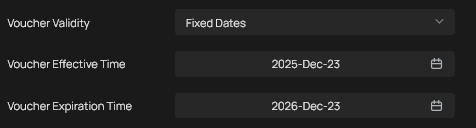
Right now this is the only expiration settings Omada have, which at first i make a 7 days expiration but i find out will literally expired the voucher regardless if use or not so it means this is not the expiration i was hoping for, but for months this set is what i use i had created 250-300 voucher under this fixed dates and will expired in 3 months as i estimate the voucher will all be used but most of the time more or less 50 vouchers are left.
all my pause voucher i promote (4 hrs, 9 hrs, 15hrs) have 3 days expiration upon enter but since that expiration date is tie up on the voucher expiration(3 months since voucher creation) i have to do manual "unauthorize" on each of the clients that reach that specific expiration time, which is kinda hassle since alot of them ends up like that, and when the overall voucher expiration do came up (3 days before) i have to take and destroyed the unused vouchers.
what i hope for is an Expiration that effects only when the voucher is used/entered.
so i request/suggest that either overhaul this fixed dates or add another expiration system.
thank you very much.
- Copy Link
- Subscribe
- Bookmark
- Report Inappropriate Content


@Vente7 If you are looking to have the vouchers expire after a set time, you'll want to set the Voucher Validity Setting to Permanent and set the Duration type to Voucher Duration.
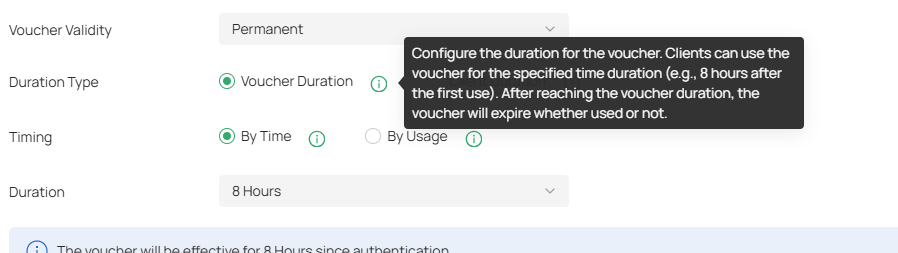
There, you can set the duration and have it automatically expire after the time period. The vouchers will remain usable until they are first redeemed, and then will expire after the period is over.
- Copy Link
- Report Inappropriate Content
@NeilR_M thanks for the reply but this is not what i mean, I've been experimenting multiple times on various settings for vouchers but what i and other needed are not possible by omada voucher settings.
its like a combination of "by time" duration as expiration for the voucher & "by usage" time allocation
Voucher created with 2 Condition:
e.x. Voucher has time allocation of "X" Hours than can be Pause.
But also the Voucher has an Expiration (similar to that of Voucher Validity: Fixed Date) but. it will only take effect the moment they used or enter the code for the first time.
because we don't want them to linger too long that's why we set a specific X days as expiration or time limit for them to used up the given allocation of X hours for this Pause Voucher, but because this type of system not existing in Omada we do it manually to unauthorized them 1 by 1 everyday.
that setting you mentioned was the typed of voucher widely used on market i called this type as "Continuous Connection" regardless if they connected or not time will go until it meet its time limit/expiration, mostly people used this type are heavy user, but the other type the "Pause Connection" where Casual & Practical people used.
if we did this setting-
Voucher Validity: Permanent
Duration Type: Voucher Duration
Timing: By Time
then its no longer a Pause Voucher its already a Continuous Connection with a set amount of X Hours Allocation used of Data with expiration duration same with time allocated.
i saw other WiFi Network/HotSpot System had this features in them, i don't want to mixed other system in Omada it might cause issue along the way.
thanks hope my explanation hits the mark.
- Copy Link
- Report Inappropriate Content
@Vente7 Thanks for clarifying, I understand.
In this scenario then, I would recommend using the following settings.
Duration Type: Client Duration
Timing: By Usage
Duration: (your specific X days for expiration)
This will allow the vouchers to automatically expire, with the time starting only on first use. As for the time allocation of X hours you requested, unfortunately, that doesn't seem directly possible, but if your goal is to restrict heavy usage, I would set either the Rate Limit feature or Traffic Limit feature to a reasonable number according to your normal clients usage.
Rate Limit will prevent people from downloading heavy amounts of files and taking up all the bandwidth from everyone else.
Traffic Limit, if set to a reasonable number, will ensure casual users will have access to the network for the whole expiration period, letting you not have to worry about the time allocation at all. It will also restrict heavy users by cutting off their access to the network once their quota is reached.
- Copy Link
- Report Inappropriate Content
@NeilR_M oh i see its not possible in your system, well i guess i have to do it manually as always, issue its not about heavy user using heavy traffic may ISP Plan is more than capable on taking care of it what a i hope for is for a simple and convenient way to tackle sa Pause Voucher Expiration.
thanks anyway.
- Copy Link
- Report Inappropriate Content

Hi @Vente7
Please have a look at the following post:
Portal/ voucher pause time features request.
Is this what you want? If yes, you may cast your vote there.
- Copy Link
- Report Inappropriate Content
@Vincent-TP this is an Old request that already been implemented i think, Omada already had a Pause Features, my request is different though, an Voucher with Settings of X Hours "By Usage" but have an Expiration Settings of "By Time" where expiration only effects the moment the Voucher is Used/Entered.
That MIKROTIK thing mentioned in that old Post as well as other Network/Wifi Centralize System had this very feature i'm talking about.
- Copy Link
- Report Inappropriate Content
Hi @Vente7
For example, the voucher is valid for 1 month (from January 1, 2026, to February 1, 2026) and has a total usage time of 8 hours. Usage can be paused during this period. Additionally, once the voucher is activated, the 8 hours must be used within 3 days. Any unused time will automatically expire on the third day after activation (for example, if activated on January 10, 2026, it will expire automatically on January 13, 2026, regardless of whether the 8 hours have been fully used).
Is this what you mean?
BTW, you mentioned some other manufacturers have already supported this feature. Is it convenient to share some screenshots with us? Thank you.
- Copy Link
- Report Inappropriate Content
@Vincent-TP exactly like that, right now the closest thing to that, for example 1 client want to avail my highest value pause voucher which is 110 hours total time usage that will expire in 45 days but since this rarely been avail (only 2 so far) what i did is generating that voucher at that moment of purchase so i can set the expiration thru.:
[Voucher Validity: Fixed Date: This day/date to the day/date of expiration (45 days]
other settings of course as follow:
Duration Type: Voucher Duration
Timing: By usage.
but for the lower value of pause time voucher that many client mostly avail, its not practical to do the same method and i'm gonna waste a lot of paper for prints and time for cutting each of those, imagine generating 100 or more Vouchers with pause that have 3 days expiration by method of Voucher validity: Fixed Date i.e Jan 1(set at 12mn) - Jan 4 (which is absolute and continue running expiration the moment you generate the voucher), just passing 2-3 hours all other unused Vouchers are no longer fall under 3 days, even just the next day it will only have 2 days left so you gonna throw away those printed & cut vouchers, so to combat this i often do a 3 months set up, but since i gave each voucher a 3 days / 7 days expiration (depends on the value) everyday i check the Authorize Clients for them, what time and day they been entered/used count the days of their expiration wait for them to reach that time & date to manually unauthorize them, which is kinda hassle since their a lot of them like that of not using all the allocated time given only few manage use up all time allocated for their vouchers.
regarding the other network/wifi system manufactures, i'm not exactly sure what brand but i often hear MIKROTIK, and mostly from my clients also who often ask mo how long my expiration for Pause Voucher because my competitor or other WiFi Seller here in my area all have this things in their own WiFi Vendo Machine that my client say automatically disconnect them the moment they reach that expiration date/time regardless if they still have time left, that also what my client from my Printing Shop who also running a Vendo Machine told me it will automatically disconnect the clients once the expiration date/time is reach, but to what kind of program her vendo machine has well she has no idea she just avail that vendo machine thru a local company in our country they the one who set it up for her using mixed device like Mikrotik, Ubiquiti and also TP-Link EAP.
few days i got i did some digging watch some youtube regarding this vendo machine i suspect they created their own custom system and program for this various features. its either they created their own boards or buy a made one re-program it to act either like something similar to OC200 etc.
- Copy Link
- Report Inappropriate Content
- Copy Link
- Report Inappropriate Content
Information
Helpful: 1
Views: 1353
Replies: 9
Voters 1
