
Can't apply HomeShield subscription to replacement router

I had to buy a new router to replace an Ax5400 which had a hardware problem. I can't for the life of me get my homeshield subscription to work on the new router. I've tried factory resetting everything, unbinding, rebinding, uninstalling & reinstalling everything. Every time I open up tether it reminds me that homeshield isn't applied but when I try and do it (I would have tried hundreds of times) it comes up with the following message:
Couldn't apply HomeShield Subscription Service to your network.
Please try again. If the problem still persists, please contact our technical support.
I've contacted tech support and waiting for a reply but this ongoing issue is very annoying.
- Copy Link
- Subscribe
- Bookmark
- Report Inappropriate Content
So it's all been fixed. Something about a cloud update they did that didn't allow for certain scenarios 🤷♂️
- Copy Link
- Report Inappropriate Content


Hi@Cam975 ,
Welcome to our community.
Have you tried to transfer the HomeShield subscription Service to another TP-Link router?
Please Click HomeShield card in Tether/ Deco app sidebar and enter HomeShield subscription interface, under your TP-Link ID the current device bound is displayed. Access it and you may switch networks on the “Select a network” page.
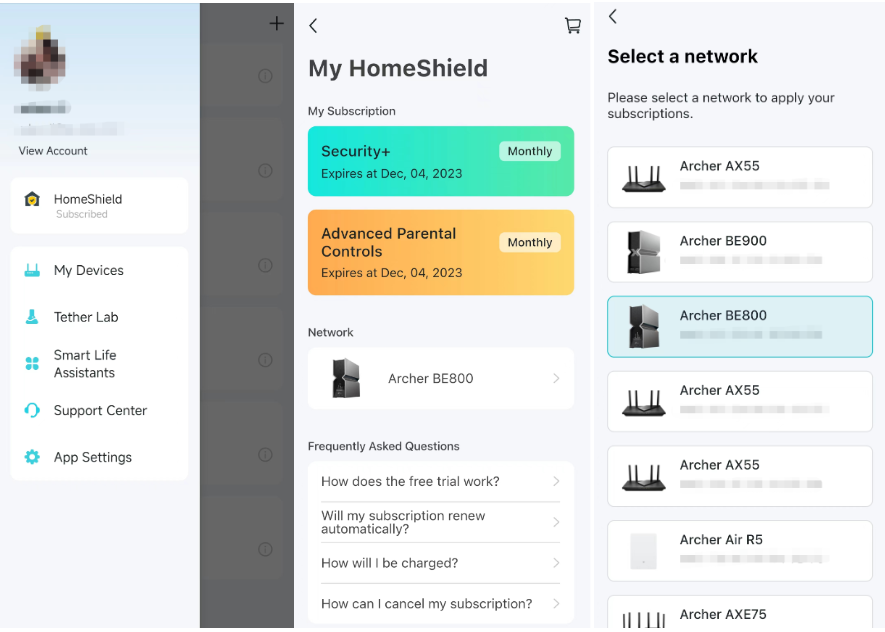
If it doesn't help, please try a different phone to apply the service again.
- Copy Link
- Report Inappropriate Content
Hi Joseph and thanks for taking the time to reply. I thought you might have been onto something with trying a different device to apply the subscription but sadly I got the same error message from a completely different Android device.
Regarding applying the subscription from the app as suggested, the only network that shows up is the one in trying to get to work. Clicking, holding, hoping doesn't do anything extra and I inevitably have to hit the confirm button and see the same error message again 😵💫
Tech support has had to handball the issue to their engineers which I'm waiting on for some sort of solution.
Thanks again for trying 👍

- Copy Link
- Report Inappropriate Content
Hello @Cam975 ,
It seems quite likely that there are some anomalies in the application of the Homeshield service, and I believe the engineers will follow up on your case as soon as possible.
Please feel free to share any progress you may make.
- Copy Link
- Report Inappropriate Content
- Copy Link
- Report Inappropriate Content
So it's all been fixed. Something about a cloud update they did that didn't allow for certain scenarios 🤷♂️
- Copy Link
- Report Inappropriate Content
Hello @Cam975 ,
Thanks for getting back.
It seems to be an accidental occurrence. It is great that everything returned to normal!
- Copy Link
- Report Inappropriate Content
Information
Helpful: 0
Views: 557
Replies: 6
Voters 0
No one has voted for it yet.