
ER605 QoS not working when setting DSCP to anything other than "Any"

I am trying to setup QoS for my VoIP phones. I setup a separate network (192.168.10.0/24 VLAN 10) and then configure an IP Group for that network called VoIP. I then create a class rule in QoS called Voice set it to class 1, assign it the VoIP group to it and set DSCP to "Any". I then assign Class 1 to 20% of the bandwidth, Class 2 to 5% Class 3 to 5% and Others is 70% by default. I only have the one class rule.
When connect my laptop to this network and do a speed test, I can see it limiting it to 20% of the available bandwidth, and can see in the routers admin utility that Class 1 shows activity during the speed test. All is good so far.
Now I want VoIP to have the highest priority, so I change the DSCP from "Any" to EF, which is gives VoIP the highest priority. As soon as I do this, everything goes south. Now when I run a speed test I can see that I am now using 70% of the available bandwidth and when looking at the QoS monitor it shows the traffic going out over the "Others" class. Upon further investigation, setting DSCP to any value other than Any will cause the traffic to go out over Others and not Class 1.
What am I doing wrong and how do I get my VoIP traffic to go out over Class1 with the highest priority and the correct bandwidth limit?
Help!!
Thanks,
John
- Copy Link
- Subscribe
- Bookmark
- Report Inappropriate Content

Hi @TestingJohn
Thanks for posting here.
Please refer to the following guide and test again:
How to configure Quality of Service on Omada Gateway via Omada Controller
If still the same, please share with us the following info:
1. Screenshots of the mentioned config pages;
2. How did you verify it's not working? better with some screenshots;
3. The bandwidth of your ISP;
4. The topology of your network.
- Copy Link
- Report Inappropriate Content
Hi @TestingJohn
Thanks for posting here.
Please refer to the following guide and test again:
How to configure Quality of Service on Omada Gateway via Omada Controller
If still the same, please share with us the following info:
1. Screenshots of the mentioned config pages;
2. How did you verify it's not working? better with some screenshots;
3. The bandwidth of your ISP;
4. The topology of your network.
- Copy Link
- Report Inappropriate Content
@Vincent-TP Thank you for the reply. I have enclosed pictures of my configuration, but will explain it here as well. 2 Networks configured as follows:
Network/LAN: (see picture LAN Config.jpg)
Name VLAN IP Address Subnet Mask DHCP Server
LAN 1 192.168.0.1 255.255.255.0 Enabled
VoIP 10 192.168.10.1 255.255.255.0 Enabled
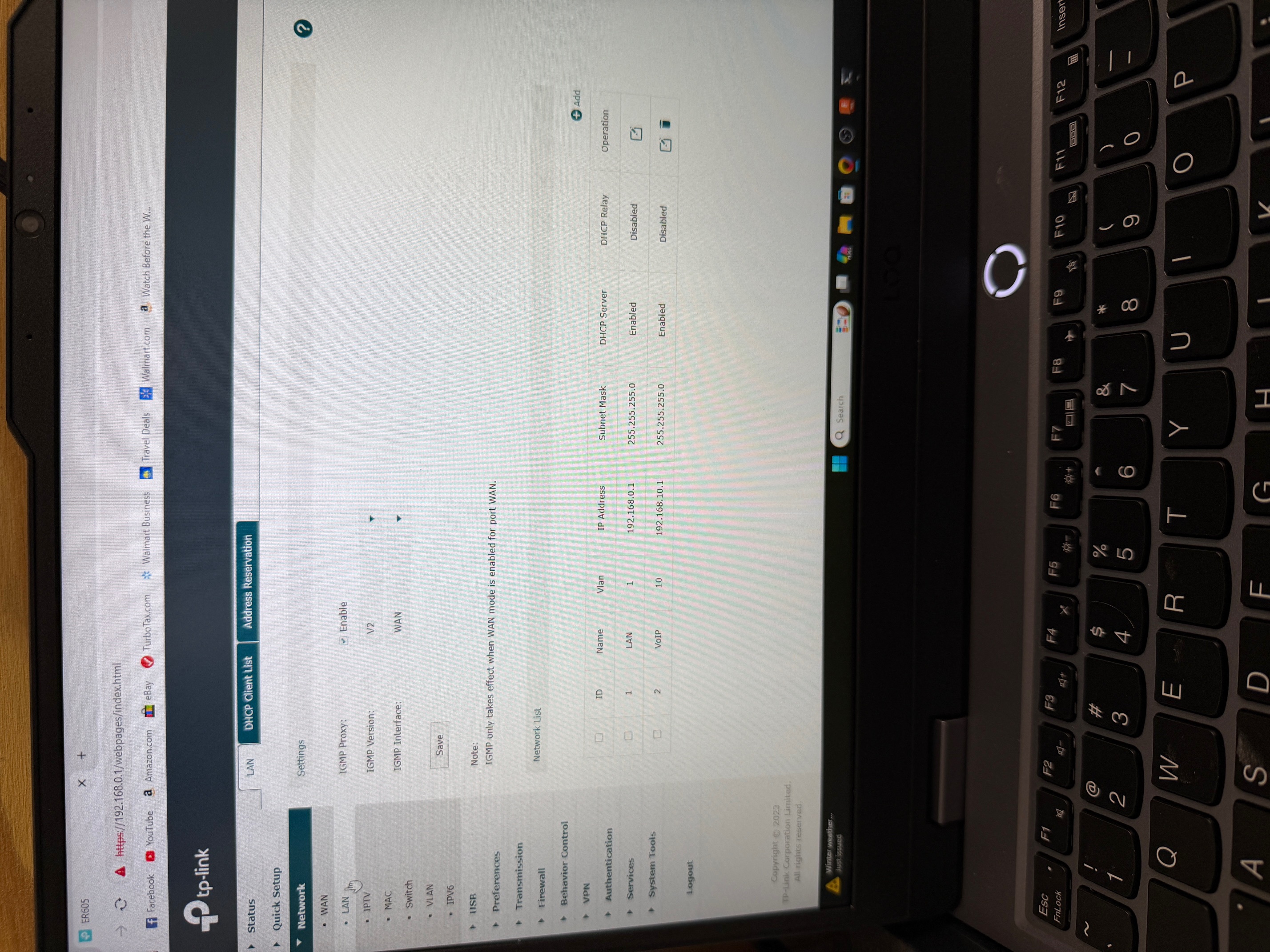
Network/VLAN: (see pictures VLAN.jpg and VLAN ports.jpg)
ID VLAN ID Name Ports Description
1 1 vlan1 2(untag) 5(untag) LAN1
2 10 vlan10 3(untag) 4(untag) VoIP
3 4096 vlan4096 1(untag) WAN
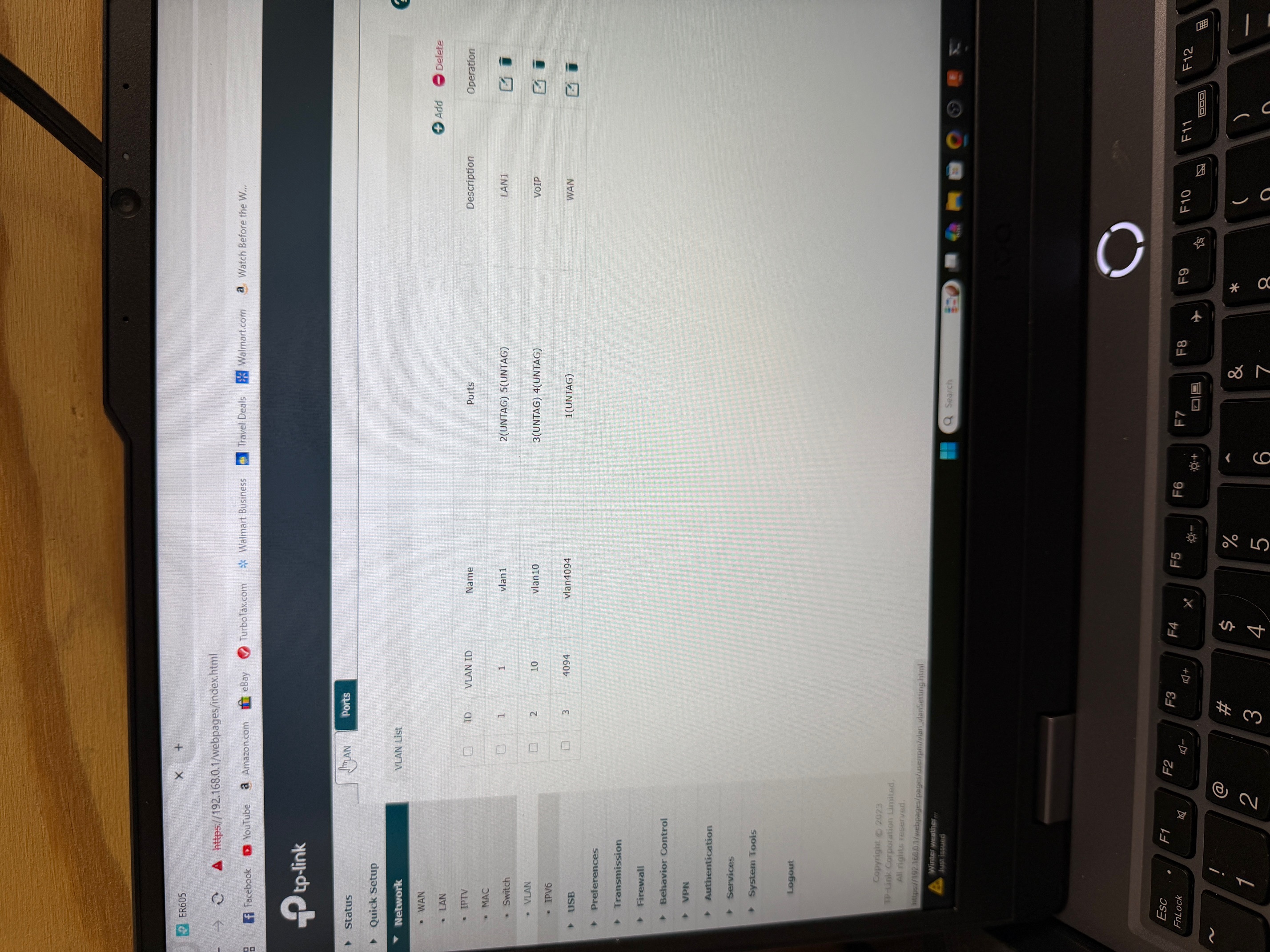
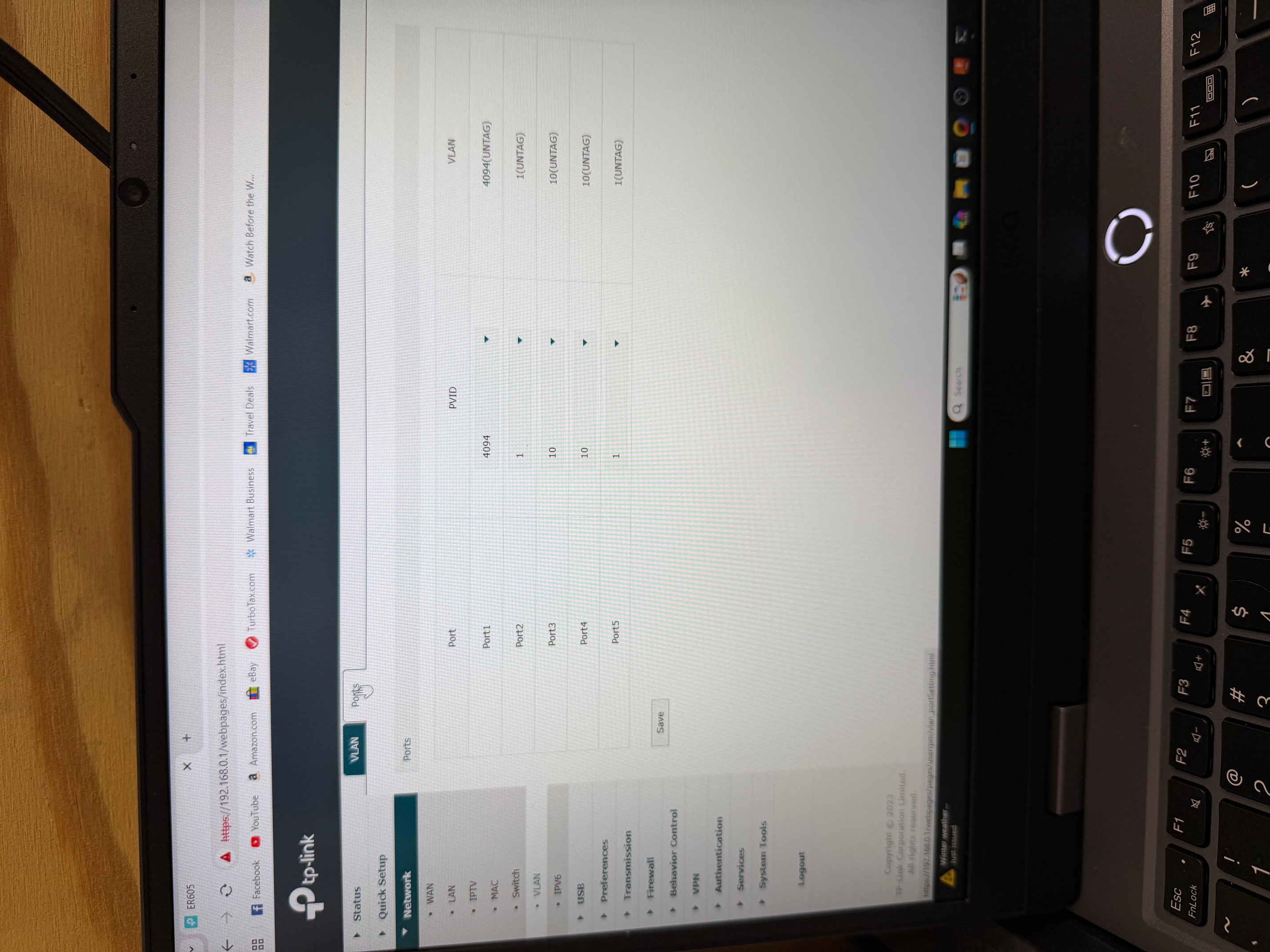
Preferences/IP Group/IP Group (see picture IPGroup.jpg)
ID Group Name Address Name Description
3 Data Data Computer Network
4 Voice_Group Voice Phone Network
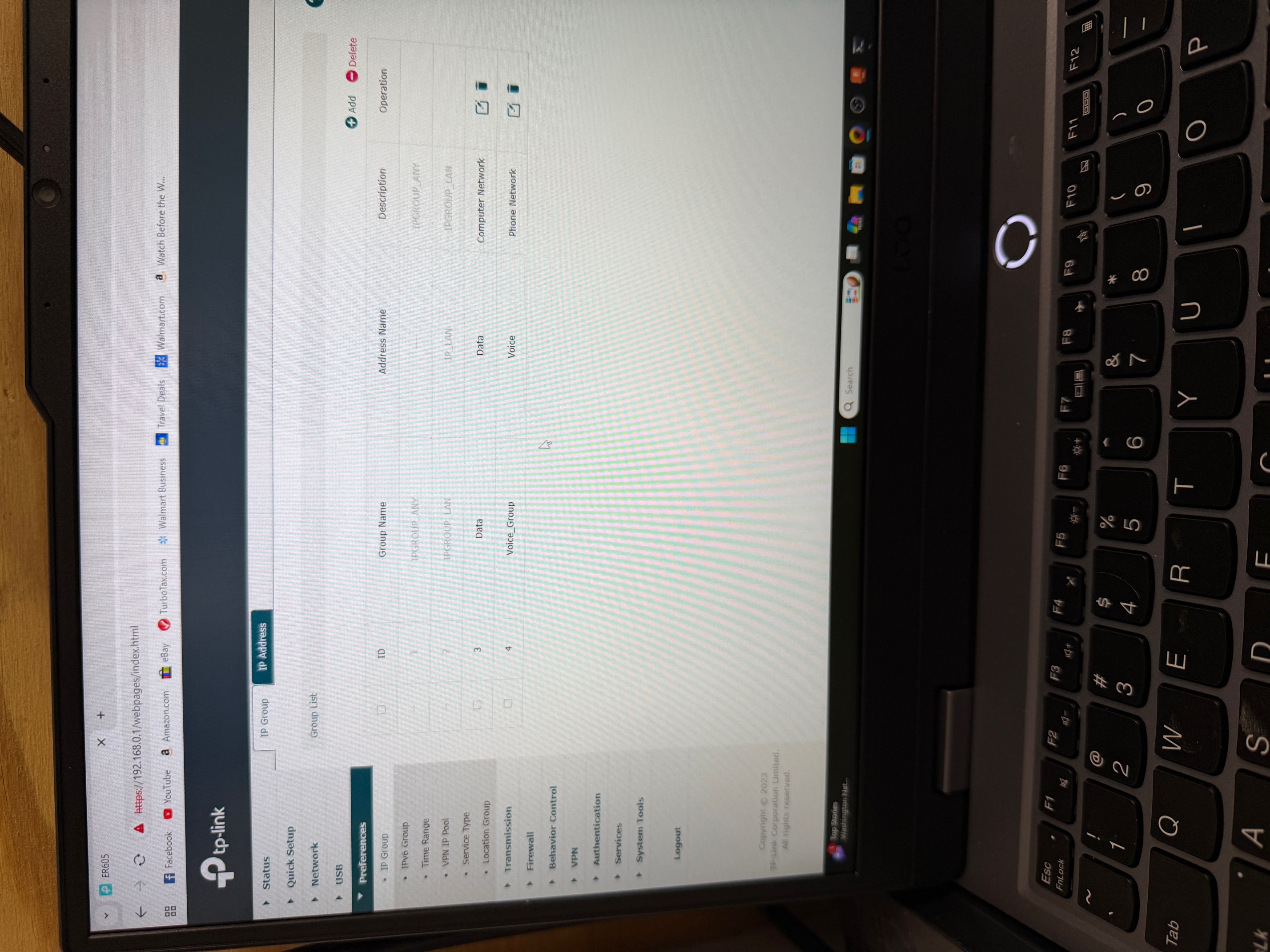
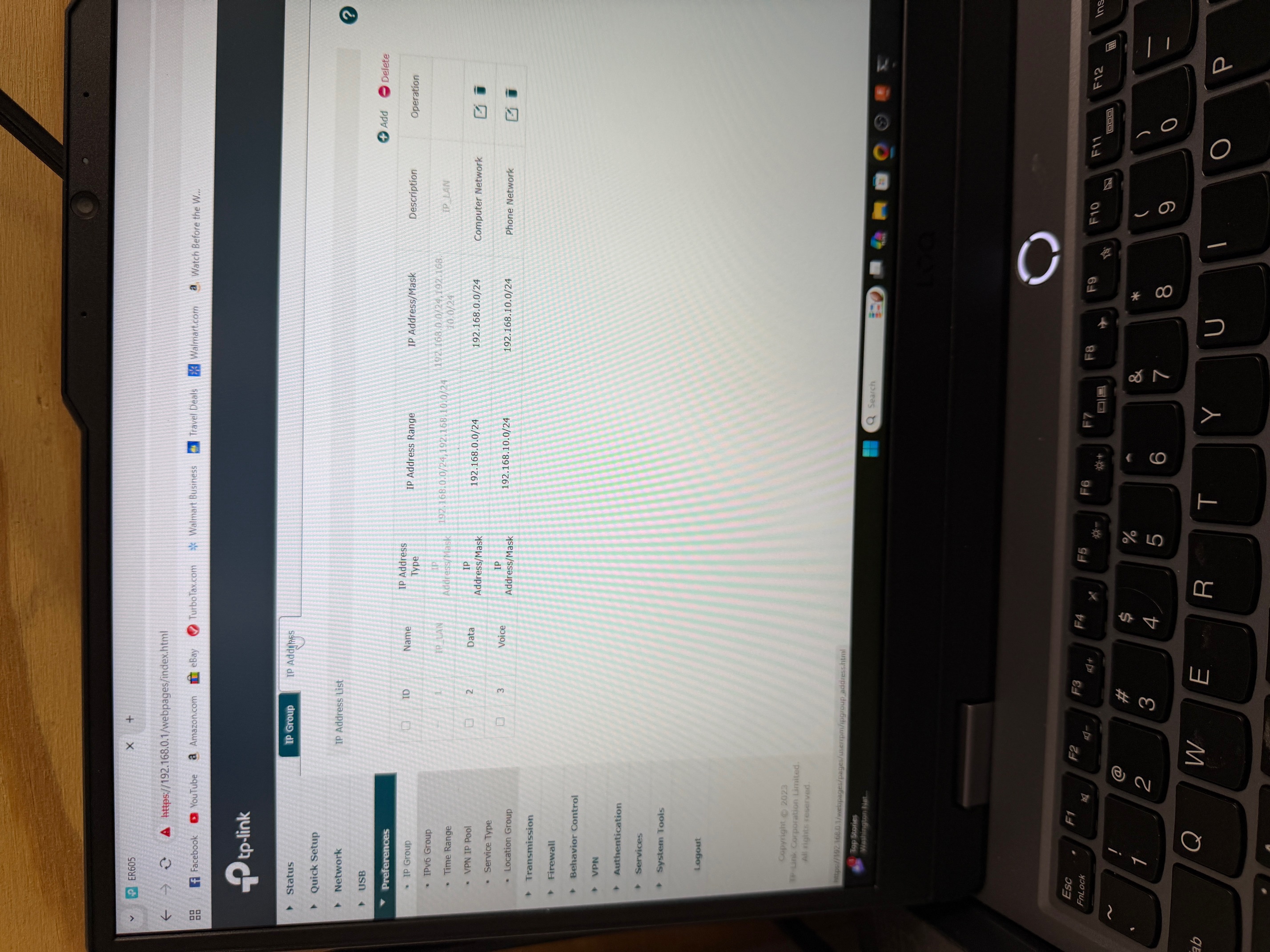
Preferences/IP Group/IP Address (see picture IP Address.jpg)
ID Name IP Address Type IP Address Range IP Address/Mask Description
2 Data IP Address/Mask 192.168.0.0/24 192.168.0.0/24 Computer Network
3 Voice IP Address/Mask 192.168.10.0/24 192.168.10.0/24 Phone Network
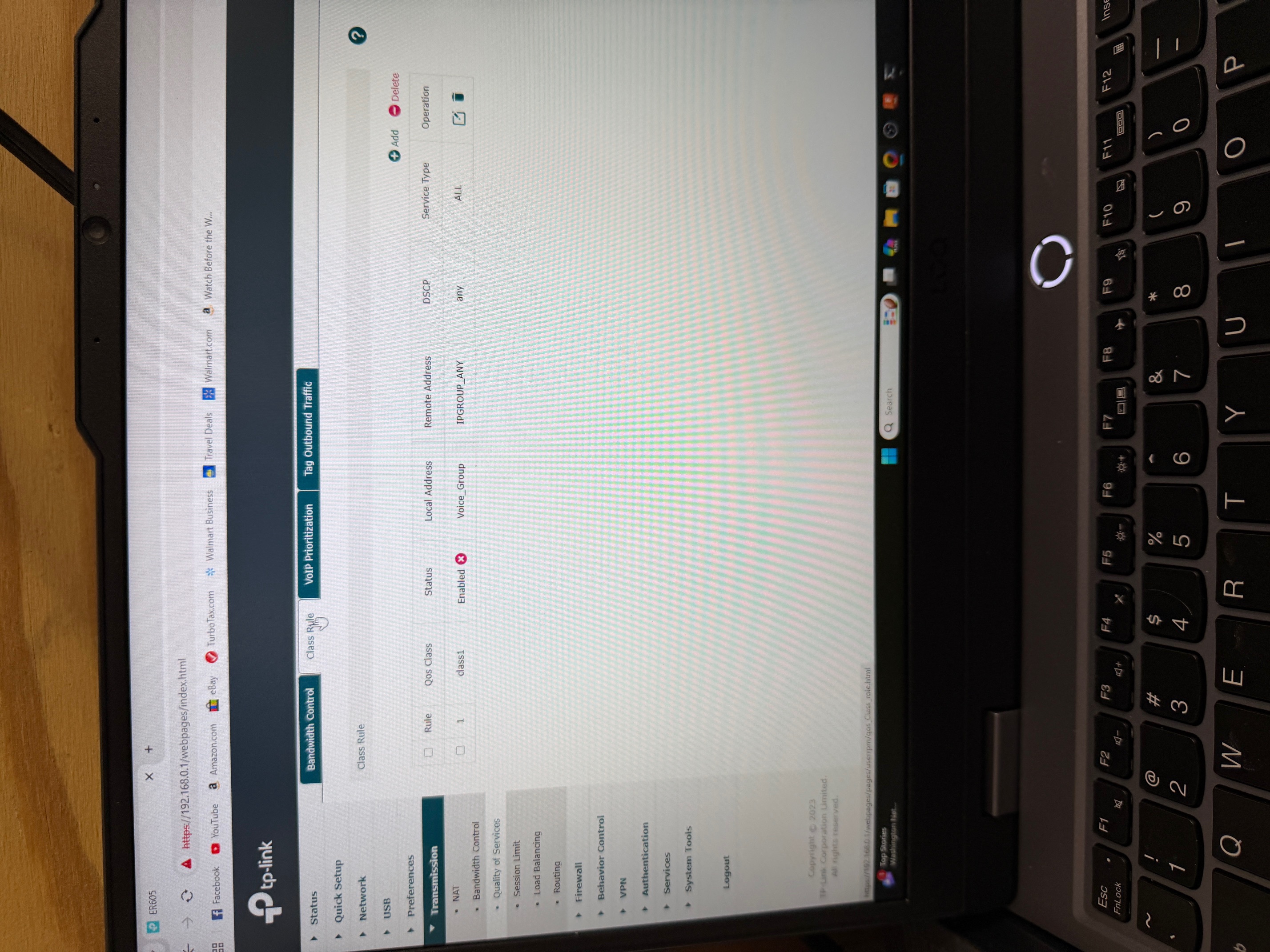
Transmission/Quality of Service/Class Rule (see picture Class Rule Any. jpg)
Rule Qos Class Status Local Address Remote Address DSCP Service Type
1 Class 1 Enabled Voice_Group IPGROUP_ANY any all
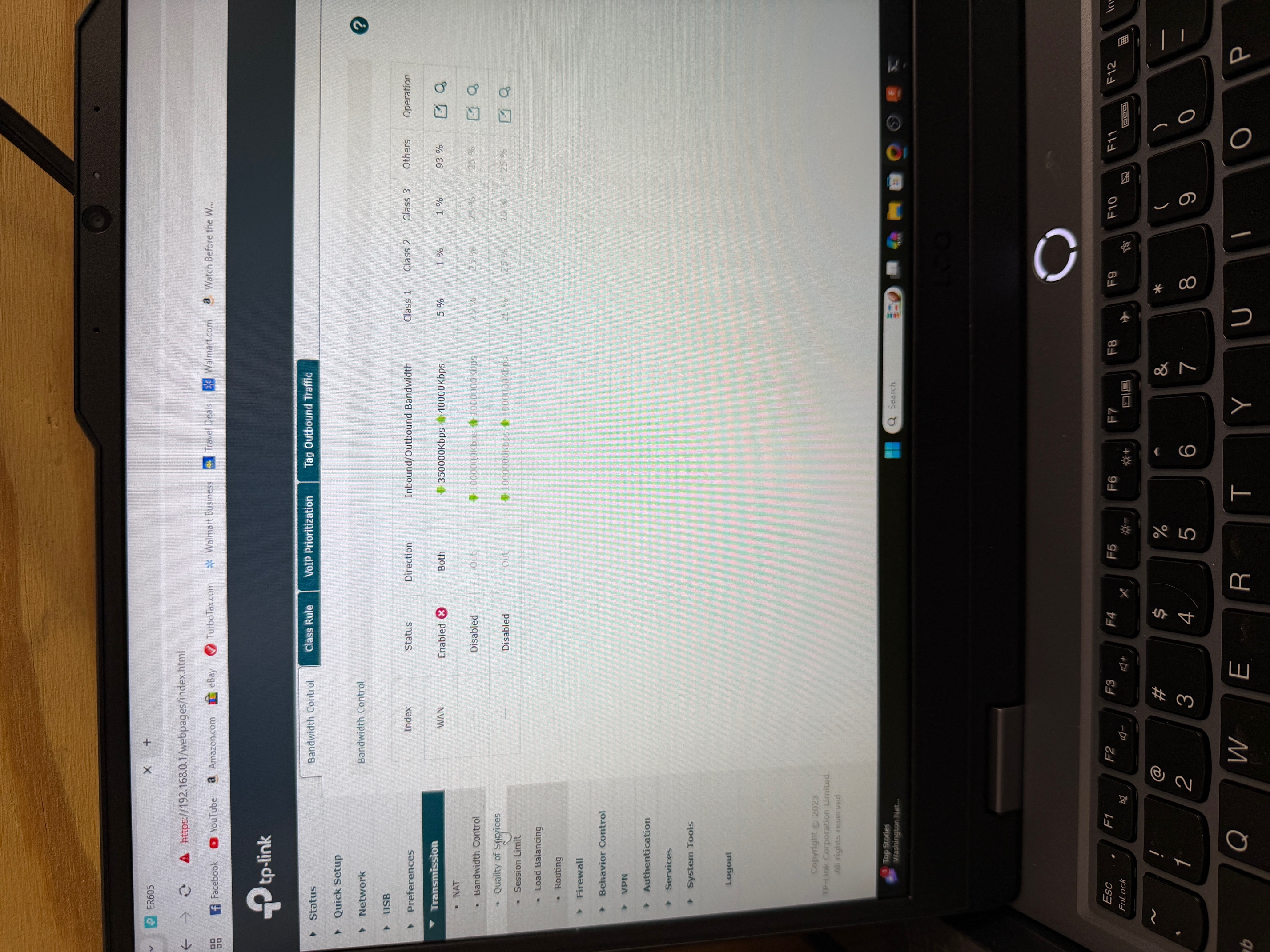
Transmission/Quality of Service/Bandwidth Control (see picture bandwidth control.jpg)
Index Status Direction Inbound/Outbound Bandwidth Class 1 Class 2 Class 3 Others
WAN Enabled Both 350000Kbps/40000Kbps 5% 1% 1% 93%
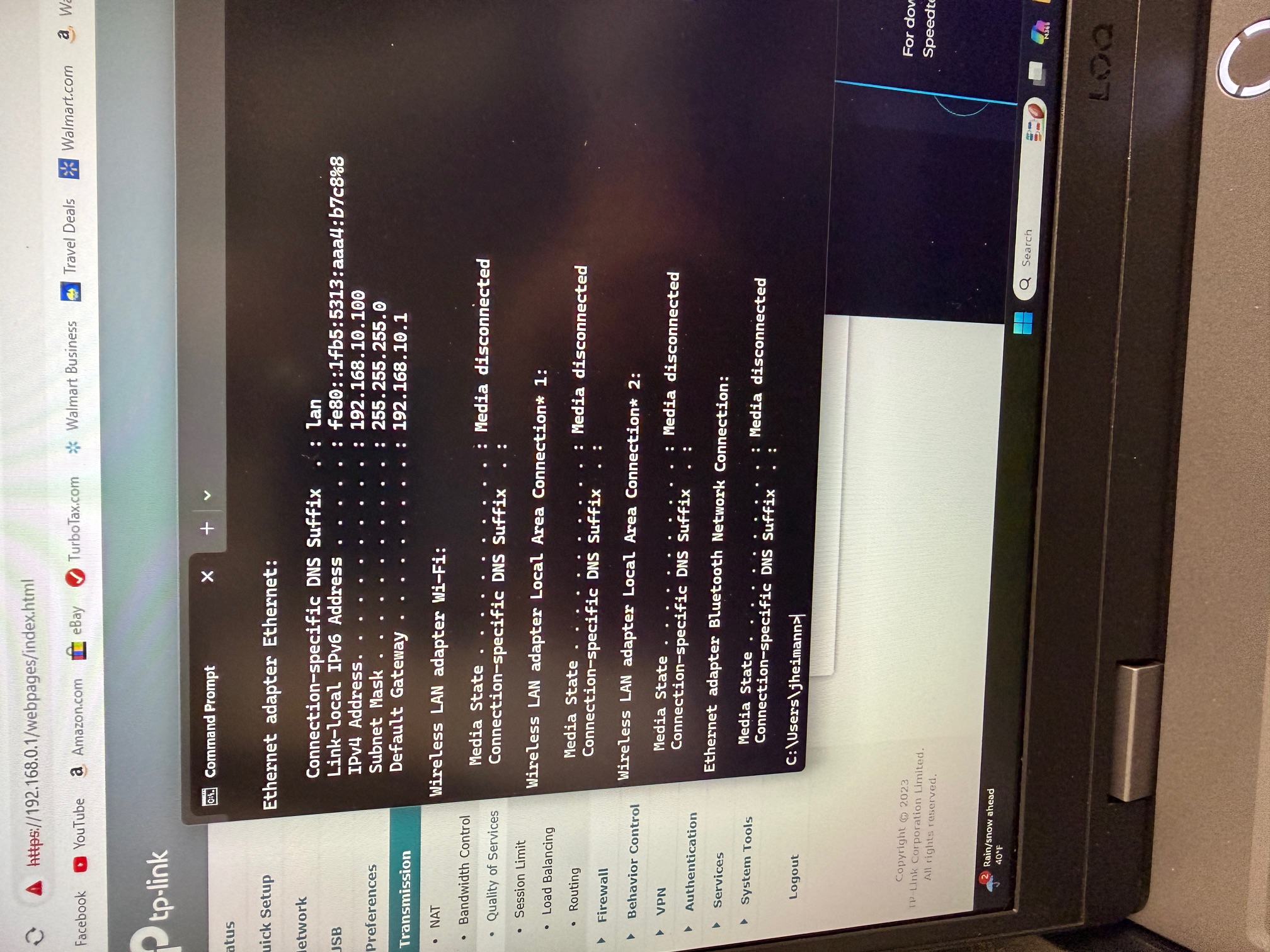
My laptop is connected to Port 3 which is the VoIP network. It properly gets an IP address 192.168.10.100 from DHCP on the router (see picture IP Config.jpg). Notice that the Class Rule has DSCP set to "any".
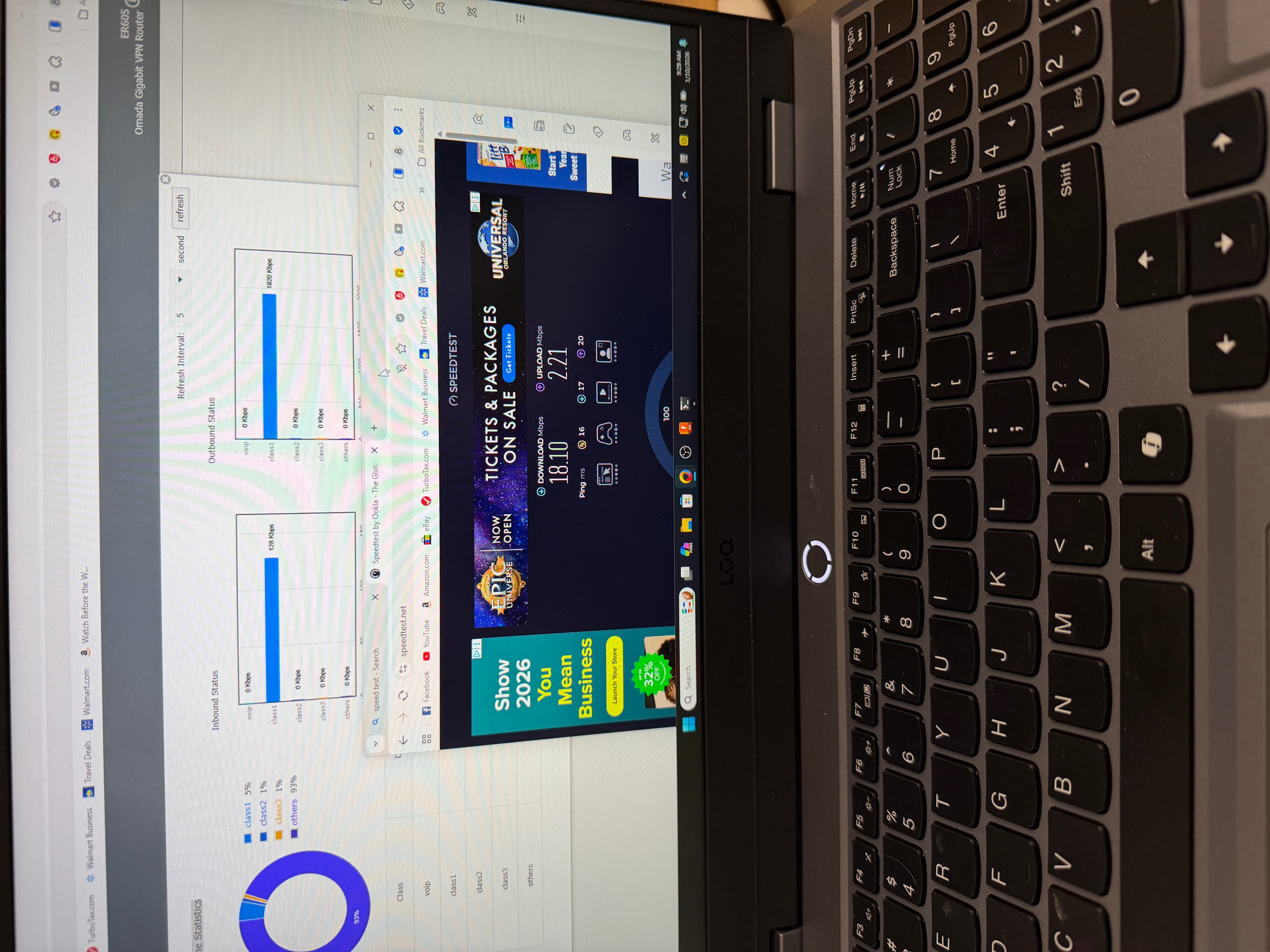
Run a speed test and can see that my bandwidth is 18.10Mbps Down and 2.21Mbps Up and I can see from the WAN Online Statistics page (on the router) that the traffic is going out on Class 1 (see picture Success.jpg).
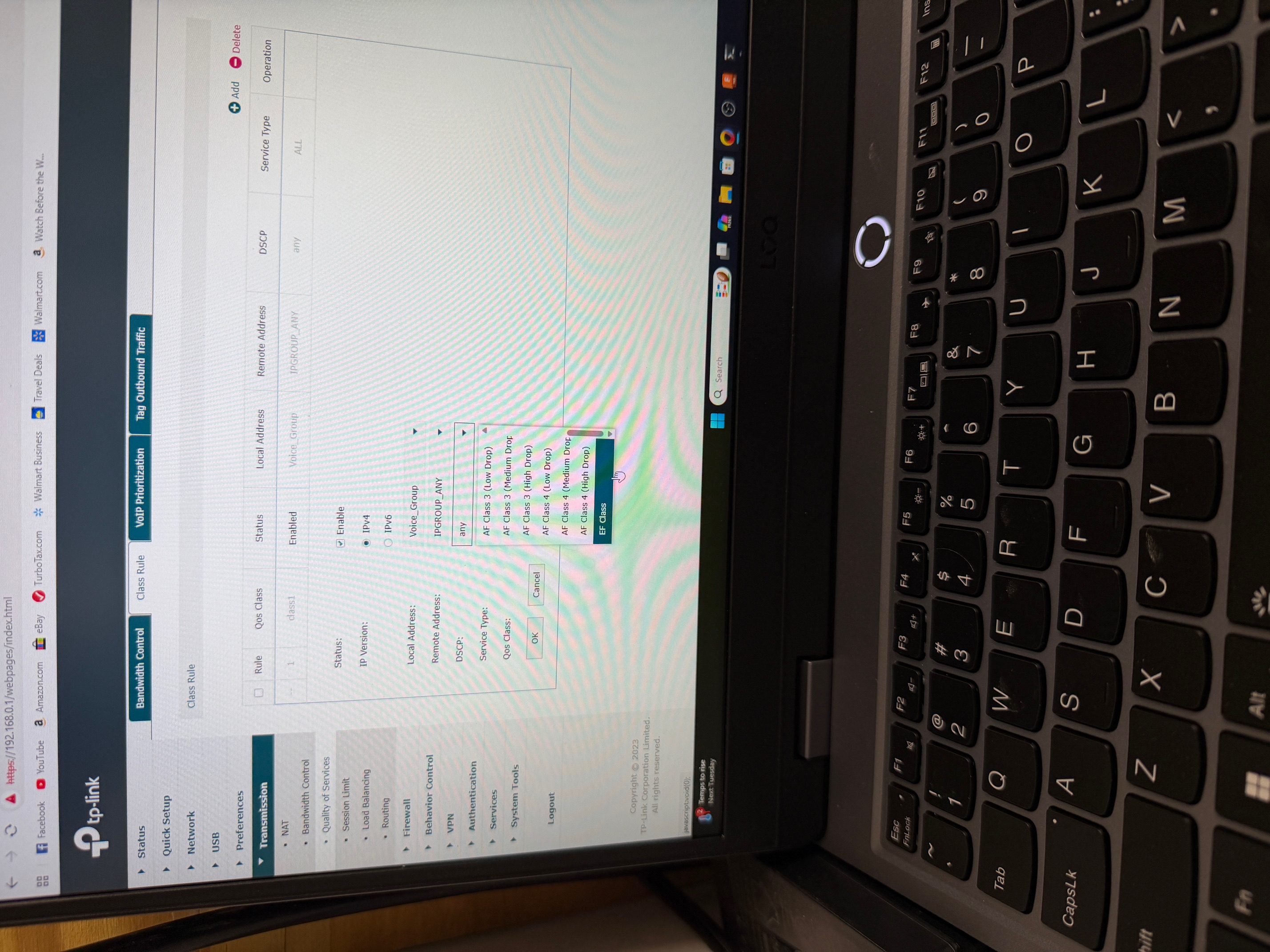
This works as expected, but I want my phone traffic to have the highest priority (EF). So all I did is go into the Class Rule (Transmission/Quality of Service/Class Rule) and change the DSCP setting from "any" to "EF" (see picture Class Rule EF.jpg).
I then rerun my speed test. Now get 330.62Mbps Down and 38.04Mbps Up, and can see from the WAN Online Statistics page (on the router) that the traffic is going out on Others (see picture Failure.jpg).
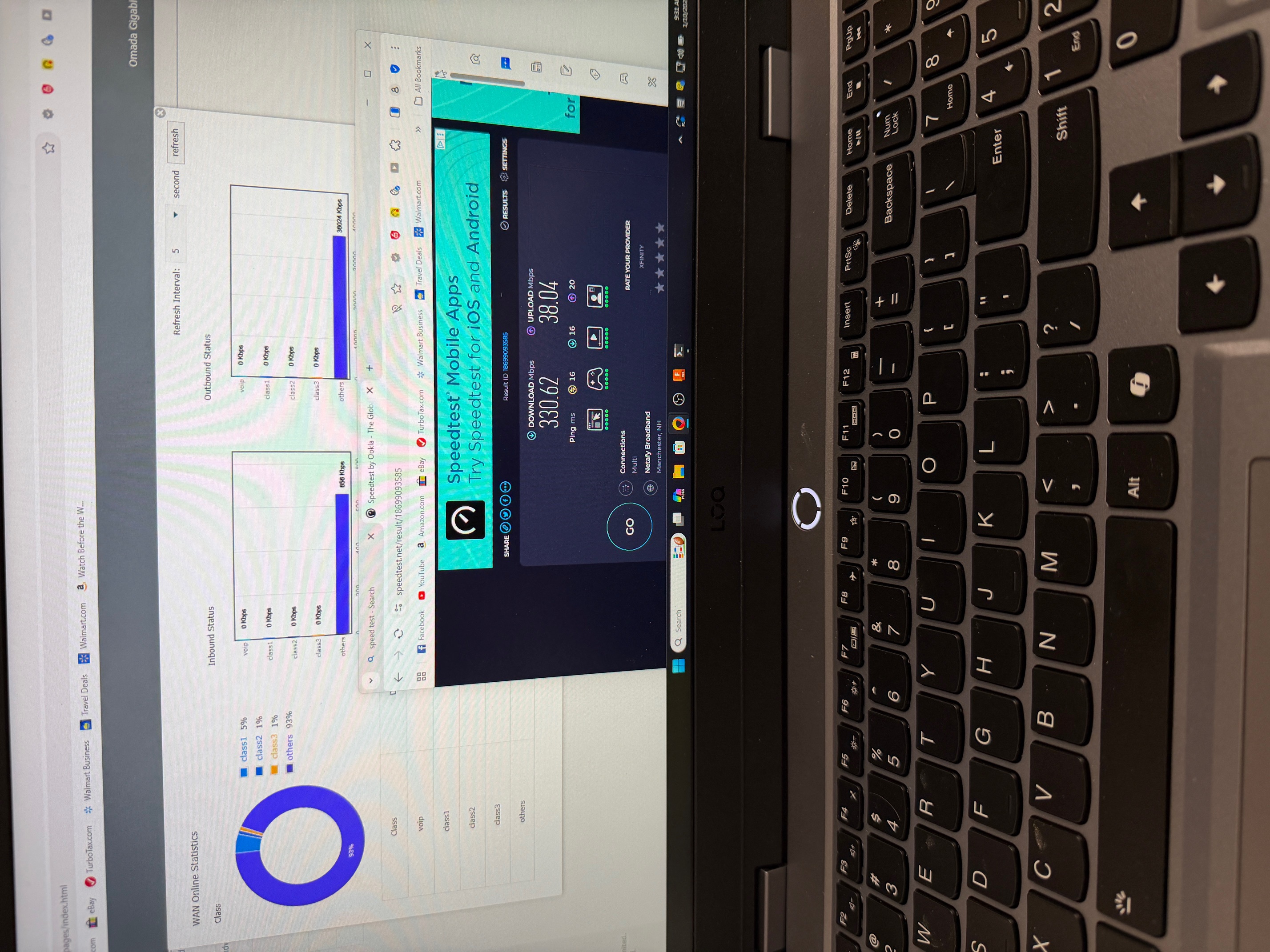
Setting DSCP to any setting other than "any" causes the traffic to go on the VoIP network to go out over Others class and not Class 1. This is a real problem for me and I am not sure what I did wrong in my configuration or how to correct this.
I surely need some help and guidance here. Thanks!!
- Copy Link
- Report Inappropriate Content
- Copy Link
- Report Inappropriate Content
I upgraded to the latest firmware 2.3.3 which had no effect on this issue. Other than "Any" became "BE" in the DSCP dropdown, the problem still exists.
Any help or insight on this problem would be greatly appreciated!
thanks,
John
- Copy Link
- Report Inappropriate Content
I am still at a loss to get this to work. Anyone have any ideas on this one?
Help me please.
Thanks,
John
- Copy Link
- Report Inappropriate Content
@TestingJohn Iv'e been banging my head the same as you; here is what I have infered: the DSCP value is not to classify (or tag) the traffic.It is to identify it IF it already brings that said tag along with it.
That's why it only works when you select "any".
Im dealing with a different scenario: my gateway (ER706W) does NOT have the "any" tag under for selecting. Which makes my problem quite a kerfufle since there is no way I can make the trafic be recognized due to the behaviour I explained above.
- Copy Link
- Report Inappropriate Content

If you are using any Omada Controller with version 6.1 or later, and have all your switches updated to the latest pre-releases or latest official (late december, january builds) you can achieve exactly what you want
Using switch QoS, assign each network to a queue and enable DSCP Remarking, and select the desired queue . This will re-tag all traffic on that network with the selected DSCP tag value.
Do this for all networks
Then, you can select that particular DSCP value in gateway QoS for each class
Note, Gateway QoS only has a subset of the available DSCP markers (EF, CS and AF classes) so make sure you select only those in switch QoS
- Copy Link
- Report Inappropriate Content
I am not using the Omada Controller. I am using the WebUI of the router itself. Is there a way to set DSCP remarking within the routers built in Web UI pages? My down stream switches (2) are dumb switches. One switch is for computer traffic and the other is specific to VoIP phones, so I can't set the DSCP remarking at the switch level, only at the ER605 (maybe).
We are a small business, but our phones are giving us problems when the internet traffic is high. I would have thought the ER605 would have allowed me to configure the traffic on a given network to be a higher priority than the other, but that appears to not be the case :(
- Copy Link
- Report Inappropriate Content
No, that can only be done with Switch QoS - but the traffic still has to hit the gateway and that seems to be the problem for you.
about the best you can do is figure out /specify in phone GUI what DSCP is assigned to phone traffic, and use Gateway QoS and assign those DSCP values to class 1 and give it the bandwidth it needs
- Copy Link
- Report Inappropriate Content
Information
Helpful: 0
Views: 1135
Replies: 9
Voters 0
No one has voted for it yet.