
IP reservation - Out of IP Pool range

Hello,
In my network, all IP addresses are fixed or reserved in various subnets.
Previously, reservations were not an issue. With the new controller version, I am no longer able to make reservations outside the DHCP network.
What do I need to do to restore this functionality?
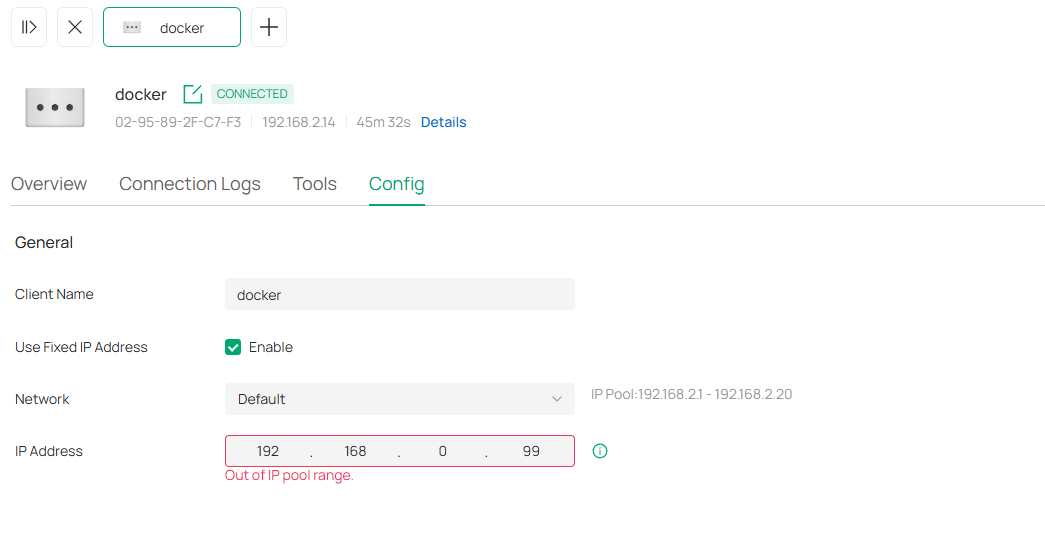
Thank you, Chris
- Copy Link
- Subscribe
- Bookmark
- Report Inappropriate Content


Hi @Neki_AT
Thanks for posting here.
We are aware of this and will fix it in the next firmware update. Thanks.
https://community.tp-link.com/en/business/forum/topic/852308?replyId=1653830
https://community.tp-link.com/en/business/forum/topic/852308?replyId=1654006
- Copy Link
- Report Inappropriate Content
Hi @Neki_AT
Thanks for posting here.
We are aware of this and will fix it in the next firmware update. Thanks.
https://community.tp-link.com/en/business/forum/topic/852308?replyId=1653830
https://community.tp-link.com/en/business/forum/topic/852308?replyId=1654006
- Copy Link
- Report Inappropriate Content
Hello @Vincent-TP,
thank for the update.
Do you know approximately when the fix will be rolled out?
This would work temporarily?
- Increase range
- Make reservation
- Instantly reduce range again
Thanks, Chris
- Copy Link
- Report Inappropriate Content

- Copy Link
- Report Inappropriate Content

With the newer controller versions, that’s actually expected behavior.
You can no longer create DHCP reservations outside the defined DHCP pool range. Older versions allowed it, but now the reservation has to fall within the pool.
If you want to keep using fixed IPs outside the DHCP range, you’ve got two options:
-
Expand the DHCP pool to include those addresses, then reserve them.
-
Leave the DHCP pool as-is and set those devices manually with static IPs on the device itself (no reservation).
There’s no setting to “re-enable” the old behavior, it was changed intentionally in newer firmware
- Copy Link
- Report Inappropriate Content
this is incorrect, the issue in the OP was a bug, and it was resolved in the official 6.1 controller release - you are again free to make a reservation on any IP withing the whole scope of the vlan, not just the DHCP pool
- Copy Link
- Report Inappropriate Content
Information
Helpful: 0
Views: 383
Replies: 5
Voters 0
No one has voted for it yet.