
VLAN, ACL and crosswise communication
VLAN, ACL and crosswise communication

Hello,
I have a setup with a few VLANs with the following ACL rules applied:
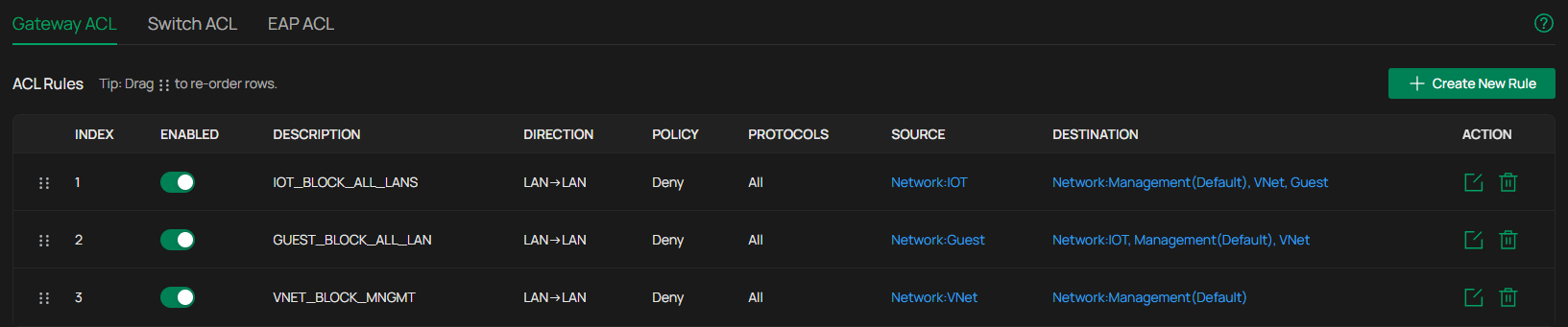
For a device on the IOT vlan, I want to perform an OTA update from the Management vlan. When disabling the first Gateway ACL rule, the update works, otherwise not, with the error being that the device on the IOT vlan is not responding.
I've tried to create a switch ACL rule to allow for that communication:

This does not work either.
Am I missing something obvious? Have I hit a limit of what is possible to do with Omada? Is there a bug?
Cheers
- Copy Link
- Subscribe
- Bookmark
- Report Inappropriate Content

Switch ACLs work without needing an interface on any particular VLAN, since all SG class and better switches are L3 capable they inspect packet headers of anything traversing the switch, however switch ACLs will only work if traffic traverses at least one switch before hitting a gateway - if any client is directly connected to the gateway they cannot manage that particular data stream until it goes back through a switch to somewhere else on the network. As you know they are also stateless so need a fair bit more thinking to plan and execute properly.
OP - you may be hitting a quite of stateful firewalls on the gateway.
The only scenario i can think of that would make your top gateway rule block the OTA update is this
Your PC is on management VLAN
Device is on IOT
you log into device on IOT - this is implicitly allowed since you dont have a Management>IOT block rule
You instruct IOT Device to perform update in its GUI.... as above the data tream is still Management>IOT and allowed
If the IOT device is then initiating the connection to the management vlan to pull the update file itself, rather than is being pushed over your GUI connection, the ACL will block it
- Copy Link
- Report Inappropriate Content

For the switch ACLs to work properly, at a minimum you need to have a switch interface enabled on each VLAN, otherwise everything passes through the switch and on to the gateway for routing where the gateway ACL blocks everything. I currently don't use switch ACLs but I believe that you also need to set up some static routes on the switch so routing between the VLANs will work properly.
- Copy Link
- Report Inappropriate Content
@jra11500 Thanks for your reply and for the suggestions. Would this work with the SG2210P switch used currently?
- Copy Link
- Report Inappropriate Content
I use SG2008 switches here which are practically the same. As stated earlier, I don't use switch ACLs because gateway ACLs are easier to set up. The latest Omada v6 controller allows IP and IP-Port groups in gateway ACLs so I do everything on the gateway.
If you are using the v6 controller, I would create a gateway rule and eliminate the switch rules and see how everything goes.
- Copy Link
- Report Inappropriate Content
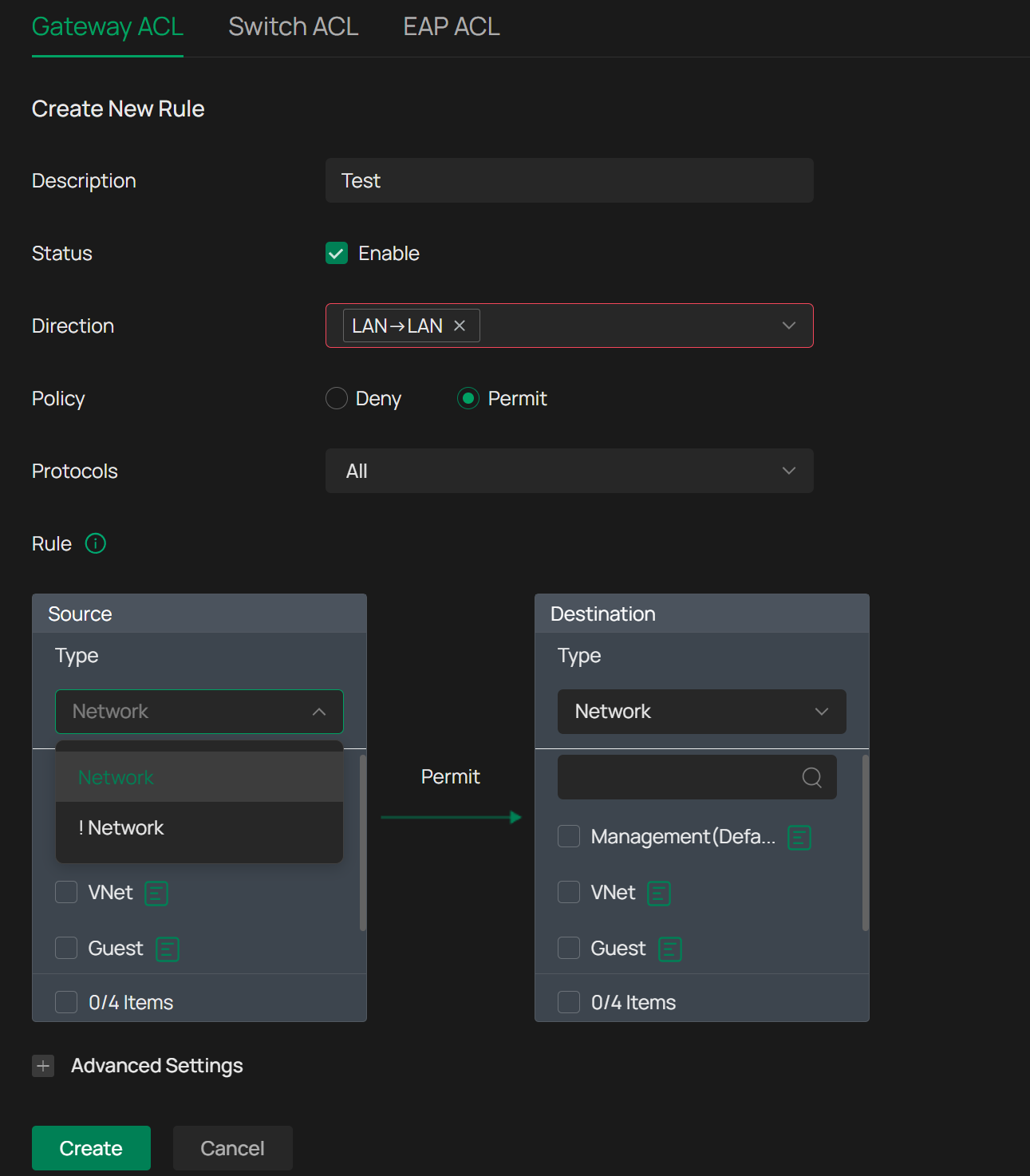
@jra11500 I am using V6.0.0.25 of the Omada Controller. When selecting Gateway ACL I indeed have the option to select IP Groups when Direction is not selected. As that is an option which has to be given, I select LAN->LAN, resulting in that only networks are shown in the Source. Any ideas?
- Copy Link
- Report Inappropriate Content
I just checked the release notes and you might need v6.1 of the controller instead of v6.0. The latest pre-release firmware post was just updated an hour ago.
- Copy Link
- Report Inappropriate Content
@jra11500 Oh dear! I like the timing of that :) Thanks a lot for the help, seems like things will be solved quite soon!
- Copy Link
- Report Inappropriate Content
Switch ACLs work without needing an interface on any particular VLAN, since all SG class and better switches are L3 capable they inspect packet headers of anything traversing the switch, however switch ACLs will only work if traffic traverses at least one switch before hitting a gateway - if any client is directly connected to the gateway they cannot manage that particular data stream until it goes back through a switch to somewhere else on the network. As you know they are also stateless so need a fair bit more thinking to plan and execute properly.
OP - you may be hitting a quite of stateful firewalls on the gateway.
The only scenario i can think of that would make your top gateway rule block the OTA update is this
Your PC is on management VLAN
Device is on IOT
you log into device on IOT - this is implicitly allowed since you dont have a Management>IOT block rule
You instruct IOT Device to perform update in its GUI.... as above the data tream is still Management>IOT and allowed
If the IOT device is then initiating the connection to the management vlan to pull the update file itself, rather than is being pushed over your GUI connection, the ACL will block it
- Copy Link
- Report Inappropriate Content
- Copy Link
- Report Inappropriate Content
GRL wrote
Switch ACLs work without needing an interface on any particular VLAN, since all SG class and better switches are L3 capable they inspect packet headers of anything traversing the switch, however switch ACLs will only work if traffic traverses at least one switch before hitting a gateway - if any client is directly connected to the gateway they cannot manage that particular data stream until it goes back through a switch to somewhere else on the network. As you know they are also stateless so need a fair bit more thinking to plan and execute properly.
From my limited testing here, switch ACLs are "filters" and are OK for blocking traffic that passes through the switch. True, an SVI is not needed. Without an interface however, the switch does not do any routing between connected VLANs even if there are "allow" rules. Please correct me if I am wrong.
- Copy Link
- Report Inappropriate Content
Switch allow rules will just let the traffic sent by the client hit the gateway or direct L2 frame-forwarding if on the same vlan (gateway not needed, if the switch MAC table has the destination known, or ARPs and another switch responds because that MAC is "owned" by the other switch, it will just directly forward it). Both allow and block rules inspect packet headers regardless if there is an interface or not so filter traffic on both allows and denies - this is why they work before gateway (or switch) routing
In fact, if you have a switch rule, or more than one, EVERY SINGLE PACKET is checked against all rules top-down in the list until first-match-wins. If it doesnt specifically match any allow or deny rules, its just forwarded on.
Other vendors sometimes do it a bit different and need a switch interface for rules to take effect on that vlan, Omada just checks everything all the time, which i think is the better approach
- Copy Link
- Report Inappropriate Content
Information
Helpful: 0
Views: 936
Replies: 11
Voters 0
No one has voted for it yet.