

TL SG108E LAG help

TL SG108E LAG help

TL SG108E LAG help
TL SG108E LAG help
22 hours ago
Model: TL-SG108E  
Hardware Version: V6
Firmware Version: 1.0.0 Build 20201208 Rel.40304

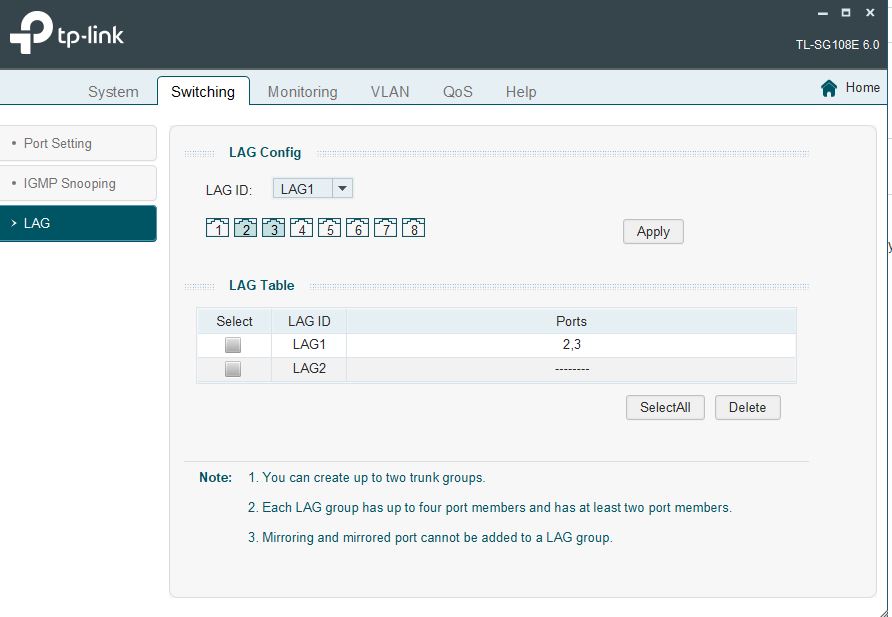
My system has the following connected to the switch by Ethernet. EERO modem (port 1) synology NAS (LAN 1,2 bonded Port 2,3) - PC (port 4) tv (port 5).


I want to set up link adregation. However, wehen I turn it on in the switch using ports 2,3 the tv loses connection.don't understand what I'm doing wrong.  Can anyone advise. TIA
 

784b5264b7c64baca263a0044f065ec0

  0      
  0      
#1
Options
3 Reply
Re:TL SG108E LAG help
18 hours ago

  @Cyberwasp 


What type of VLANs do you have configured on the switch (MTU, port based, or 802.1Q)?  Creating a LAG group on ports 2 and 3 should not affect port 5 unless something else is misconfigured.


1x ER7406 1x OC300 4x SG2008 1x EAP610 3x EAP650-Desktop
  0  
  0  
#2
Options
Re:TL SG108E LAG help
16 hours ago

  @jra11500 Should of mention i'm not sure what I'm doing. the video i followed never mentioned VLANs

  0  
  0  
#3
Options
Re:TL SG108E LAG help
9 hours ago

 Hi @Cyberwasp 

Thanks for posting in our business forum.

You may refer to the User Guide and try to configure the LAG on the desired ports again.

If this does not work for you, to help assist and streamline the identification of the behavior, we recommend sending an email to forumsupport.usa@tp-link.com with the following information:

Subject: [Forum Escalation][ID 856084]  
Forum Nickname: 
Thread URL:  https://community.tp-link.com/en/business/forum/topic/856084
Model&Version: 
Description: 
Any Other Relevant Information (Logs, Config Files, Images, etc.): 


Once sent, a ticket will be created in our support system, and a member of the team will follow up to gather more information or troubleshoot a cause.

Best Regards! >> Omada EAP Firmware Trial Available Here << >> Get the Latest Omada SDN Controller Releases Here << *Try filtering posts on each forum by Label of [Early Access]*
  0  
  0  
#4
Options