Poor performance with RE235BE and BE230 router

Poor performance with RE235BE and BE230 router

Poor performance with RE235BE and BE230 router
Wednesday
Model: RE235BE  
Hardware Version: V1
Firmware Version: latest

I'm using the RE235BE with an Archer BE230. I've never gotten the red light on the connection strength LED. Wherever I put the RE, closer to the router, or further away down the hall, I get speed tests of 100Mb down. I tried access point mode, wired to the router, with a device only 6 feet from the RE235BE. In that configuration, I get the expected speed, over than 600 megabits down. It would seem that the main issue may be wireless backhaul. There could also be 2.4/5ghz interference from the downstairs router, which is also configured in AP/bridge mode. Is there something wrong with the RE235BE? Is there anything I can do aside from configuring the extender in AP mode and do the backhaul using a cable? Even without the downstairs router I wasn't getting fast speeed from the extender. I'm not sure these things are more than marketing gimmicks if the wifi backhaul prevents them from working.

  0      
  0      
#1
Options
2 Reply
Re:Poor performance with RE235BE and BE230 router
Thursday

Hello @bjsnider ,

Welcome to our community.


May I know the firmware and hardware versions of your router and extender?


Please hard reset the extender, then connect it only to the router's 5GHz or 6GHz Wi-Fi.


Here are some steps and recommendations to help improve your setup:

1. Placement of the Extender:
• Place the extender about halfway between your router and the area where you need coverage. Avoid placing it too close to the router (which doesn't extend coverage) or too far away (which results in a weak backhaul connection).

2. Minimize Interference:
• Ensure the extender is placed in an open area, away from thick walls, metal objects, or electronic devices that can cause interference.
• If you have another router operating nearby (even in AP/bridge mode), try changing the Wi-Fi channels on both devices to reduce overlap and interference.

3. Use the Best Band for Backhaul:
• If your extender supports both 2.4GHz and 5GHz, ensure it is using the 5GHz band for backhaul if possible, as it typically offers higher speeds and less interference than 2.4GHz.


  0  
  0  
#2
Options
Re:Poor performance with RE235BE and BE230 router
12 hours ago

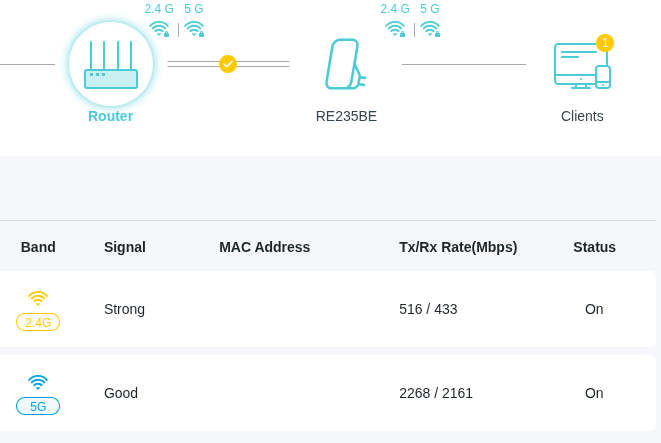
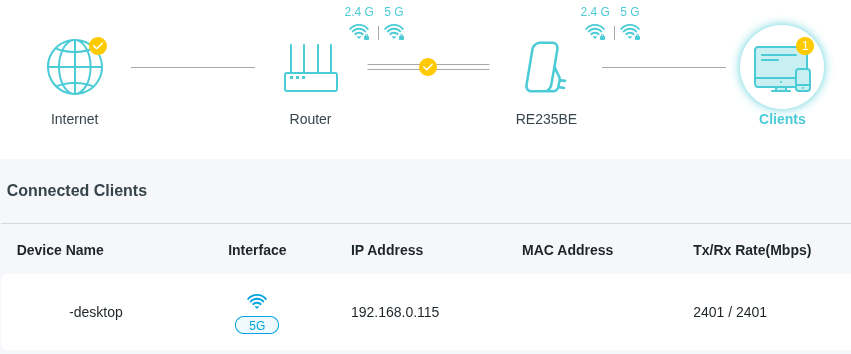
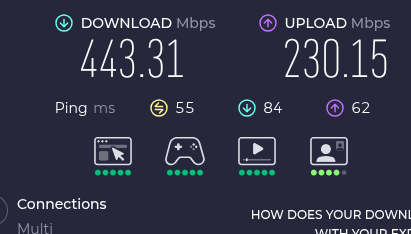
Router firmware is 1.0.4 Build 20250519 rel.47087(4341). Extender is 1.0.6 Build 20250401 rel.37513(4341). I reset the extender to factory defaults. I moved the RE235BE to a higher spot almost line of sight and 25 feet from the router. Raised the router's height too. They're each at about 3 feet. The configuration is now Easymesh. I'm doing wifi tests using a desktop with a wifi PCI card -- Archer TXE75E. The following screenshots show the connection speeds from the extender to the router, and from the desktop to the extender. Last screenshot is the internet speed test. The extender and desktop are both connected at greater than 2 gigabits and yet the internet download speed is not even 50% of maximum. The upload speed is at 25%.


Extender's admin screen reporting rx/tx speed with router.


Extender admin screen reporting link speed with desktop wifi card.


WAN speed from desktop.


  0  
  0  
#3
Options