EAP653 - IPv6 - Custom VLAN problem/bug

EAP653 - IPv6 - Custom VLAN problem/bug

EAP653 - IPv6 - Custom VLAN problem/bug
Friday - last edited Friday
Model: EAP653  
Hardware Version: V1
Firmware Version: 1.3.5 Build 20251111 Rel. 64506

Hi All,

I have identified a persistent IPv6 issue with the EAP653 v1.0 that does not occur on older models like the EAP245 or EAP225 within the same Omada SDN environment.
 

The Problem: 

When creating an SSID with a custom VLAN ID, IPv6 traffic to the outside LAN stops working after a few minutes.
However, when the same SSID is created on the default VLAN (1), IPv6 continues to work normally, even after several hours.


  • On Default VLAN (1): IPv6 remains stable for hours/days.

  • On Custom VLAN: The IPv6 Gateway becomes unreachable also IPv6 addresses on the internet

Setup:

  • Controller: Omada Software Controller (latest version)

  • Hardware: ER605 — SG2008P — EAP653 (v1.0)

  • IPv6 Config: SLAAC + Stateless DHCP with Prefix Delegation from WAN1.

  • VLANs: Default (VLAN 1) and Mobile (e.g., VLAN 100).
     

Observations:

  1. Even with U-APSD & OFDMA the issue persists on the EAP653.

  2. I have tried increasing the DTIM Period to 3 and enabling ARP-to-Unicast Conversion, but this does not resolve the VLAN-specific drop.

  3. The client (Samsung A56) can still ping other local LAN devices, but it looks like the Neighbor Discovery (NDP) table in the Gateway (ER605) seems to lose track of the client only when it's behind the EAP653 on a tagged VLAN.

  4. This seems highly related to this thread: https://community.tp-link.com/en/business/threads/topic/593488
     

It appears the EAP653 fails to correctly bridge/tag IPv6 Multicast (Neighbor Solicitations) between the custom VLAN and the Gateway after a few minutes.

Has anyone else experienced this VLAN-specific IPv6 behavior on the EAP65x series, and is there a beta firmware available that addresses IPv6 multicast handling on tagged interfaces?
 

Thanks!

  0      
  0      
#1
Options
3 Reply
Re:EAP653 - IPv6 - Custom VLAN problem/bug
23 hours ago

Hi  @E-raser 


Thanks for posting here


The handling of VLANs is independent of whether IPv6 or IPv4 is used.


When creating an SSID with a custom VLAN ID, IPv6 traffic to the outside LAN stops working after a few minutes.
However, when the same SSID is created on the default VLAN (1), IPv6 continues to work normally, even after several hours.

>>>

Are you saying that the issue only occurs when using an IPv6 address, but external access via an IPv4 address works fine—is that correct?

Did you test with different clients, are they all behave the same?

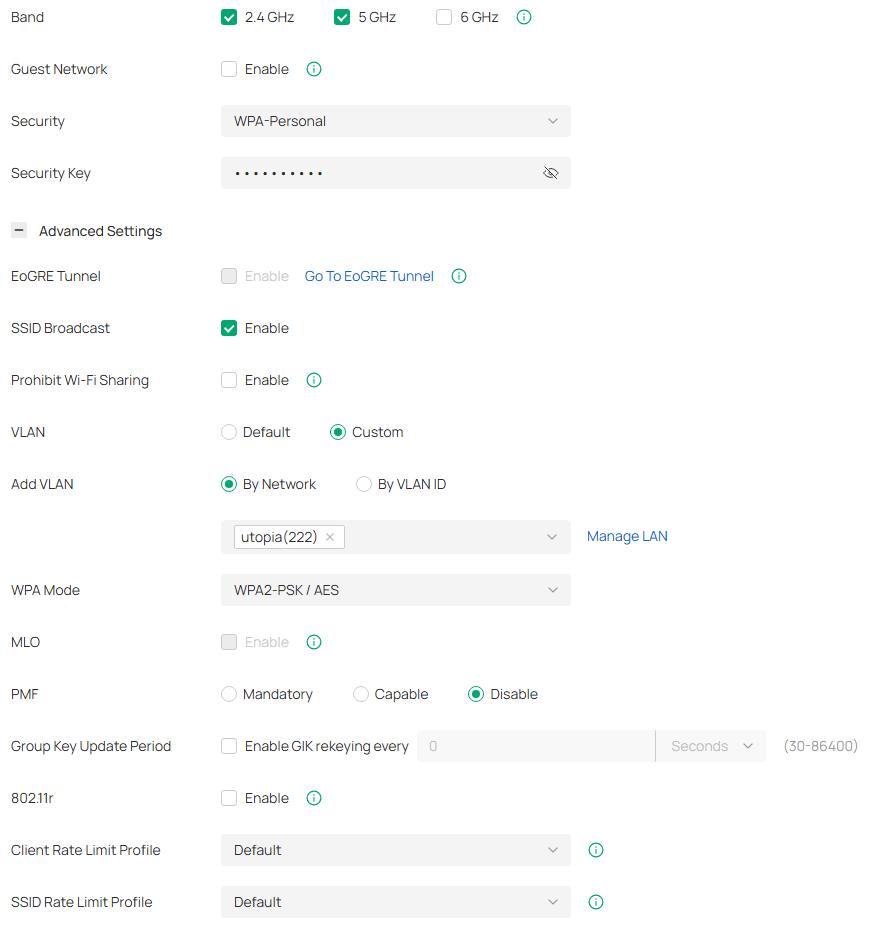
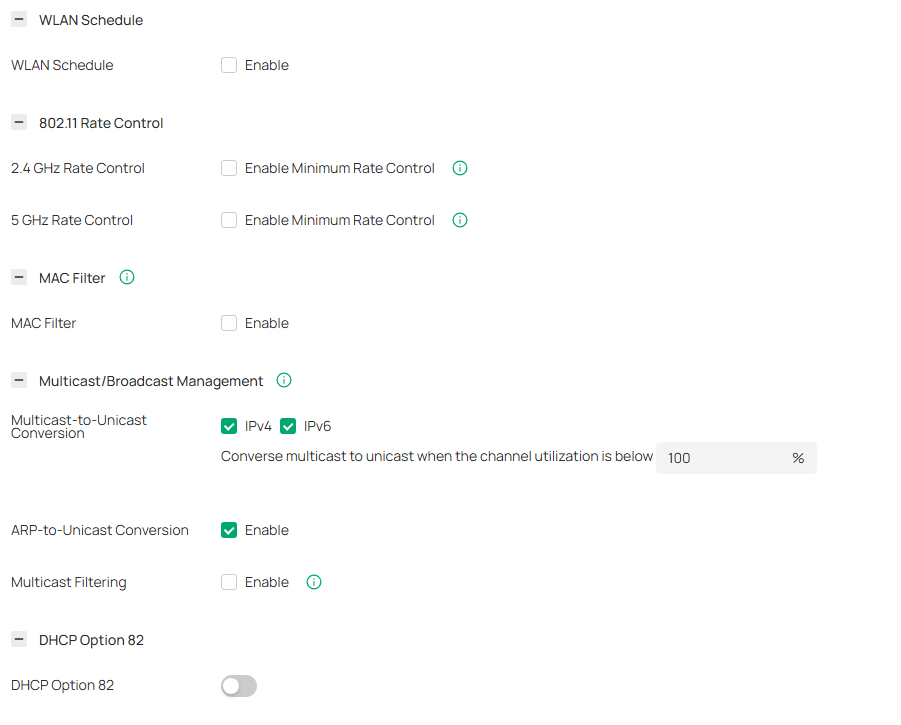
Please also share the screenshots of the SSID config page with a custom vlan id


does not occur on older models like the EAP245 or EAP225 within the same Omada SDN environment.

>>>When you test with EAP245 or EAP225, did you direct unplug the EAP653 and plug one EAP225 in?

did you use the same wireless clients to test?

what's the firmware version and hardware version of the EAP245 or EAP225?


  0  
  0  
#2
Options
Re:EAP653 - IPv6 - Custom VLAN problem/bug
19 hours ago

  @Vincent-TP 
 

Hi, thanks for the follow-up.
To answer your questions:
 

1. Is it only IPv6?
Yes, exactly. IPv4 traffic remains perfectly stable on the custom VLAN.
The issue is strictly limited to IPv6 external access (WAN) 
Looks the same as https://community.tp-link.com/en/business/threads/topic/593488 
 

2. Test results with same client (Galaxy A56):

  • Scenario A: EAP653 - Default VLAN (1)

    • ping 8.8.8.8 -> OK

    • ping 2a00:1450:400c:c0c::64 (Google IPv6) -> OK (remains stable for hours)

  • Scenario B: EAP653 - Custom VLAN (222)

    • ping 8.8.8.8 -> OK

    • ping 2a00:1450:400c:c0c::64 -> OK (initially)

    • After ~10 minutes of inactivity:

      • ping 8.8.8.8 -> OK

      • ping 2a00:1450:400c:c0c::64 -> Request Timeout

      • Note: At this point, the client can still ping other local IPv6 devices on the same VLAN.

  • Scenario C: EAP225-Outdoor / EAP245 - Custom VLAN (222)

    • I have multiple APs in my network. When the same client roams to an EAP225-Outdoor (v3, FW 5.1.11) or EAP245 (v3, FW 5.2.0), IPv6 remains OK and stable on the same custom VLAN.
       

3. Client Consistency: I tested with two different Galaxy A56 devices. Both exhibit the exact same behavior: they lose IPv6 connectivity only when connected to the EAP653 on a tagged VLAN.
 

4. Versions:

  • EAP653(EU) v1.0: Firmware 1.3.5 Build 20251111 Rel. 64506

  • EAP225-Outdoor v3: FW 5.1.11 Build 20250401 Rel. 50587

  • EAP245 v3: FW 5.2.0 Build 20240914 Rel. 59923

  • Switches SG2008P v3.20: FW 3.20.14 Build 20251031 Rel.72837

  • GW ER605 v2.0: FW 2.3.3 Build 20251029 Rel.18054
     

Screenshots of SSID Config:


Screenshots:

  0  
  0  
#3
Options
Re:EAP653 - IPv6 - Custom VLAN problem/bug
2 hours ago

Hi  @E-raser 


The old post you referenced addresses a very early-stage bug that has been fixed in the newer version.


Thank you for taking the time to post the issue in the TP-Link community!
To better assist you, I've created a support ticket via your registered email address and escalated it to our support engineer to look into the issue. The ticket ID is TKID260220866. Please check your inbox and confirm that the support email was received. Thanks!
Once the issue is resolved, please update this thread with your solution to help others who may encounter the same problem.
Many thanks for your excellent cooperation and patience!

  0  
  0  
#4
Options