
Inter-Switch Routing Omada Controller V6

Inter-Switch Routing Omada Controller V6

Inter-Switch Routing Omada Controller V6
20 hours ago - last edited 20 hours ago
Model: SG2210P  
Hardware Version: V5
Firmware Version:

Hi everybody.


I do have following network topology.
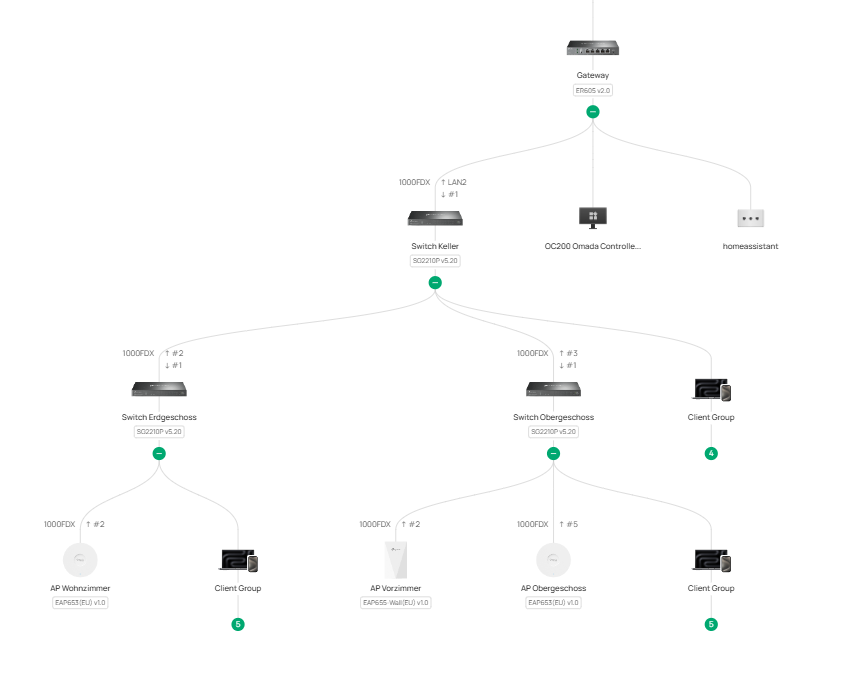
 

My Router works as DHCP Server and Gateway. I am using different VLANS and all traffic goes through the router. This is basically clear and can be demonstrated very easily.
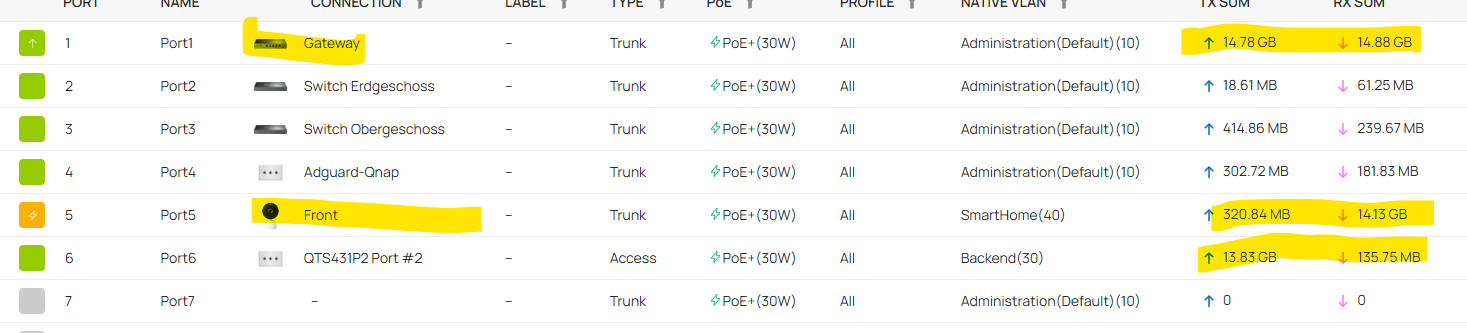


My front door bell (VLAN40) produces GB's of data, which is sent to the storage device (NAS) in VLAN30. Both devices are attached to the same "Switch Keller". you can see that data is passing the Gateway. So my question is, how does Inter-Switch routing work to avoid this? 


I checked several post but could not find some practical instructions. maybe that will not work with my switches at all.

Any ideas are appreciated


ER605 V2 EAP653 V1
  0      
  0      
#1
Options
2 Reply
Re:Inter-Switch Routing Omada Controller V6
20 hours ago - last edited 20 hours ago

  @wickie 


Without going into detail here, do a Google search for "Omada inter switch routing" and the AI response will explain everything.


1x ER7406 1x OC300 4x SG2008 1x EAP610 3x EAP650-Desktop 1x EAP772-Outdoor
  0  
  0  
#2
Options
Re:Inter-Switch Routing Omada Controller V6
15 hours ago

  @wickie 


As above, its very easy to set up


If you dont want the router to be the routing point for everything inside and outside the network, you need to enable a switch interface on all the vlans, give them a static IP, and in your gateway vlan setup use those IPs as the "gateway" via DHCP, and for any static devices, do the same


Then, create a static route on the switch 0.0.0.0/0 > Router IP on management vlan, and then make a router static ip all vlan ranges > switch IP on management vlan

  0  
  0  
#3
Options