
ER811 WAN Configuration with Multiple Static IP Addresses and Virtual Server Port Forwarding
ER811 WAN Configuration with Multiple Static IP Addresses and Virtual Server Port Forwarding

I recently bought my ER811 and am working on configuring it for the first time. My small business network has 5 static IPv4 addresses from Verizon; Verizon tells me that IPv6 addresses are still unavailable. My network has a number of small devices using DHCP, and two physical servers that require use of a static IPv4 address for accessibility to and from the public Internet.
I've configured the WAN-SFP+ port to use the first static IPv4 address from my block. I added the remaining 4 addresses to this same WAN port as WAN aliases. The remaining ports are configured as LAN ports.
I've configured multiple virtual servers for the ports I need to have forwarded to the two servers. For example, I configured one virtual server to forward tcp/80 from the first WAN alias address to the static private address for the first server. I configured a second virtual server to forward tcp/80 from the second WAN alias address to the static private address for the second server. I repeated this process for the other ports I need to forward, including SMTP, SSH, HTTPS, etc.
The "number of small devices using DHCP" are all connected to a NETGEAR GS116 switch. I'll have that switch connected to one of the ER811's LAN ports. I'll have the two servers each connected to an ER811 LAN port. For now, I've done all of the ER811 configuration in standalone mode because I want to minimize downtime when I replace my old router with this setup.
Will this setup work? Can I expect my devices that use DHCP to access the Internet using the first static IPv4 address from my assigned block, the first server using the second address, and the second server using the third address?
- Copy Link
- Subscribe
- Bookmark
- Report Inappropriate Content

I didnt recommend One:One NAT for his use since to enable bidirectional traffic both in and out, using that function would totally expose the internal IP to the internet in its entirety, since for the response to come from that IP you would have to enable DMZ for each mapping.
I still recommend the multiple WAN with policy routing for the internal IPs, and simple port forwarding for inbound access through the firewall, and letting the firewall use its stateful rules for return traffic through the policy routed WAN
- Copy Link
- Report Inappropriate Content
I finally had a chance to install my router yesterday. I had some success, and some challenges. The challenges:
WAN ports SFP+ WAN1 and SFP+ WAN/LAN2 are showing "Link Down" connection status. I'm using TP-Link Omada SM5310-T adapters. My FIOS connection only provides 1GB Ethernet, so I have both ports configured for 1000000 upstream and downstream bandwidth. I can configure the ports for a static IP address, but plugging in a cable doesn't change the link status. Did I miss something here?
I tried creating an IP Group for each of my servers and using policy routing to do incoming and outgoing NAT. I couldn't reach either server. To get things working, I deleted my IP Groups and policy routing rules and created NAT virtual servers. As @GRL noted above, this gets traffic forwarded to the right server, but outbound NAT isn't bound to the same public IP address. I then tried creating a single IP Group and policy routing rule for one of the servers. Outbound NAT still isn't working properly. Here are some images showing my configuration.
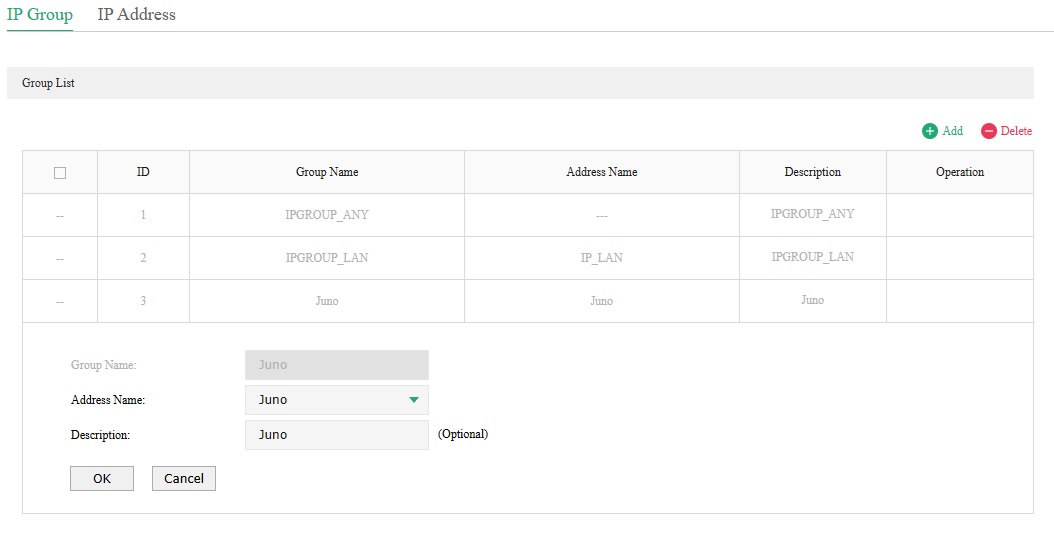
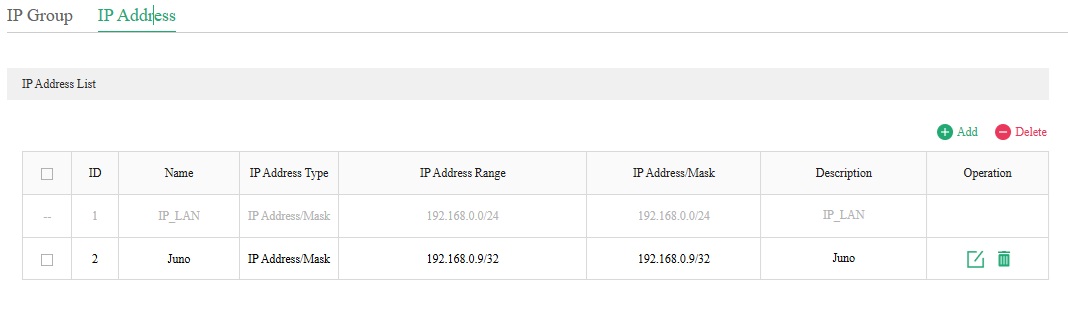
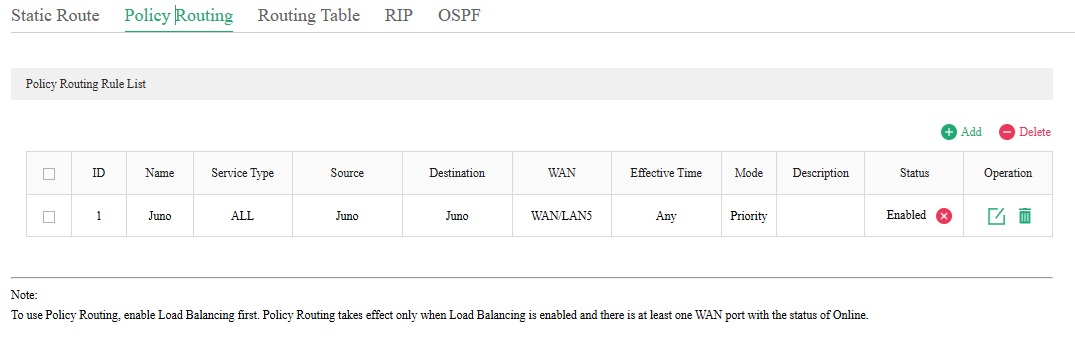
WAN/LAN5 is configured to use a static IP address that ends with .36. When I ssh from 192.168.0.9 to another server on the public internet, the IP address shown for the incoming connection isn't using .36. It varies, using one of my other configured static IP addresses.
Sorry for the long update. Can anyone help me figure out what I've done incorrectly?
- Copy Link
- Report Inappropriate Content
I think I have the policy routing situation addressed. I needed to change the destination settings to IPGROUP_ANY. Things seems to be working with that change.
Does anyone have any thoughts about the SFP+ WAN ports? I've tried swapping transceivers to make sure that isn't the problem (it isn't).
- Copy Link
- Report Inappropriate Content
for the modules you need to leave the SFP+ ports in full 10gbit mode, the module does the conversion, and they wont work if you configure the port on the gateway to 1gig
- Copy Link
- Report Inappropriate Content
@GRL I originally had them configured for 10GB bandwidth. They weren't working with that configuration, either.
- Copy Link
- Report Inappropriate Content
I have the port issue resolved after talking to TP-Link technical support. The solution was to set the Negotiation Mode to 1000M Full-duplex for Port1 (SFP+ WAN1) and Port2 (SFP+ WAN/LAN2) at Network->Switch->Port Config.
Thanks to everyone who helped educate me.
- Copy Link
- Report Inappropriate Content
Information
Helpful: 0
Views: 1453
Replies: 16
Voters 0
No one has voted for it yet.