
Solution What if Tether App Displays "Device already is bound to another account" When Rebinding Extenders?


This article applies to:
RE330_V1
RE300_V2
RE315_V1
Phenomenon:
Some users have reported that after the Range Extender disconnects, they restored the network by performing a hard reset and reconfiguring the Range Extenders. However, when trying to bind the Range Extenders to the TP-Link ID using the Tether App, they encountered a message similar to "the device is already bound to another account," thus preventing them from rebinding the Range Extenders to the TP-Link ID.
Our relevant department has identified the cause of this unexpected behavior and provided the following feasible solutions. Please refer to them according to your specific situation.
Available Solution:
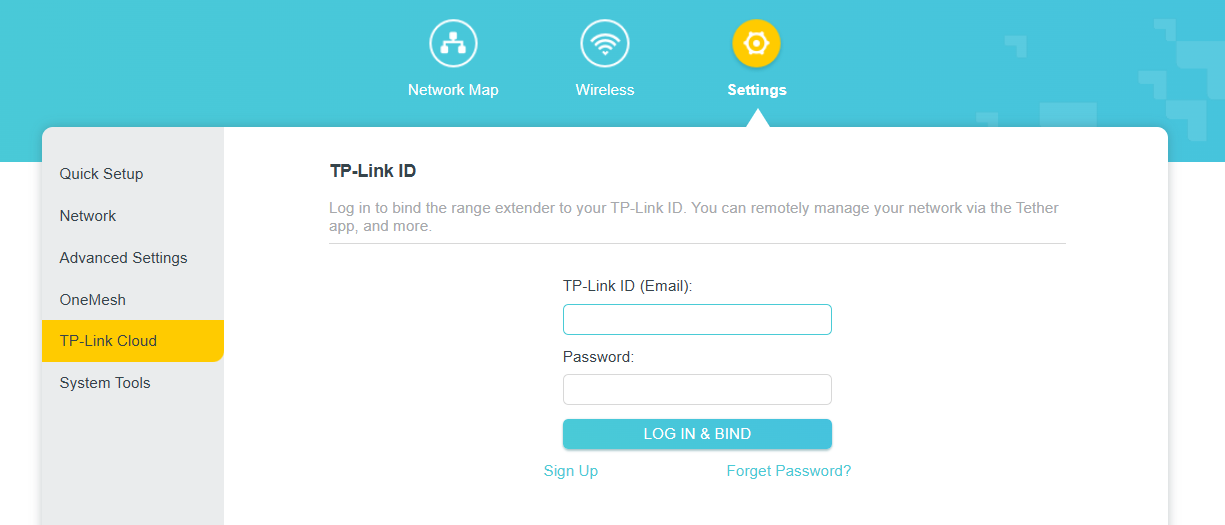
1. If your model is RE330_V1, RE300(US)_V2, or RE315(EU)_V1, please upgrade the firmware to the official version 1.0.50 or higher. Then, re-bind your account via the web interface.
- Visit http://tplinkrepeater.net, and log in with the password you set for the extender
- Please go to Settings > TP-Link Cloud.
2. For other models, please upgrade to the latest firmware version from the official website.
Note:
- For the sake of insurance, it's always recommended to save a copy of the range extender's Backup Config file before upgrading or downgrading.
- You may follow the guide to upgrade the firmware of your range extender. How to upgrade the firmware of my range extender.
If the above steps do not help, please send the following information here:
- What is your region?
- The Range Extender model, hardware version and firmware version.
- Approximate time since you bound your TP-Link ID.
- Reason for resetting the Range Extender.
Thank you for your feedback and cooperation.