
Controller > Manage Devices > Access Point dashboard

In site specific, Manage Devices, Access Point you have a clients list but it needs to be a lot more interactive...
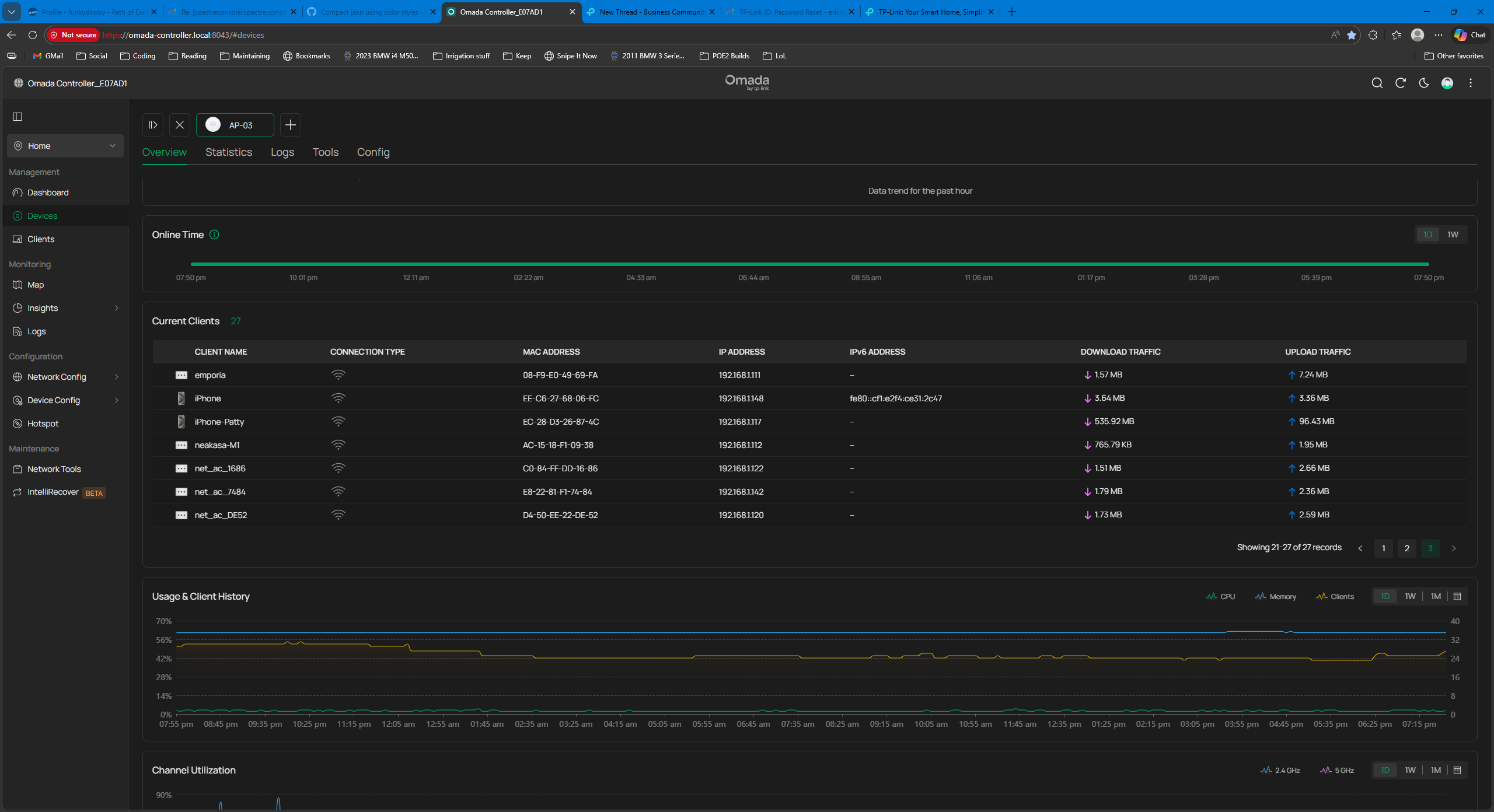
Problem is, I cant configure columns, like what band is the client using? (2.4G, 5G, 6G?) or anything else... no link to take you to a more robust client management thats filtered for the current AP
I came to this screen, because I wanted to know why all my clients except for 4 had latched onto what I consider to be the furthest AP but I find that I can't actually do much here.
The column headers should be customizable, however, I would copy the column headers from the other WIreless Clients screen. Eventually smoebody might allow for these columns to be specific to this dashboard somehow but thats scope creep IMO.
Suggestions:
- make the wireless column include the band, signal strength in the same column. Having the wireless signal just takes up space uselessly. Yes, its a wireless client. We're already focused on an access point... showing us the wireless icon is extremely redundant.
- a link to the Clients > Wireless screen with the current AP filtered would be fine for more operations, like blocking, inspecting the client signal more indepth, etc.

