
Early Access Hardware Controllers Omada SDN Controller 6.2.0 Pre-Release Firmware (Closed on 9th Apr, 2026)


This Article Applies to
OC200(UN)_V1_1.39.8_pre-release (Built-in Omada SDN Controller 6.2.0)
OC200(UN)_V2_2.24.8_pre-release (Built-in Omada SDN Controller 6.2.0)
OC200(UN)_V3_3.1.3_pre-release (Built-in Omada SDN Controller 6.2.0)
OC220(UN)_V1_1.4.8_pre-release (Built-in Omada SDN Controller 6.2.0)
OC220(UN)_V2_2.3.8_pre-release (Built-in Omada SDN Controller 6.2.0)
OC300(UN)_V1_1.33.8_pre-release (Built-in Omada SDN Controller 6.2.0)
OC400(UN)_V1_1.11.8_pre-release (Built-in Omada SDN Controller 6.2.0)
Overview
We hope to offer you the opportunity to experience the new features added in Controller v6.2.0.x in advance, and to allow TP-Link to thoroughly test the firmware in your real network environment and across scenarios before the official release. All feedback is welcome, including reports of successful upgrades.
Release Notes
Version Info
This version of the Controller is fully compatible with the Omada App version 5.0.3 or above.
Supported Device Models
For device models Omada Software Controller supports, refer to the Omada Cloud SDN Platform Compatibility List.
Added support for Access Points: Flex Bridge 5.
New Features
- Added support for configurable WAN-port PVID on gateways running firmware 6.2 in Devices > Gateway Details > Ports.
- Added support for FTP and SIP ALG settings, including editable FTP/SIP signaling ports, protocol type, peer-to-peer restriction, inactivity timers, and media timeout, for gateways on firmware 6.2 in Network Config > Transmission > NAT > ALG.
- Added support for e-mail alerts when new firmware is available in Firmware > Overview > Upgrade Settings: users can subscribe to any channel (default Stable) and receive automatic notifications whenever subscribed channels release new firmware images for devices on the controller, provided the mail server is configured
- Added support for a reorganized VPN management page in Network Config > VPN that unifies the entry workflow, maps legacy SSL VPN Server/User and WireGuard pages into the new structure, and expands WireGuard to server, client and auto site-to-site scenarios(requires Gateway 6.2 firmware).
- Added support for configuring multiple DHCP address ranges within a single VLAN in site - Network Config > LAN > VLAN (requires Gateway 6.2 firmware).
- Added support for allowing the number of local and remote subnets in VPN tunnels to scale to the limit advertised by the device firmware in Network Config > VPN > VPN (requires Gateway 6.2 firmware).
- Added support for IPv4-over-IPv6 dial-up modes of MAP-E and DS-Lite on WAN interfaces, including optional custom DS-Lite domain names, in Network Config > Network Settings > Internet. Enabling these modes automatically activates IPv6. Some functions are not supported for DS-Lite and MAP-E dialing, including VPN, SD-WAN, IGMP, DDNS, UPnP, Disable NAT, Port Forwarding, and NAT ALG. (requires Gateway 6.2 firmware).
- Added support for a new DHCP User List page on the gateway that displays all active DHCP clients when the gateway operates as the DHCP server in Gateway Details > Network View > DHCP User List (requires Gateway 6.2 firmware).
- Added support for one-click creation of DHCP reservations from the DHCP User List, allowing administrators to import existing leases directly into the reservation table in Network Config > Transmission > DHCP Reservation > Add From DHCP User List.
- Added support for Hotspot Viewer accounts to print voucher codes directly from the voucher list in Hotspot > Vouchers > Voucher Groups.
- Added support for configurable DNS cache lifetime by adding a TTL setting to LAN DNS in Network Config > Network Settings > LAN - LAN DNS (requires Gateway 6.2 firmware).
- Added support for remote packet capture on gateway WAN ports or VLANs to aid network diagnostics in Network Tools > Packet Capture (requires gateway 6.2 firmware).
- Added support for rogue-DHCP-server detection: the gateway raises an alert whenever an unexpected DHCP server is detected on the LAN in Logs > Alerts (requires gateway 6.2 firmware).
- Added support for on-device DNS resolution to query domain-to-IP mappings directly from the gateway in Network Tools > Network Check > DNS Lookup (requires gateway 6.2 firmware).
- Added support for LAN-side IP-conflict detection; the gateway logs an alert whenever multiple MACs are detected using the same IP in Logs > Alerts (requires gateway 6.2 firmware).
- Added support for Timing-based link-back (failover): users can configure a time range after which traffic automatically fails back to the standby WAN, supplementing the existing failover modes in Site > Network Config > Network Settings > Internet (requires gateway 6.2 firmware).
- Added support for on-demand Speedtest in Site > Dashboard and scheduled Speedtest in Site > Network Config > Network Settings > Internet: initiate a test on any WAN or set daily/weekly/monthly schedules; results are graphed and stored historically (requires gateway 6.2 firmware).
- Added support for extending configurable VLANs up to 4094 on gateways, covering WAN, LAN, virtual-WAN and IPTV interfaces in Site > Network Config > Network Settings > Internet/LAN/IPTV (requires gateway 6.2 firmware).
- Added support for displaying the last-edit timestamp on each portal entry in Network Config > Authentication > Portal.
- Added support for showing voucher balance and quota-limit reminders on the portal post-auth success page, along with remaining session time and, if rate-limiting is enabled, remaining data for both voucher and local-user logins on the client success page after authentication.
- Added support for uploading separate background images for mobile and PC endpoints when creating or editing a portal in Network Config > Authentication > Portal > Add/Edit Portal > Design > Background > Unified Picture.
- Added support for using a hostname instead of an IP address for the RADIUS server in portal authentication in Network Config > Authentication > Portal.
- Added support for voucher statistics grouped by voucher group, letting administrators view usage totals per group in Hotspot > Vouchers > Statistics.
- Added support for LAN Network/VLAN columns in user tables, showing the network and VLAN where each client resides in Dashboard > Traffic > Clients and Insights > Application Analytics > Users.
- Added support for managing Pro/Campus devices within Omada Controller, enabling discovery, adoption, offline provisioning, site templates and mixed-mesh deployment, while health metrics, anomaly events and Heat-Map Pro models remain unavailable in Site > Device.
- Added support for displaying the timestamp and status of the latest GPS fix (manual or automatic) on EAP772-Outdoor in AP Details > Config > General (requires EAP772-Outdoor firmware 6.2).
- Added support for configuring a NAS-ID in switch 802.1X authentication in Network Config > Authentication > 802.1X (requires switch firmware 6.2).
- Added support for VLAN assignment when MAC-based authentication is selected in switch 802.1X in Network Config > Authentication > 802.1X (requires switch firmware 6.2).
- Added support for choosing hybrid mode (802.1X first, MAB on failure), displaying downstream devices on switch ports, and configuring a guest VLAN in Network Config > Authentication > 802.1X (requires switch firmware 6.2).
- Added support for transparent SSDP forwarding when both IGMP Snooping and unknown-multicast discard are active by introducing the "Flood Known Protocols" option in Network Config > Network Settings > LAN > Multicast Snooping (requires Switch 6.2 firmware).
- Added support for real-time LACP member-status indication: LAG list now shows green for successfully negotiated, up members and red for failed members, with failure logs sent by the switch and stored in the Controller in Switch Details > Ports > LAG List (requires Switch 6.2 firmware).
- Added support for in-place toggling between Active and Passive LACP modes without deleting and recreating the LAG; Static LAG mode remains unchanged in Switch Details > Ports > LAG Detail (requires Switch 6.2 firmware).
- Added support for displaying the last-known uplink device and uplink port columns in the device list, preserving this information even after the device goes offline in Devices > Device List.
- Added support for configuring multiple DHCP-relay server addresses on a Switch VLAN interface (quantity limited by hardware) in Switch Details > Config > VLAN Interface > DHCP Relay (requires Switch 6.2 firmware).
- Added support for VLAN-aware topology highlighting: links in the VLAN topology diagram now change color to indicate whether the selected VLAN’s traffic can traverse each connection in Network Config > Network Settings > LAN and Dashboard > Topology.
- Added support for SDM template integration, allowing administrators to view and modify SDM template options directly within switch device templates in Site Template > Device Template (switch) > Config > General > Others > SDM Template (requires Switch 6.2 firmware; supported models listed).
- Added support for cloud-based remote access (NAT traversal) that lets administrators reach HTTP/HTTPS services on private-LAN devices through a cloud-connected jump host, available for gateway 6.2 firmware and select switch/AP 6.2 builds in Network Tools > Remote Access and Client Details > Toolbox > Remote Access (Cloud Access must be enabled for Local Controller).
Enhancements
- Optimized the Internet page by moving Virtual WAN under Port Config and merging the separate Port Config and Load Balancing submit buttons into a single bottom action in Site > Network Config > Network Settings > Internet.
- Optimized Load Balancing logic to apply device-side settings when WAN Settings Overrides is disabled and added real-time port-status indicators under each WAN weight field to prevent user confusion in Site > Network Config > Network Settings > Internet > Load Balancing (requires gateway 6.2 firmware).
- Optimized Portal creation/editing with a rebuilt layout that groups settings more intuitively and exposes additional component-customization options in Network Config > Authentication > Portal.
- Optimized IP-input fields throughout the UI to accept a copied IP address pasted as a single string.
- Optimized Cloud Access with a redesigned connection flow that reduces cloud-request latency and improves overall user experience in Settings > Cloud Access.
- Optimized the DPI Rules Management page by replacing the single QoS toggle with a type selector that lets users choose between ACL and QoS rule types in Site > Network Config > Security > Application Control > Rules Management.
- Optimized controller security with built-in brute-force protection that locks login attempts after repeated password failures on "managed by other" devices in Controller (available now for AP & Gateway; Switch & OLT support planned for firmware 6.3).
- Optimized public OpenAPI documentation by completing deprecated-interface descriptions and correcting the categorization of site-template endpoints.
Bug Fixed
- Fixed bug where RADIUS Message-Authenticator was not forcibly validated, which could lead to RADIUS protocol security vulnerability (CVE-2024-3596), by adding support for enforcing Message-Authenticator verification when the “Require Message-Authenticator” option is enabled, in Site > Network Config > Profile > RADIUS Profile and Global/MSP > Settings > Server Settings > RADIUS Server.
- Fixed bug where RADIUS packets containing the Proxy-State attribute did not enforce Message-Authenticator validation, potentially exposing the system to RADIUS protocol security vulnerability (CVE-2024-3596), by adding support for limiting Proxy-State and enforcing Message-Authenticator verification when the “Limit Proxy-State” option is enabled, in Site > Network Config > Profile > RADIUS Profile and Global/MSP > Settings > Server Settings > RADIUS Server.
- Fixed bug where adding a device via Device Key failed in certain scenarios. This is the main modification to the newly provided pre-release version on Mar 27, 2026.
Notes
- Please note that Controllers on different platforms may vary in features, even if their first three digits of the version code are the same. For example, the Linux Controller currently supports Cluster Mode, but the Windows Controller doesn't support it yet.
- The Omada SDN Controller can only manage specific devices running the supported firmware. Please confirm that your device is compatible with the SDN Controller.
- Since version 5.14.32, the Omada Software Controller no longer supports upgrading from Controller v4.
- To strengthen overall security, we recommend upgrading all devices to the latest firmware.
Firmware Download
Before the Upgrade
(1) Please be sure you have read the Beta Test Agreement before upgrading the Pre-release firmware!
(2) For the sake of insurance, it's always recommended to save a copy of the controller Backup Config file before upgrading or downgrading.
(3) You may follow the following guide to upgrade your Omada Controller. How to Upgrade or Downgrade Omada SDN Controller.
Firmware Download Link
Direct Download
OC200(UN)_V1_1.39.9_pre-release (Built-in Omada SDN Controller 6.2.0)
OC200(UN)_V2_2.24.9_pre-release (Built-in Omada SDN Controller 6.2.0)
OC200(UN)_V3_3.1.4_pre-release (Built-in Omada SDN Controller 6.2.0)
OC220(UN)_V1_1.4.9_pre-release (Built-in Omada SDN Controller 6.2.0)
OC220(UN)_V2_2.3.9_pre-release (Built-in Omada SDN Controller 6.2.0)
OC300(UN)_V1_1.33.9_pre-release (Built-in Omada SDN Controller 6.2.0)
OC400(UN)_V1_1.11.9_pre-release (Built-in Omada SDN Controller 6.2.0)
OC200(UN)_V1_1.39.8_pre-release (Built-in Omada SDN Controller 6.2.0)
OC200(UN)_V2_2.24.8_pre-release (Built-in Omada SDN Controller 6.2.0)
OC200(UN)_V3_3.1.3_pre-release (Built-in Omada SDN Controller 6.2.0)
OC220(UN)_V1_1.4.8_pre-release (Built-in Omada SDN Controller 6.2.0)
OC220(UN)_V2_2.3.8_pre-release (Built-in Omada SDN Controller 6.2.0)
OC300(UN)_V1_1.33.8_pre-release (Built-in Omada SDN Controller 6.2.0)
OC400(UN)_V1_1.11.8_pre-release (Built-in Omada SDN Controller 6.2.0)
OC200(UN)_V1_1.39.7_pre-release (Built-in Omada SDN Controller 6.2.0)
OC200(UN)_V2_2.24.7_pre-release (Built-in Omada SDN Controller 6.2.0)
OC200(UN)_V3_3.1.2_pre-release (Built-in Omada SDN Controller 6.2.0)
OC220(UN)_V1_1.4.7_pre-release (Built-in Omada SDN Controller 6.2.0)
OC220(UN)_V2_2.3.7_pre-release (Built-in Omada SDN Controller 6.2.0)
OC300(UN)_V1_1.33.7_pre-release (Built-in Omada SDN Controller 6.2.0)
OC400(UN)_V1_1.11.7_pre-release (Built-in Omada SDN Controller 6.2.0)
Additional Information
If somehow you encounter an issue during or after the controller upgrade, it's suggested to contact us with the following info:
- Omada Controller version (previous and current)
- Device Model(s), Hardware and Firmware versions
- (if possible) A copy of the Log file and Backup Config file
If you decide to downgrade the controller before reporting the issue to TP-Link, it's recommended to save a copy of the current Log file and Backup Config file, which could help TP-Link investigate and address the problem quickly.
>> How to get the Log file and Backup Config file for Omada SDN Controller:
-
If your Windows software controller failed to launch, please locate the controller installation path for the Log file.
-
If it's not a launch issue, you can export the Log file and Backup Config file to the local network.
-
For Omada Controller v5.8 or later version,
In the Global View, go to Settings > Maintenance > Backup & Restore > Retained Data Backup, select Settings Only, then click Export for the Backup Config file. On the same page, scroll down to Export for Support, then click Export Running Logs to download the desensitized Log file.
-
For Omada Controller v5.6 or v5.7,
Go to Settings > Maintenance > Backup & Restore > Retained Data Backup, select Settings Only, then click Export for the Backup Config file. On the same page, scroll down to Export for Support, then click Export Running Logs to download the desensitized Log file.
-
For Omada Controller v5.5 or a previous version,
Go to Settings > Maintenance > Backup & Restore > Retained Data Backup, select Settings Only, then click Export for the Backup Config file. Go to Settings > Services > Export Data > Running Log to export the Log file.
-
Update Log
Apr 9th, 2026
Close this trail.
Update the download links to the official ones.
Mar 27th, 2026
Updated the pre-release firmware.
Updated the release notes to add a new bug fix.
Mar 18th, 2026
Updated point 37 in the New Features section.
Mar 13th, 2026
Updated the pre-release firmware as follows:
OC200(UN)_V1_1.39.7_pre-release (Built-in Omada SDN Controller 6.2.0)
OC200(UN)_V2_2.24.7_pre-release (Built-in Omada SDN Controller 6.2.0)
OC200(UN)_V3_3.1.2_pre-release (Built-in Omada SDN Controller 6.2.0)
OC220(UN)_V1_1.4.7_pre-release (Built-in Omada SDN Controller 6.2.0)
OC220(UN)_V2_2.3.7_pre-release (Built-in Omada SDN Controller 6.2.0)
OC300(UN)_V1_1.33.7_pre-release (Built-in Omada SDN Controller 6.2.0)
OC400(UN)_V1_1.11.7_pre-release (Built-in Omada SDN Controller 6.2.0)
Update Note:
Add one new feature: Point 37.
Mar 4th, 2026
Provide the following firmware:
OC200(UN)_V1_1.39.6_pre-release (Built-in Omada SDN Controller 6.2.0)
OC200(UN)_V2_2.24.6_pre-release (Built-in Omada SDN Controller 6.2.0)
OC200(UN)_V3_3.1.1_pre-release (Built-in Omada SDN Controller 6.2.0)
OC220(UN)_V1_1.4.6_pre-release (Built-in Omada SDN Controller 6.2.0)
OC220(UN)_V2_2.3.6_pre-release (Built-in Omada SDN Controller 6.2.0)
OC300(UN)_V1_1.33.6_pre-release (Built-in Omada SDN Controller 6.2.0)
OC400(UN)_V1_1.11.6_pre-release (Built-in Omada SDN Controller 6.2.0)
Recommended Threads
EAP7xx Fully Adapted to Omada 6.2 Pre-release Firmware (Released on 23rd Jan, 2026)
Omada_Network_Application_V6.2.x.x Pre-Release Firmware (Released on 11th Feb, 2026)
ER7206 V2 Pre-Release Firmware for SDN Controller 6.2.X.X (Released on February 12th, 2026)
ER707-M2 V1 Pre-Release Firmware for SDN Controller 6.2.X.X (Released on February 12th, 2026)
ER7406 V1 Pre-Release Firmware for SDN Controller 6.2.X.X (Released on February 12th, 2026)
Omada SG_2 Series Pre-Release FW for SDN Controller 6.2.X.X (Released on March, 17th, 2026)
Omada S4500&5500 Series Pre-Release FW for SDN Controller 6.2.X.X (Released on March, 18th, 2026)
Omada SG_3 Series Pre-Release FW for SDN Controller 6.2.X.X (Released on March, 17th, 2026)
Wish you a happy life and smooth network usage! >Omada US Enterprise Beta Program Launch< >Get the Latest Omada SDN Controller Releases Here< >Experience the Latest Omada EAP Firmware<
- Copy Link
- Subscribe
- Bookmark
- Report Inappropriate Content

- Copy Link
- Report Inappropriate Content
Now, today, more than 24hrs after DST, i dont have any issues with site health graph or WiFi page in dashboard........ ?
- Copy Link
- Report Inappropriate Content
Hi @Vishlamba
Thanks for posting here.
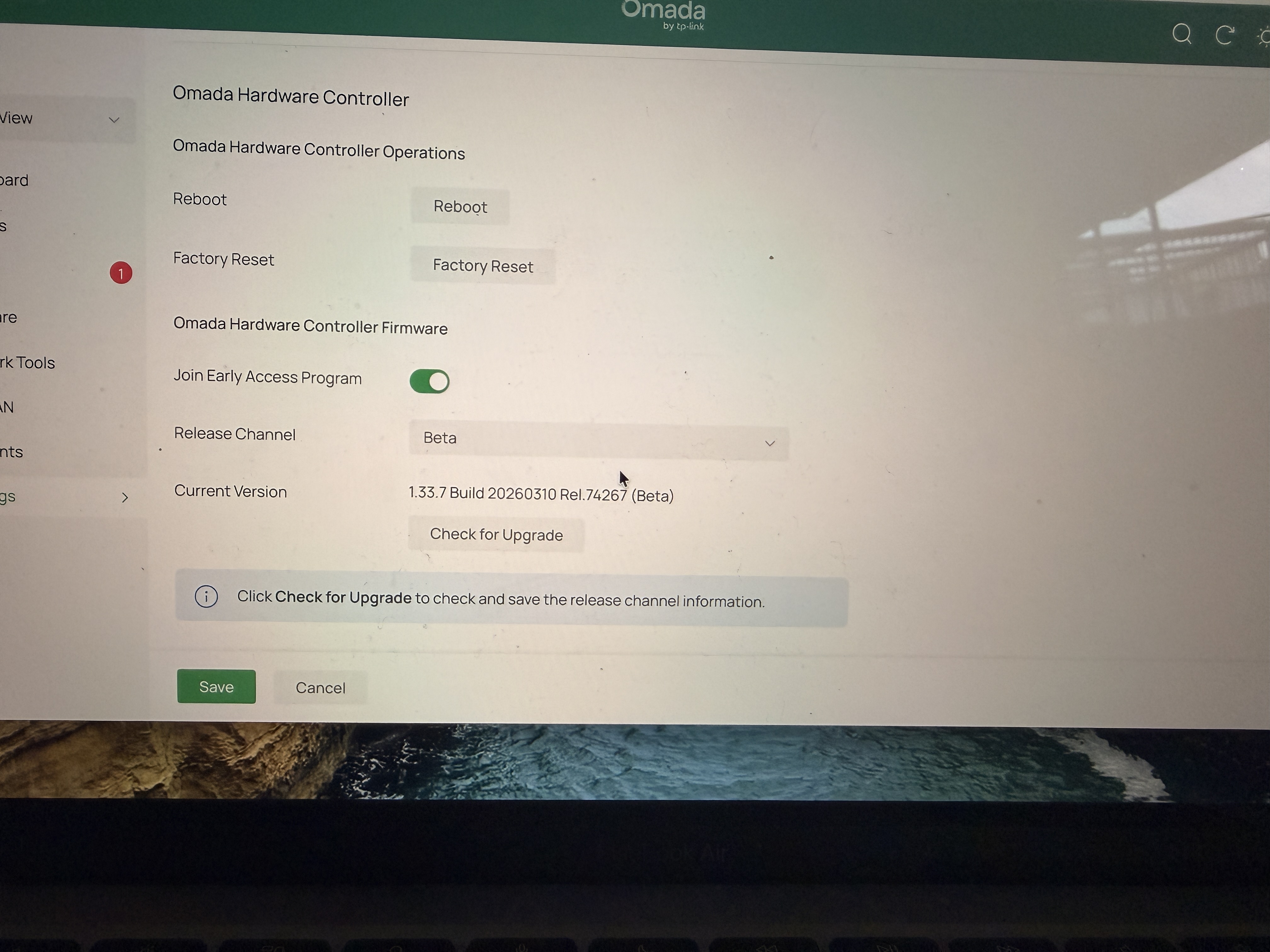
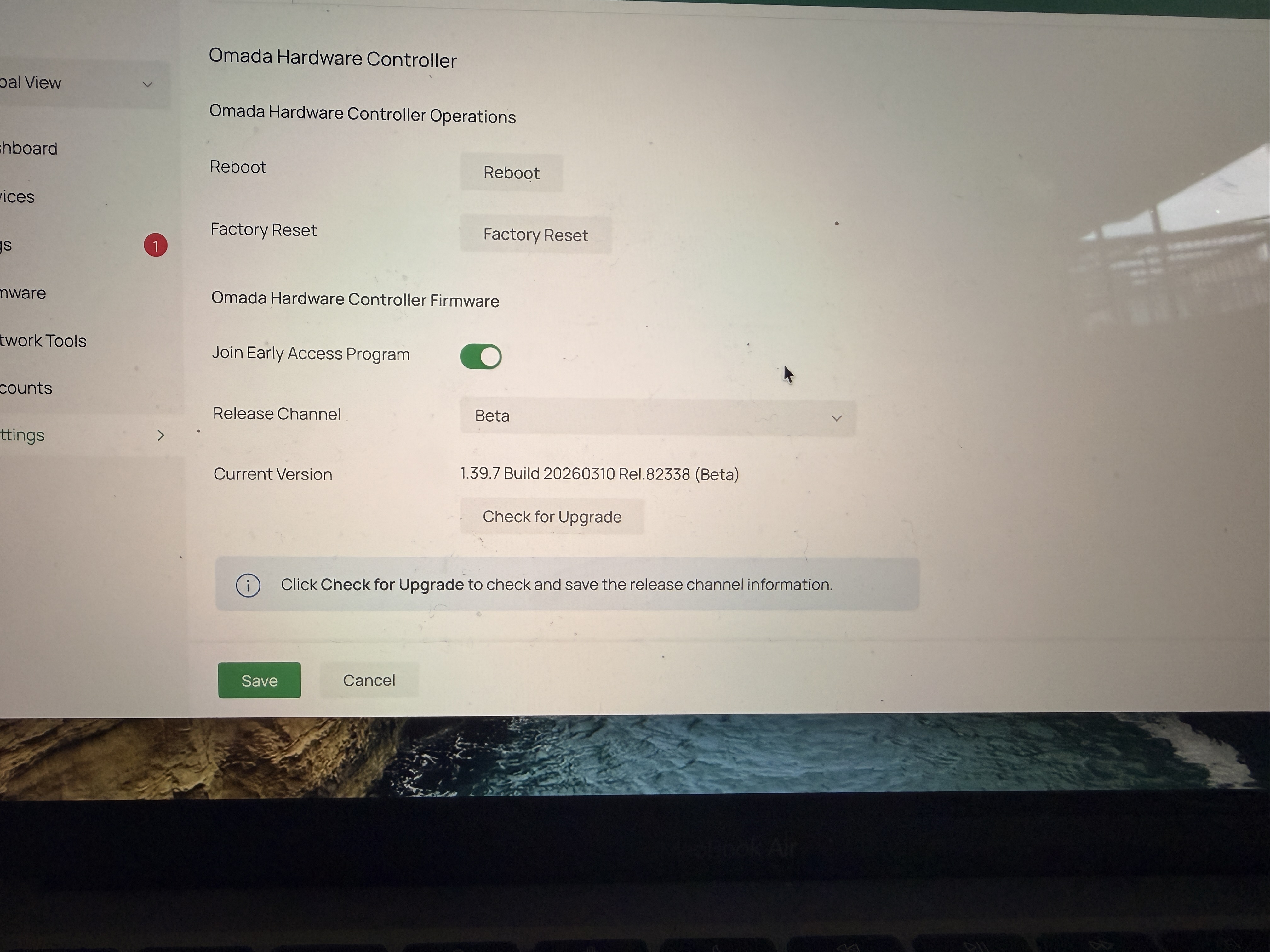
For hardware controllers, Cloud Access discontinued support for manual updates several years ago. May I ask what version you were using before the upgrade?
We recommend that you log in locally to upgrade to the latest firmware. Thank you.
Vishlamba wrote
@Vincent-TP Hi
I have a few systems running, mostly on OC200 V1 and one of OC300, I just noticed that manual update option for the controller is missing after updating to 1.33.7 on OC300 and 1.39.7 OC200. Before this update I was able to update all my controller easily, but now the option is completely gone ? Can you please tell me why this is ? thanks
- Copy Link
- Report Inappropriate Content
@Vincent-TP hi
This is very strange then as the last update for my 2 OC200 from 6.1 to 6.2 was done remotely in march 26, so after the 1.33.7 and 1.39.7 it stopped. Thank you
- Copy Link
- Report Inappropriate Content

GRL wrote
Now, today, more than 24hrs after DST, i dont have any issues with site health graph or WiFi page in dashboard........ ?
Everything is OK here as well. This was a strange problem because I did not have DST enabled and manually changed the time zone. Later, I went back to the correct zone and enabled DST. In both scenarios, I had the problem. In any case, everything is working for now and the Omada folks have 6 months to fix the issue before the next time change.
- Copy Link
- Report Inappropriate Content
Horay for magical auto-fixing. if only everything was like that.
Ive given support cloud access to my controller so they can pull some data.
- Copy Link
- Report Inappropriate Content
Good News - EAP650 icons fixed
Bad news - ES208G switch icon now broken

caches cleared, full restart, chrome and firefox same
- Copy Link
- Report Inappropriate Content
- Copy Link
- Report Inappropriate Content
Hi @GRL
Thanks for the feedback. We just checked your controller and it's displayed correctly. We are using Firefox 149.0.

Please let us know the version number of the Firefox you are using. Thanks.
GRL wrote
Good News - EAP650 icons fixed
Bad news - ES208G switch icon now broken
caches cleared, full restart, chrome and firefox same
- Copy Link
- Report Inappropriate Content
The icons always load correctly over cloud, its local access to the controller IP that has the icon issues and produces the 404 error in the console, eg, for the ES208G

This particular icon has actually been working fine for days since the 6.2.0.16 update, then just stopped working for no reason yesterday
- Copy Link
- Report Inappropriate Content
Information
Helpful: 1
Views: 14615
Replies: 81
Voters 1
