
Early Access Omada Switch Pre-Release FW Preview for SDN Controller 6.2.X.X (Update on May, 8th, 2026)


Release Notes
New Features:
1. Added support for NAT Traversal.
2. Added compatibility with Omada Config Tools V2.0.
3. Added support for Private VLAN.
4. Added support for Lightweight DHCPv6 Relay Agent (LDRA).
5. Added IGMP Snooping VLAN SSDP Flood to ensure that packets destined for multicast group 239.255.255.250 (commonly used for SSDP service discovery) are always flooded.
6. Added Extend Mode for non-PoE models.
7. Added support for configuring VLAN Isolation via SNMP.
8. Added a CLI command to display Spanning Tree Topology Change Notification (STP TCN) statistics for each port.
Enhancement:
1. Supported common MAC address formats for MAC address input fields.
2. Supported configuring 802.1X authentication in MAB-only mode.
3. Supported disabling DNS Adoption to meet specific network management requirements.
4. Optimized the fan status log reporting frequency.
5. Improved LLDP protocol compatibility.
6. Added system self-healing recovery capability to enhance long-term device stability.
7. Improved management link reliability.
8. Improved STP module reliability and optimize the stability of Spanning Tree operation.
9. Optimized the display logic for VLAN Interface Down events.
Bug Fixes:
1. Fixed the issue where SNMP nodes Q-BRIDGE-MIB and BRIDGE-MIB did not comply with protocol specifications.
2. Fixed the issue of wired client loss in abnormal scenarios.
3. Fixed an issue where MAC address table entries for ports other than a specific port could not be displayed via CLI.
4. Fixed an issue where SG3428X-M2 v1.30 reported Switch Fan Failure while the fan LED indicated normal status.
Firmware Download
Before the Upgrade
(1) Please be sure you have read the Beta Test Agreement before upgrading the Beta firmware!
(2) You may follow the following guide to upgrade your Omada devices. How to Upgrade/Downgrade Omada Switches
Firmware Download Link
You can download the TP-Linkmibs to work with your switch to experience more features.
Notes:
(1) We recommend using Find in Page (Ctrl/Command+F) to locate the exact model you have to ensure the correct firmware is installed.
(2) Your device’s configuration won’t be lost after upgrading.
Additional Information
All feedback is welcome, including letting us know about successful device upgrades.
If somehow you encounter an issue during or after the upgrade, it's suggested to contact us with the following info:
- Omada Controller version if you have any.
- Device Firmware version with Build number (previous and current)
If your model gets bricked during the firmware upgrade, you may follow the guide below to recover the firmware.
Configuration Guide How to Upgrade/Downgrade Omada Switches
Update Log
May, 8th, 2026
Update all remaining models with firmware from the same batch as April 29th.
So the updated content is the same.
April, 29th, 2026
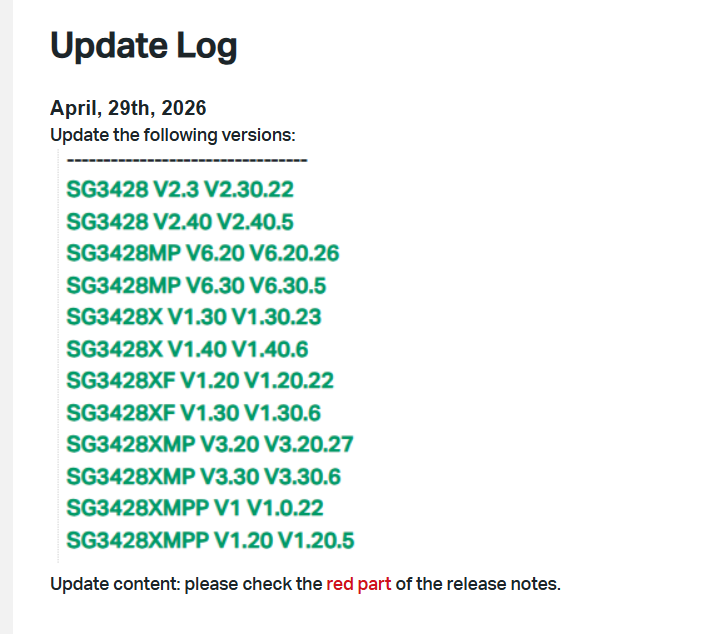
Update the following versions:
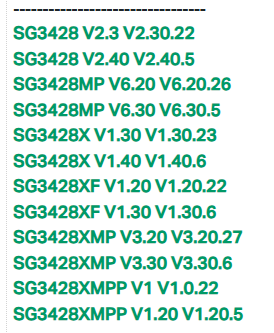
Update content: please check the red part of the release notes.
April, 1st, 2026
Add the following firmware versions:
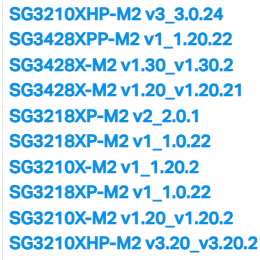
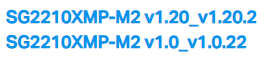
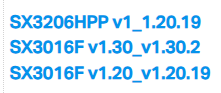
March, 27th, 2026
Release of this article.
Recommended Threads
Omada_Network_Application_V6.2.x.x Pre-Release Firmware (Released on 11th Feb, 2026)
- Copy Link
- Subscribe
- Bookmark
- Report Inappropriate Content

Hi @Vincent-TP
For few days I was experiencing that the PC that is connected via SG2008 v4.20, firmware 4.20.20 had problems with Ethernet connection.
The Ethernet connection was up for a while and down for a longer time, then up, and down, and...
Then I passed by the switch and connected PC directly to the router. All was working normally, as usually.
I downgraded the firmware to 4.20.19, connected it back to its original position, between the PC and the router.
Over next hour all was working normally.
- Copy Link
- Report Inappropriate Content

The issue I'm having is different. The PC I'm using to access the switch is on the same (management) VLAN as the switch itself. The web interface begins to load (shows graphics, shows the switch name in the title bar) but it either does not fully load (I can see the Omada logo, sometimes the login & password prompt shows up) or it will sometimes eventually load where I can log into it, but I can't navigate the tabs (L2 FEATURES, L3 FEATURES, etc).
Last night I was able to painstakingly get to the System Tools-->Boot Config page to roll back to "image1.bin" (1.20.21 Build 20260310 Rel.12599) which was the previous firmware. Once I did this, the issue disappeared. The version that is NOT working is 1.20.22 Build 20260313 Rel.4593.
One of the things I noticed in the changelog is "Added support for Private VLAN". I'm not sure what this means, but could it somehow be conflicting with my current 802.11Q VLANs?
The gateway issue you're describing would completely prevent / block access to the web interface - it wouldn't just load a little bit, like it did for me. I wouldn't want to specify a default gateway even if I could, because I ONLY want the management VLAN (and no other VLANs) to be able to access the web interface.
I should also note that while I was on the "bad" version (1.20.22 Build 20260313 Rel.4593) I could still continuously ping the router with 100% success, and less than 1ms of latency, and the switch config continued to function - so the connection to the switch is/was not the problem either. I simply could not load the web interface fully.
- Copy Link
- Report Inappropriate Content
Thank you so much for taking the time to post the issue on the TP-Link community!
To better assist you, I've created a support ticket via your registered email address and escalated it to our support engineer to look into the issue. The ticket ID is TKID260425997. Please check your inbox and confirm that the support email was received. Thanks!
msankowski wrote
Hi @Vincent-TP
For few days I was experiencing that the PC that is connected via SG2008 v4.20, firmware 4.20.20 had problems with Ethernet connection.
The Ethernet connection was up for a while and down for a longer time, then up, and down, and...
Then I passed by the switch and connected PC directly to the router. All was working normally, as usually.
I downgraded the firmware to 4.20.19, connected it back to its original position, between the PC and the router.
Over next hour all was working normally.
- Copy Link
- Report Inappropriate Content
Thank you so much for taking the time to post the issue on the TP-Link community!
To better assist you, I've created a support ticket via your registered email address and escalated it to our support engineer to look into the issue. The ticket ID is TKID260426012. Please check your inbox and confirm that the support email was received. Thanks!
Rahzadan wrote
It is happening on both Microsoft Edge and Mozilla Firefox, from multiple PCs on my network. Tried clearing browser caches. The Switch appears to be functioning, however the web interface fails to fully load. The login screen loads the background, then stalls. I have tried powercycling as well, but the web interface continues to load slowly. This was not an issue in the previous firmware version 1.20.21.
- Copy Link
- Report Inappropriate Content
We have released a new version for these models today; you may update them as needed. Any feedback is appreciated!
- Copy Link
- Report Inappropriate Content

@Vincent-TP For the SG3428X-M2 V1.20.21 breaks the mDNS functionality.
My Apple devices can't even see anymore the IoT devices.
- Copy Link
- Report Inappropriate Content
Hi @Julian2111
Thanks for the feedback.
This is the latest firmware for SG3428X-M2 1.20.24. I will update the post later. Please update it and let us know if the situation persists.
In the meantime, please try to delele the mDNS config and test again. Thanks.
Julian2111 wrote
@Vincent-TP For the SG3428X-M2 V1.20.21 breaks the mDNS functionality.
My Apple devices can't even see anymore the IoT devices.
- Copy Link
- Report Inappropriate Content
@Vincent-TP I've deleted the rules and tried to update the switch, but whyever I can not update it. It says updating but after a few minutes the controller just shows "Connected", with the same firmware and says "failed to update device" without any further information.
UPDATE: The updated worked, I just needed to restart the switch before.
Whyever mDNS is still not working, I will retry later rebooting the Gateway maybe a restart fixes things.
- Copy Link
- Report Inappropriate Content

@Vincent-TP Trying to update SG3210X-M2 V1.0 to 1.20.2 - using Firefox - latest Omada software controller 6.2.10.17
Says that it upgraded, but version stays at 1.0.22 ?!?  Already updated my EAPs 787 & 773 without issue using same method
- Copy Link
- Report Inappropriate Content
@Spanky66 Did you reboot the switch? I had most likely the same issue.
- Copy Link
- Report Inappropriate Content
Information
Helpful: 2
Views: 9070
Replies: 62
Voters 1
