
Early Access Omada Switch Pre-Release FW Preview for SDN Controller 6.2.X.X (Closed)
 This thread has been locked for further replies. You can start a new thread to share your ideas or ask questions.

Release Notes
New Features:
1. Added support for NAT Traversal.
2. Added compatibility with Omada Config Tools V2.0.
3. Added support for Private VLAN.
4. Added support for Lightweight DHCPv6 Relay Agent (LDRA).
5. Added IGMP Snooping VLAN SSDP Flood to ensure that packets destined for multicast group 239.255.255.250 (commonly used for SSDP service discovery) are always flooded.
6. Added Extend Mode for non-PoE models.
7. Added support for configuring VLAN Isolation via SNMP.
8. Added a CLI command to display Spanning Tree Topology Change Notification (STP TCN) statistics for each port.
Enhancement:
1. Supported common MAC address formats for MAC address input fields.
2. Supported configuring 802.1X authentication in MAB-only mode.
3. Supported disabling DNS Adoption to meet specific network management requirements.
4. Optimized the fan status log reporting frequency.
5. Improved LLDP protocol compatibility.
6. Added system self-healing recovery capability to enhance long-term device stability.
7. Improved management link reliability.
8. Improved STP module reliability and optimize the stability of Spanning Tree operation.
9. Optimized the display logic for VLAN Interface Down events.
Bug Fixes:
1. Fixed the issue where SNMP nodes Q-BRIDGE-MIB and BRIDGE-MIB did not comply with protocol specifications.
2. Fixed the issue of wired client loss in abnormal scenarios.
3. Fixed an issue where MAC address table entries for ports other than a specific port could not be displayed via CLI.
4. Fixed an issue where SG3428X-M2 v1.30 reported Switch Fan Failure while the fan LED indicated normal status.
Firmware Download
Before the Upgrade
(1) Please be sure you have read the Beta Test Agreement before upgrading the Beta firmware!
(2) You may follow the following guide to upgrade your Omada devices. How to Upgrade/Downgrade Omada Switches
Firmware Download Link
| S4500/S5500 Series | SG3 Series | SG2 Series | SX Series |
| S5500-24F4XF V1.0 V1.0.7 S5500-24GP4XF V1.0 V1.0.7 S5500-48GP4XF V1.0 V1.0.8 S5500-24MPP4XF V1.0 V1.0.7 S5500-24GP4F V1.0 V1.0.12 S5500-16XF V1.0 V1.0.7 S5500-8XF V1.0 V1.0.7 S5500-8MHP2XF V1.0 V1.0.6 S5500-4XHPP2XF V1.0 V1.0.7 S4500-8GP V1.0 V1.0.10 S4500-8GP2F V1.0 V1.0.7 S4500-8G V1.0 V1.0.6 S4500-16GP V1.0 V1.0.6 S4500-16G2F V1.0 V1.0.6 |
SG3210 V3.20 V3.20.23 SG3210 V3.30 V3.30.5 SG3210X-M2 v1_1.0.25 SG3210X-M2 v1.20_v1.20. SG3452XMPP V1 V1.0.21 SG3452XMPP V1.20 V1.20.5 SG3452XP V2.20 V2.20.26 SG3452X V1.20 V1.20.24 SG3210XHP-M2 v3.20_v3.20.5 |
SG2005P-PD V1 V1.0.25 SG2005P-PD V2 V2.0.5 SG2008 V4.20 V4.20.23 SG2008 V4.30 V4.30.5 SG2008P V3.20 V3.20.23 SG2008P V3 V3.30.5 SG2016P V1.20 V1.20.23 SG2016P V1.30 V1.30.5 SG2206MP V1 V1.0.4 SG2210MPV4.20 V4.20.24 SG2210MPV5 V5.0.21 SG2210MP V5 V5.0.21 SG2210MP V5.20 V5.20.5 SG2210P V5.20 V5.20.24 SG2210P V5.30 V5.30.6 SG2218 V1.20 V1.20.23 SG2218 V1.30 V1.30.5 SG2218PV1.20 V1.20.23 SG2218P V2 V2.0.21 SG2218P V2.20 V2.20.6 SG2428LP V1 V1.0.22 SG2428LP V1.20 V1.20.5 SG2428P V5.20 V5.20.26 SG2428P V5.30 V5.30.22 SG2428P V5.40 V5.40.5 SL2428P V6.20 V6.20.24 SL2428P V6.30 V6.30.5 SG2210XMP-M2 v1.20_v1.20.5 |
SX3032F V1 V1.0.21 |
You can download the TP-Linkmibs to work with your switch to experience more features.
Notes:
(1) We recommend using Find in Page (Ctrl/Command+F) to locate the exact model you have to ensure the correct firmware is installed.
(2) Your device’s configuration won’t be lost after upgrading.
Additional Information
All feedback is welcome, including letting us know about successful device upgrades.
If somehow you encounter an issue during or after the upgrade, it's suggested to contact us with the following info:
- Omada Controller version if you have any.
- Device Firmware version with Build number (previous and current)
If your model gets bricked during the firmware upgrade, you may follow the guide below to recover the firmware.
Configuration Guide How to Upgrade/Downgrade Omada Switches
Update Log
June 9th 2026
Remove all the download links. Please go to the official website to download the latest firmware.
May, 8th, 2026
Update all remaining models with firmware from the same batch as April 29th.
So the updated content is the same.
April, 29th, 2026
Update the following versions:
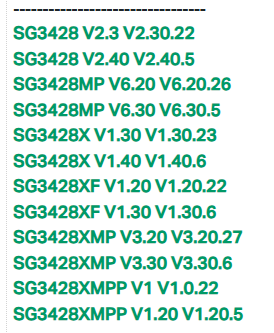
Update content: please check the red part of the release notes.
April, 1st, 2026
Add the following firmware versions:
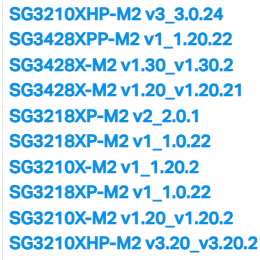
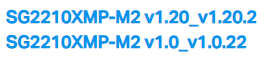
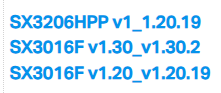
March, 27th, 2026
Release of this article.
Recommended Threads
Omada_Network_Application_V6.2.x.x Pre-Release Firmware (Released on 11th Feb, 2026)
- Copy Link
- Subscribe
- Bookmark
- Report Inappropriate Content

1.
2x 10 GBit/s DAC cables
2x EAP773 PoE
1x 2.5 Gbit/s copper
2.
Fan did spin up and down already at:
PoE Power Used
24.60W / 200.00W
3.
I feel previously the fans stayed low, now they spin up every few minutes and then spin down again to previous levels.
4/5
No other changes. I will rollback later this week and let you know if that changed the fan noise.
- Copy Link
- Report Inappropriate Content
Hi @Acorny
Thanks for your information.
We tested locally, and the fan noise is the same as before.
If convenient, please use a noise measurement app to test the noise level when the fan spins up and down.
In the meantime, we will test more locally with a similar installation.
Acorny wrote
1.
2x 10 GBit/s DAC cables
2x EAP773 PoE
1x 2.5 Gbit/s copper
2.
Fan did spin up and down already at:
PoE Power Used
24.60W / 200.00W
3.
I feel previously the fans stayed low, now they spin up every few minutes and then spin down again to previous levels.
4/5
No other changes. I will rollback later this week and let you know if that changed the fan noise.
- Copy Link
- Report Inappropriate Content
@Vincent-TP
Can confirm myself that the noise isn't measurably different, I am going to ascribe this to increased ambient temperatures. After testing there was indeed no difference between .19 and the most recent version. Apologies for reporting without testing other variables first.
edit: That said, I would love more control over fan curves and visibility into temperatures for the switch.
- Copy Link
- Report Inappropriate Content
Hi @Acorny
Thank you for the update.
If you have any ideas about displaying temperature, you can join the discussion in this thread and cast your vote.
Acorny wrote
@Vincent-TP
Can confirm myself that the noise isn't measurably different, I am going to ascribe this to increased ambient temperatures. After testing there was indeed no difference between .19 and the most recent version. Apologies for reporting without testing other variables first.
edit: That said, I would love more control over fan curves and visibility into temperatures for the switch.
- Copy Link
- Report Inappropriate Content

SNMP cable diagnostics is broken. OID 1.3.6.1.4.1.11863.6.8.1.3.2 always returns incorrect status and length, while .1.3.6.1.4.1.11863.6.8.1.2.1 returns correct values but not always. For example:
show cable-diagnostics interface gigabitEthernet 1/0/16
Port        Pair      Status      Length         Error
Gi1/0/16    Pair-A    Open        ---            62 (+/- 2m)
            Pair-B    Open        ---            63 (+/- 2m)
            Pair-C    Open        ---            1 (+/- 2m)
            Pair-D    Open        ---            1 (+/- 2m)
SNMPv2-SMI::enterprises.11863.6.8.1.2.1.3.49168 = STRING: "---"
It is unclear how to obtain the value 62, which appears in the Error column. If I understand correctly, this is the distance at which the fault occurred. In older versions, the length, even when errors were present, was always available via SNMPv2-SMI::enterprises.11863.6.8.1.2.1.3.49168.
- Copy Link
- Report Inappropriate Content
Hi @altlc
Thanks for the feedback.
Please let us know the model number, hardware version, and firmware version of the switch you are using. Thanks
altlc wrote
SNMP cable diagnostics is broken. OID 1.3.6.1.4.1.11863.6.8.1.3.2 always returns incorrect status and length, while .1.3.6.1.4.1.11863.6.8.1.2.1 returns correct values but not always. For example:
show cable-diagnostics interface gigabitEthernet 1/0/16textPort Pair Status Length Error Gi1/0/16 Pair-A Open --- 62 (+/- 2m) Pair-B Open --- 63 (+/- 2m) Pair-C Open --- 1 (+/- 2m) Pair-D Open --- 1 (+/- 2m)
SNMPv2-SMI::enterprises.11863.6.8.1.2.1.3.49168 = STRING: "---"It is unclear how to obtain the value 62, which appears in the Error column. If I understand correctly, this is the distance at which the fault occurred. In older versions, the length, even when errors were present, was always available via
SNMPv2-SMI::enterprises.11863.6.8.1.2.1.3.49168.
- Copy Link
- Report Inappropriate Content
System Description - Omada 24-Port Gigabit L2+ Managed Switch with 4 SFP Slots
System Name - SG3428
Hardware Version - SG3428 2.30
Software Version - 2.30.22 Build 20260423 Rel.25510
- Copy Link
- Report Inappropriate Content
Hi @altlc
Thanks for the reply.
One point prone to operation failure is that before walking the node 1.3.6.1.4.1.11863.6.8.1.3.2 (tpPortCableTestCFEntry), you must first perform a set operation on 1.3.6.1.4.1.11863.6.8.1.3.1 (tpPortCableTestFlush). “Flush” refers to refreshing the cable test results of the port, while 1.3.2 is used to read the refreshed results.
Please try executing the set 0 command on 1.3.1 and let us know the result.
After flushing, 1.3.2 uses CF cable test. For ports that are link up, the returned length is “–” instead of the actual length, which aligns with the results of show cable careful in standalone mode.
If the results from 1.2.1 are not always accurate, it might indicate a cable issue. Extremely short cables often cannot be detected correctly.
Please let us know the cable length, the cable test results, the link status (up/down), the speed, and the port number of the connected switch.
altlc wrote
System Description - Omada 24-Port Gigabit L2+ Managed Switch with 4 SFP Slots
System Name - SG3428
Hardware Version - SG3428 2.30
Software Version - 2.30.22 Build 20260423 Rel.25510
- Copy Link
- Report Inappropriate Content

@Vincent-TP SG3428X-M2 HW 1.20
Firmware 1.20.25 and 1.20.24 mDNS air play does still not work.
- Copy Link
- Report Inappropriate Content
Vincent-TP wrote
Hi @altlc
Thanks for the reply.
One point prone to operation failure is that before walking the node 1.3.6.1.4.1.11863.6.8.1.3.2 (tpPortCableTestCFEntry), you must first perform a set operation on 1.3.6.1.4.1.11863.6.8.1.3.1 (tpPortCableTestFlush). “Flush” refers to refreshing the cable test results of the port, while 1.3.2 is used to read the refreshed results.
Please try executing the set 0 command on 1.3.1 and let us know the result.
I know this procedure. We use SNMP for our monitoring system, and that’s exactly how it’s done: first 1.3.6.1.4.1.11863.6.8.1.3.1 – ports are turned on/off, then 1.3.6.1.4.1.11863.6.8.1.3.2 is read. Now the correct value is never there. It has also stopped working in the CLI:
SG3428#sho cable-diagnostics interface gigabitEthernet 1/0/2
Port        Pair      Status      Length         Error
Gi1/0/2     Pair-A    Normal      42 (+/- 2m)    ---
            Pair-B    Normal      42 (+/- 2m)    ---
            Pair-C    Open        ---            17 (+/- 2m)
            Pair-D    Open        ---            42 (+/- 2m)

SG3428#show cable-diagnostics careful interface gigabitEthernet 1/0/2
Port        Pair      Status      Length         Error
Gi1/0/2     Pair-A    Normal      ---            ---
            Pair-B    Normal      ---            ---
            Pair-C    Normal      ---            ---
            Pair-D    Normal      ---            ---

SG3428#sho cable-diagnostics interface gigabitEthernet 1/0/2
Port        Pair      Status      Length         Error
Gi1/0/2     Pair-A    Normal      43 (+/- 2m)    ---
            Pair-B    Normal      43 (+/- 2m)    ---
            Pair-C    Open        ---            17 (+/- 2m)
            Pair-D    Open        ---            43 (+/- 2m)

SG3428#show cable-diagnostics careful interface gigabitEthernet 1/0/2
Port        Pair      Status      Length         Error
Gi1/0/2     Pair-A    Normal      1 (+/- 2m)     ---
            Pair-B    Normal      1 (+/- 2m)     ---
            Pair-C    Open        ---            17 (+/- 2m)
            Pair-D    Open        ---            42 (+/- 2m)

SG3428#show cable-diagnostics careful interface gigabitEthernet 1/0/2
Port        Pair      Status      Length         Error
Gi1/0/2     Pair-A    Normal      ---            ---
            Pair-B    Normal      ---            ---
            Pair-C    Normal      ---            ---
            Pair-D    Normal      ---            ---

SG3428#sho cable-diagnostics interface gigabitEthernet 1/0/2
Port        Pair      Status      Length         Error
Gi1/0/2     Pair-A    Normal      42 (+/- 2m)    ---
            Pair-B    Normal      42 (+/- 2m)    ---
            Pair-C    Open        ---            17 (+/- 2m)
            Pair-D    Open        ---            42 (+/- 2m)

SG3428#show cable-diagnostics careful interface gigabitEthernet 1/0/2
Port        Pair      Status      Length         Error
Gi1/0/2     Pair-A    Normal      1 (+/- 2m)     ---
            Pair-B    Normal      1 (+/- 2m)     ---
            Pair-C    Open        ---            17 (+/- 2m)
            Pair-D    Open        ---            42 (+/- 2m)

SG3428#show cable-diagnostics careful interface gigabitEthernet 1/0/2
Port        Pair      Status      Length         Error
Gi1/0/2     Pair-A    Normal      1 (+/- 2m)     ---
            Pair-B    Normal      1 (+/- 2m)     ---
            Pair-C    Open        ---            17 (+/- 2m)
            Pair-D    Open        ---            42 (+/- 2m)

SG3428#show cable-diagnostics careful interface gigabitEthernet 1/0/2
Port        Pair      Status      Length         Error
Gi1/0/2     Pair-A    Normal      1 (+/- 2m)     ---
            Pair-B    Normal      1 (+/- 2m)     ---
            Pair-C    Open        ---            17 (+/- 2m)
            Pair-D    Open        ---            42 (+/- 2m)

SG3428#show cable-diagnostics careful interface gigabitEthernet 1/0/2
Port        Pair      Status      Length         Error
Gi1/0/2     Pair-A    Normal      1 (+/- 2m)     ---
            Pair-B    Normal      1 (+/- 2m)     ---
            Pair-C    Open        ---            17 (+/- 2m)
            Pair-D    Open        ---            42 (+/- 2m)

SG3428#show cable-diagnostics careful interface gigabitEthernet 1/0/2
Port        Pair      Status      Length         Error
Gi1/0/2     Pair-A    Normal      1 (+/- 2m)     ---
            Pair-B    Normal      1 (+/- 2m)     ---
            Pair-C    Open        ---            17 (+/- 2m)
            Pair-D    Open        ---            43 (+/- 2m)

SG3428#show cable-diagnostics careful interface gigabitEthernet 1/0/2
Port        Pair      Status      Length         Error
Gi1/0/2     Pair-A    Normal      ---            ---
            Pair-B    Normal      ---            ---
            Pair-C    Normal      ---            ---
            Pair-D    Normal      ---            ---

SG3428#sho cable-diagnostics interface gigabitEthernet 1/0/2
Port        Pair      Status      Length         Error
Gi1/0/2     Pair-A    Normal      42 (+/- 2m)    ---
            Pair-B    Normal      42 (+/- 2m)    ---
            Pair-C    Open        ---            17 (+/- 2m)
            Pair-D    Open        ---            42 (+/- 2m)

SG3428#show cable-diagnostics careful interface gigabitEthernet 1/0/2
Port        Pair      Status      Length         Error
Gi1/0/2     Pair-A    Normal      1 (+/- 2m)     ---
            Pair-B    Normal      1 (+/- 2m)     ---
            Pair-C    Open        ---            17 (+/- 2m)
            Pair-D    Open        ---            42 (+/- 2m)
- Copy Link
- Report Inappropriate Content
Information
Helpful: 2
Views: 13426
Replies: 75
Voters 1
