
WLAN des Hotspots wird vom Router nicht gefunden um WISP Mode nutzen zu können.

WLAN des Hotspots wird vom Router nicht gefunden um WISP Mode nutzen zu können.

WLAN des Hotspots wird vom Router nicht gefunden um WISP Mode nutzen zu können.
Wednesday
Model: TL-WR3002X  
Hardware Version: V1
Firmware Version:

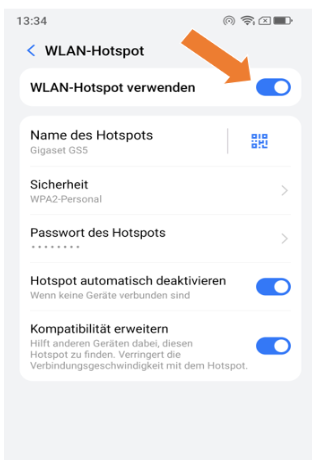
Das Gigaset GS5 LITE wird als Hotspot betrieben. Andere Geräte in der Nähe finden diesen HotSpot auch.

Der TL-WR3002X findet diesen Hotspot jedoch nicht sodass das Internet des Hotspots nicht über den mobilen Router geteilt werden kann.

Das Gigaset GS5 LITE bietet die im Screenshot gezeigten Optionen.


Die Firmwareversion ist aktuell ich habe nochmals versucht ein Update zu triggern es wurde jedoch nichts Neueres gefunden.

Neustart und auch Rücksetzen des TL-WR3002X haben nicht zum Erfolg geführt.


Leider sollte der TL-WR3002X genau mit diesem Smartphone im WISP Mode betrieben werden.


Was kann ich noch machen oder prüfen?
 

  0      
  0      
#1
Options
1 Reply
Re:WLAN des Hotspots wird vom Router nicht gefunden um WISP Mode nutzen zu können.
Thursday

Hello @G3W0 ,


Looks like your TL-WR3002X router cannot detect the Wi-Fi hotspot from your Gigaset GS5 LITE smartphone when using WISP mode, even though other devices can see and connect to it successfully.


Since you've already updated the firmware, restarted, and reset the router, here are some additional troubleshooting steps to try:


On your Gigaset GS5 LITE smartphone hotspot:
1. Ensure the hotspot is not set to hidden/stealth mode • it should be broadcasting its SSID publicly.
2. Check which Wi-Fi channel and frequency band (2.4GHz or 5GHz) the hotspot is using. Try manually setting it to a common 2.4GHz channel like channel 1, 6, or 11, as some devices have better compatibility with specific channels.
3. If your smartphone hotspot is broadcasting on 5GHz, try switching it to 2.4GHz only, as this may improve compatibility.
4. Check the security/encryption settings • try using WPA2-PSK if other options are available, as this offers the best compatibility with most devices.


On your TL-WR3002X router:
1. When scanning for available networks in WISP mode, try refreshing the network list multiple times.
2. If possible, try moving the router closer to the smartphone during the initial setup to rule out weak signal strength.


If these steps don't help, please Local Support team.

  0  
  0  
#2
Options
