
incorrect Topology

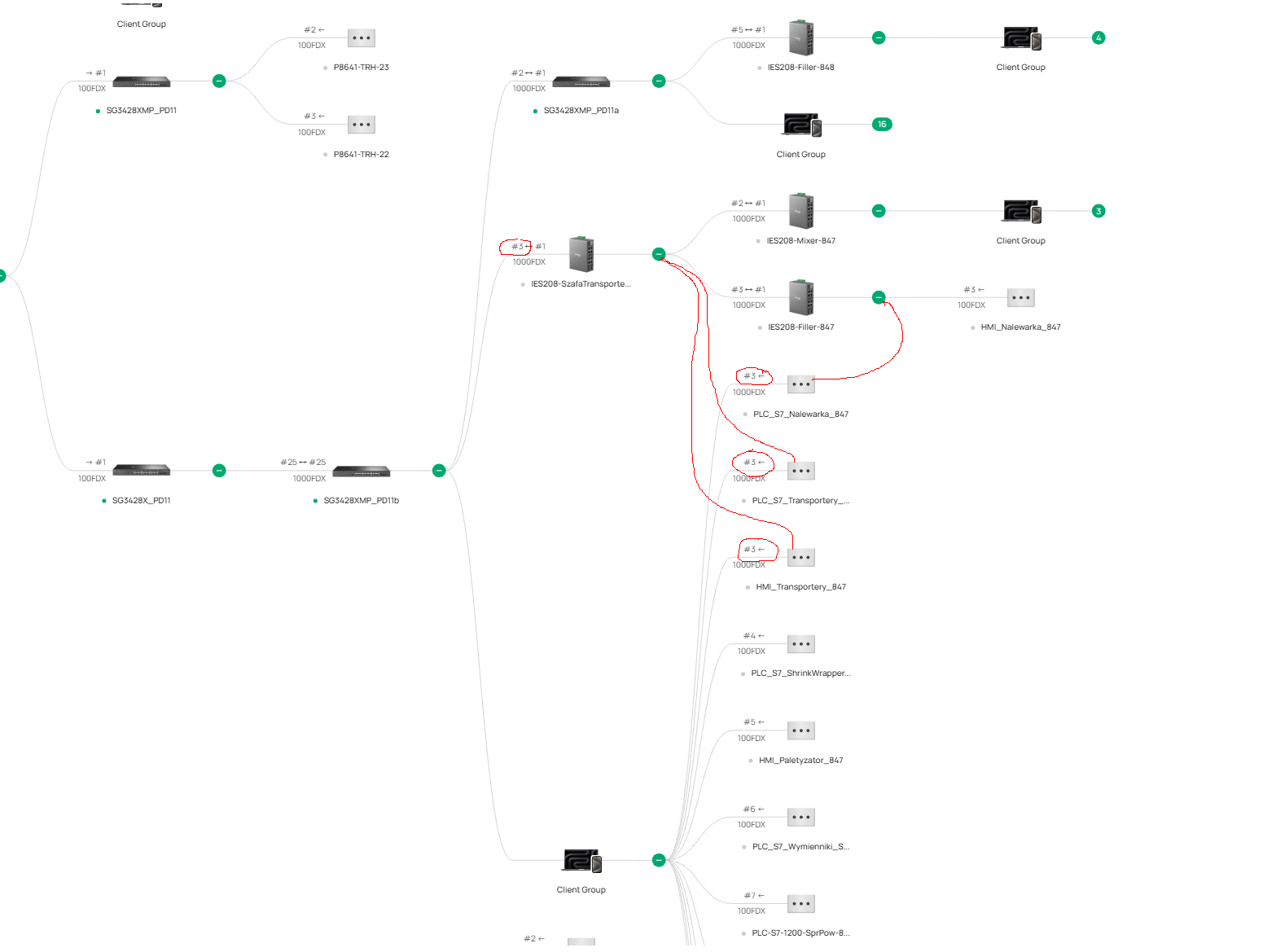
we have a problem with incorrect placement of clients in the network topology, the switches are placed correctly but the clients are placed in different places,
below is one example, 3 clients are assigned to one of the master switches, but they should be assigned to the switches shown in the figure,
as you can see these clients are assigned to the same port as the switch,
we have the latest firmware on all devices,
what could be the problem and how can we diagnose it?
- Copy Link
- Subscribe
- Bookmark
- Report Inappropriate Content


@pcsh Some features are missing because they are Easy-Managed Switches; while they can be adopted and managed by the Omada Controller they will not have the same management features as an L2+ or higher switch.
How to View the Topology of Complex Switch Configurations in Omada Controller | Omada Network Support
The FAQ here also lists the requirements for Topology display:
"Requirements:
Spanning tree topology display requires Omada L2 switches/ Omada L3 switches/Omada Pro switches; VRRP topology display requires Omada L3 switches/Omada Pro switches; M-LAG topology display requires Omada Pro switches
Omada Controller V6.1 and above (some features, such as M-LAG, require Omada Pro Controller)"
- Copy Link
- Report Inappropriate Content
@pcsh Is LLDP enabled across all your devices? In your Site > Network Config > Site Settings > General Config

I recommend enabling it across all your devices if it is not already.
- Copy Link
- Report Inappropriate Content
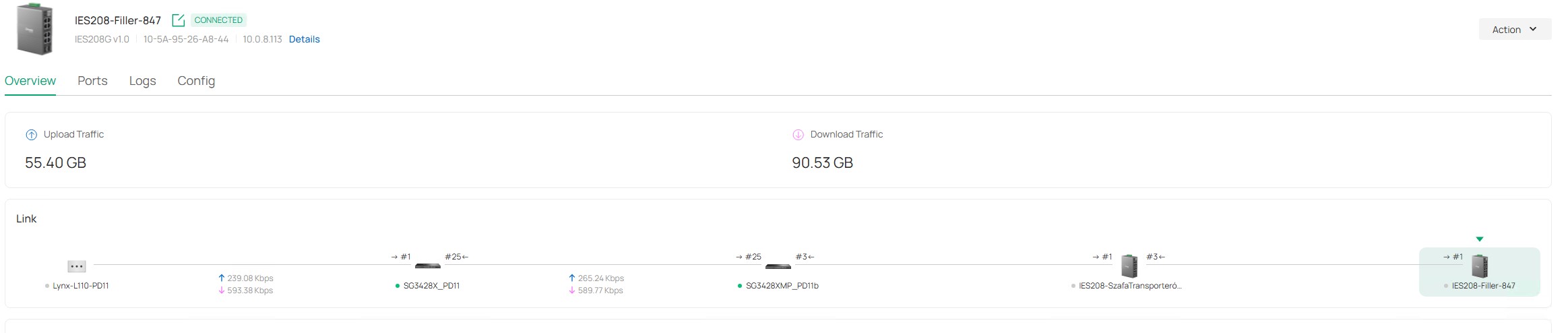
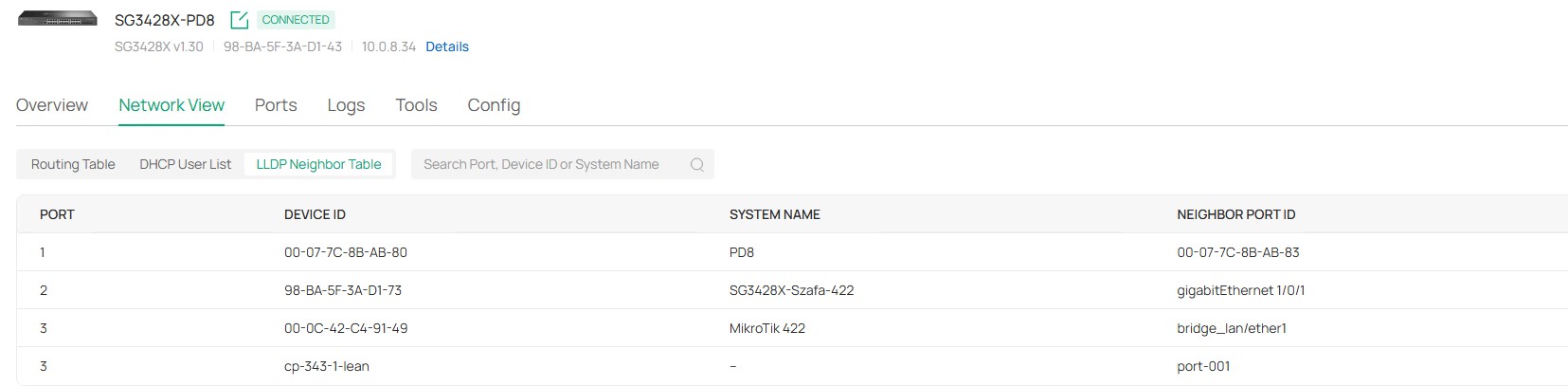
@NeilR_M yes, I have LLDP enabled on all devices,
but I cannot check the LLDP neighbors on IES208 or IES210 because there is no Network View tab and LLDP, as in the SG3428 switch

the Tools tab is also missing and the Terminal tool
- Copy Link
- Report Inappropriate Content
@pcsh Some features are missing because they are Easy-Managed Switches; while they can be adopted and managed by the Omada Controller they will not have the same management features as an L2+ or higher switch.
How to View the Topology of Complex Switch Configurations in Omada Controller | Omada Network Support
The FAQ here also lists the requirements for Topology display:
"Requirements:
Spanning tree topology display requires Omada L2 switches/ Omada L3 switches/Omada Pro switches; VRRP topology display requires Omada L3 switches/Omada Pro switches; M-LAG topology display requires Omada Pro switches
Omada Controller V6.1 and above (some features, such as M-LAG, require Omada Pro Controller)"
- Copy Link
- Report Inappropriate Content
@NeilR_M thanks for your help,
we do not use STP, VRRP or M-LAG, this is a simple network in an industrial plant, that's why we use industrial models IES 208 and IES210, the connections between the omada switches are displayed correctly in the topology, we want the clients to be displayed correctly as well,
we do not need advanced L2+ or L3 management functions, we just want to see which client is connected to which switch and on which port
- Copy Link
- Report Inappropriate Content
NeilR_M still no solution, maybe some more helpful tips,
or could the problem be that easy managed switches do not support this function?
we don't need advanced L2+ or L3 functions, just see correct connection between switches
- Copy Link
- Report Inappropriate Content

Hi,
I can certainly vouch for this issue also being present in my environment after carrying out the latest firmware updates last week.
A large number of clients are now showing as connected to switches and devices they are physically not connected to. Please see the attached image for reference.
These are just a few examples, however there are well over 100 clients currently displaying incorrect topology and switch association information across the deployment, which is absolutely not correct.
This was not occurring prior to the recent firmware/controller updates and my team is now having great difficulty properly tracing clients and troubleshooting network issues due to the incorrect topology information being displayed.
In addition, we have also noticed that since the update some clients randomly drop out for a few seconds and then reconnect automatically shortly after. This behaviour was not previously observed in our environment before the recent updates.
Controller: OC400
Omada Version: 6.2.10.18
Gateway: ER8411
Current deployment consists of:
1 × ER8411 v1.0
12 × SG3428XPP-M2 v1.20
1 × SX3016F v1.20
9 × EAP683 UR(EU) v1.0
Hopefully this can be investigated further as the issues are having noticeable operational impact in larger deployments.

- Copy Link
- Report Inappropriate Content
This is a virtual PC hosted as a VM however it now shows that its connected to an outdoor Switch that is in the Parking area on Port 5.
- Copy Link
- Report Inappropriate Content
Aggregate Switch which is only connected directly to all the main Switches however port 5 shows that it has 23 Cameras connected to it, which is incorrect.
it should only show the as port 1 and 2 the switches that are connected.
- Copy Link
- Report Inappropriate Content
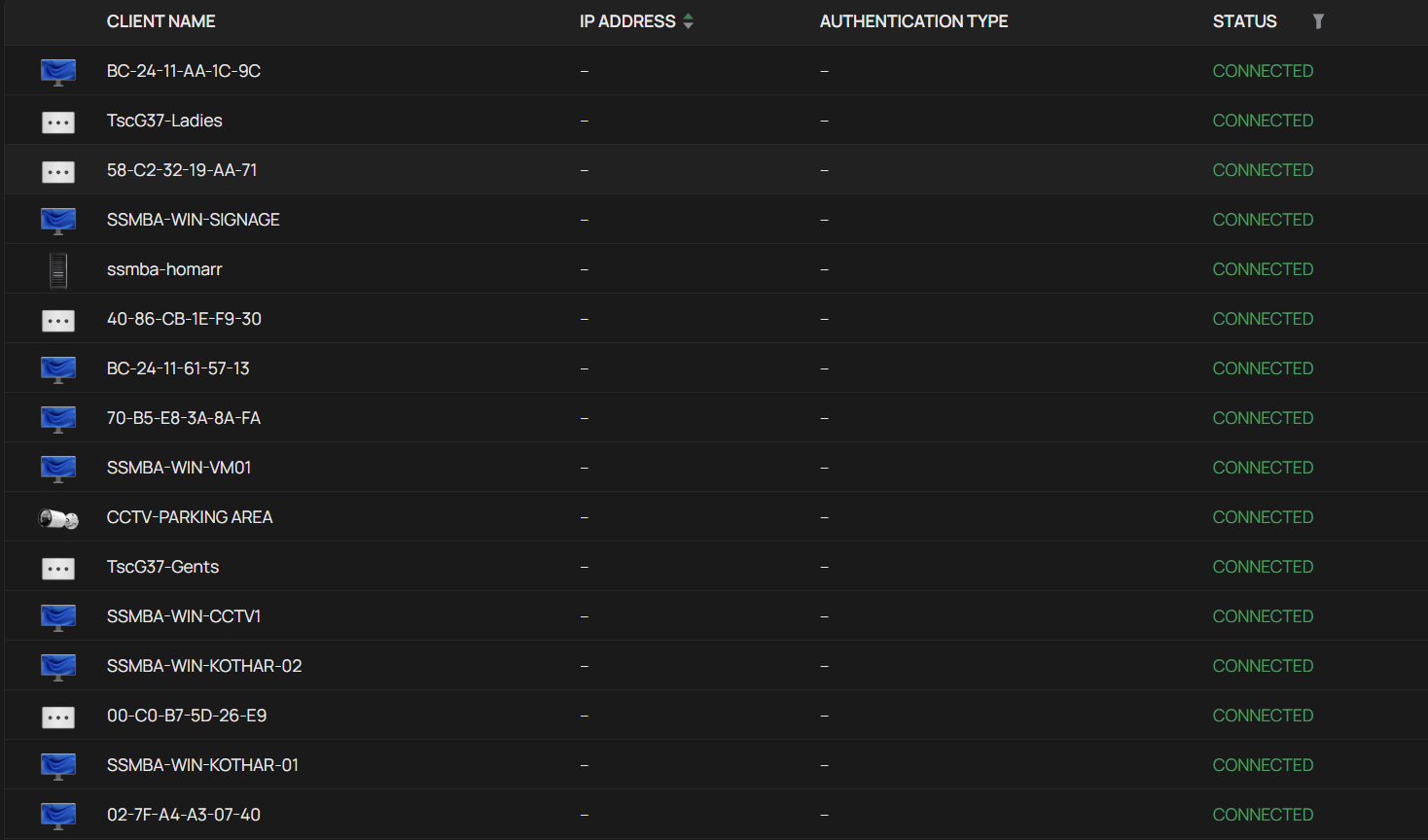
These Clients are active connected and communicating however the IP Address are not showing, I have about 40 devices that are displayed on the Clients menu like this.
- Copy Link
- Report Inappropriate Content

Hi @KBhuva
Thanks for posting here.
What devices did you update? Do you remember the firmware version before this update?
To better assist you, I've created a support ticket via your registered email address and escalated it to our support engineer to look into the issue. The ticket ID is TKID260556920. Please check your inbox and confirm that the support email was received. Thanks!
KBhuva wrote
Hi,
I can certainly vouch for this issue also being present in my environment after carrying out the latest firmware updates last week.
A large number of clients are now showing as connected to switches and devices they are physically not connected to. Please see the attached image for reference.
These are just a few examples, however there are well over 100 clients currently displaying incorrect topology and switch association information across the deployment, which is absolutely not correct.
This was not occurring prior to the recent firmware/controller updates and my team is now having great difficulty properly tracing clients and troubleshooting network issues due to the incorrect topology information being displayed.
In addition, we have also noticed that since the update some clients randomly drop out for a few seconds and then reconnect automatically shortly after. This behaviour was not previously observed in our environment before the recent updates.
Controller: OC400
Omada Version: 6.2.10.18
Gateway: ER8411
Current deployment consists of:
1 × ER8411 v1.0
12 × SG3428XPP-M2 v1.20
1 × SX3016F v1.20
9 × EAP683 UR(EU) v1.0
Hopefully this can be investigated further as the issues are having noticeable operational impact in larger deployments.
- Copy Link
- Report Inappropriate Content
Information
Helpful: 0
Views: 439
Replies: 10
Voters 0
No one has voted for it yet.