Incorrect topology and not showing a managed L3 Cisco switch

Incorrect topology and not showing a managed L3 Cisco switch

Incorrect topology and not showing a managed L3 Cisco switch
Yesterday - last edited 7 hours ago
Hardware Version: V6
Firmware Version: 6.2.0.100

Hello,


I am currently reviewing and validating my network configuration to ensure the logical topology accurately reflects the physical layout. Upon inspecting the TP-Link Omada topology view, I’ve noticed several inconsistencies.


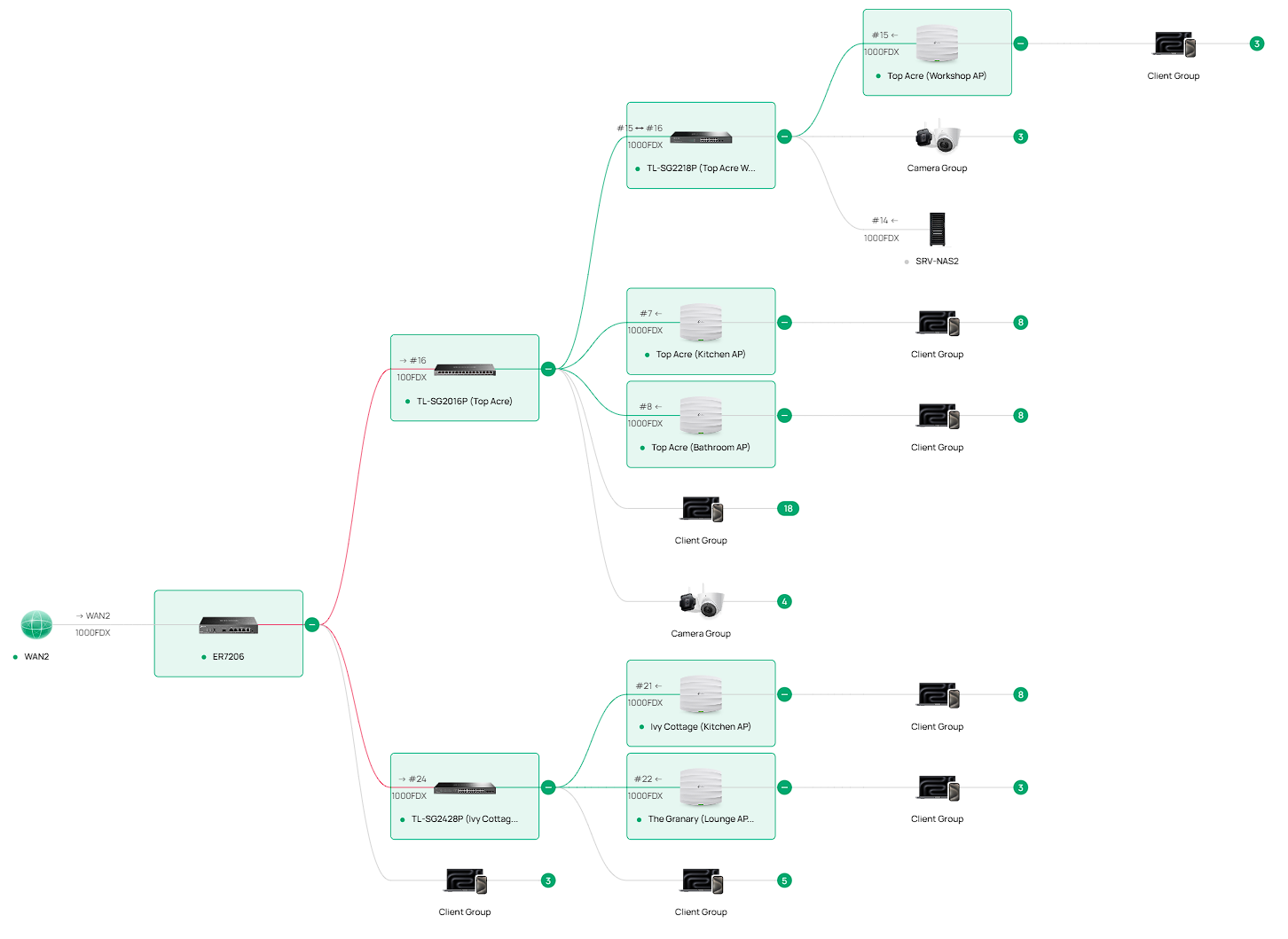
Specifically, one of the TP-Link smart switches (TL-SG2016P) is displayed as being directly connected to the ER7206 gateway. In the physical topology, this is incorrect. The TL-SG2016P is downstream of a TL-SG2428P, which functions as the primary aggregation (core) switch for the network, excluding server infrastructure.


The topology map shows red links originating from the ER7206, which I understand typically indicate an unknown, unmanaged, or non-Omada-discoverable Layer 2 path. I believe this behaviour is caused by two Pharos CPE510 outdoor wireless bridge devices currently in operation. These devices form a point-to-point Layer 2 bridge between two buildings and are not visible or manageable within Omada. The uplink from the TL-SG2428P traverses this wireless bridge and ultimately terminates at the TL-SG2016P. As such, while the physical forwarding path is correct, Omada is unable to properly infer the intermediate connectivity, resulting in an inaccurate topology representation.


In addition, the network includes multiple servers that I have intentionally segmented from the rest of the infrastructure. For this purpose, a dedicated Cisco CBS350 Layer 3 smart switch is deployed and connected directly to the ER7206 gateway. Functionally, this design is operating as intended, with routing and segmentation behaving correctly. However, similar to the issue above, Omada’s topology view does not accurately represent this switch and instead detects it as a client device rather than as an upstream switching device.


My primary question is whether it is possible within TP-Link Omada to reclassify or otherwise influence the detection of a third‑party managed switch (specifically a Cisco CBS350) so that it is recognised as a switch rather than a client. Ideally, I would like Omada to display this device as an intermediary Layer 2/Layer 3 node and populate the downstream server connections accordingly within the topology view.


I have attached a screenshot of the current topology for reference.
 

  0      
  0      
#1
Options
1 Accepted Solution
Re:Incorrect topology and not showing a managed L3 Cisco switch-Solution
23 hours ago - last edited 7 hours ago

 Hi @Jeremy_12,


I will certainly consider submitting a formal suggestion to enable administrators to incorporate third‑party devices into the network topology and establish logical associations between them.


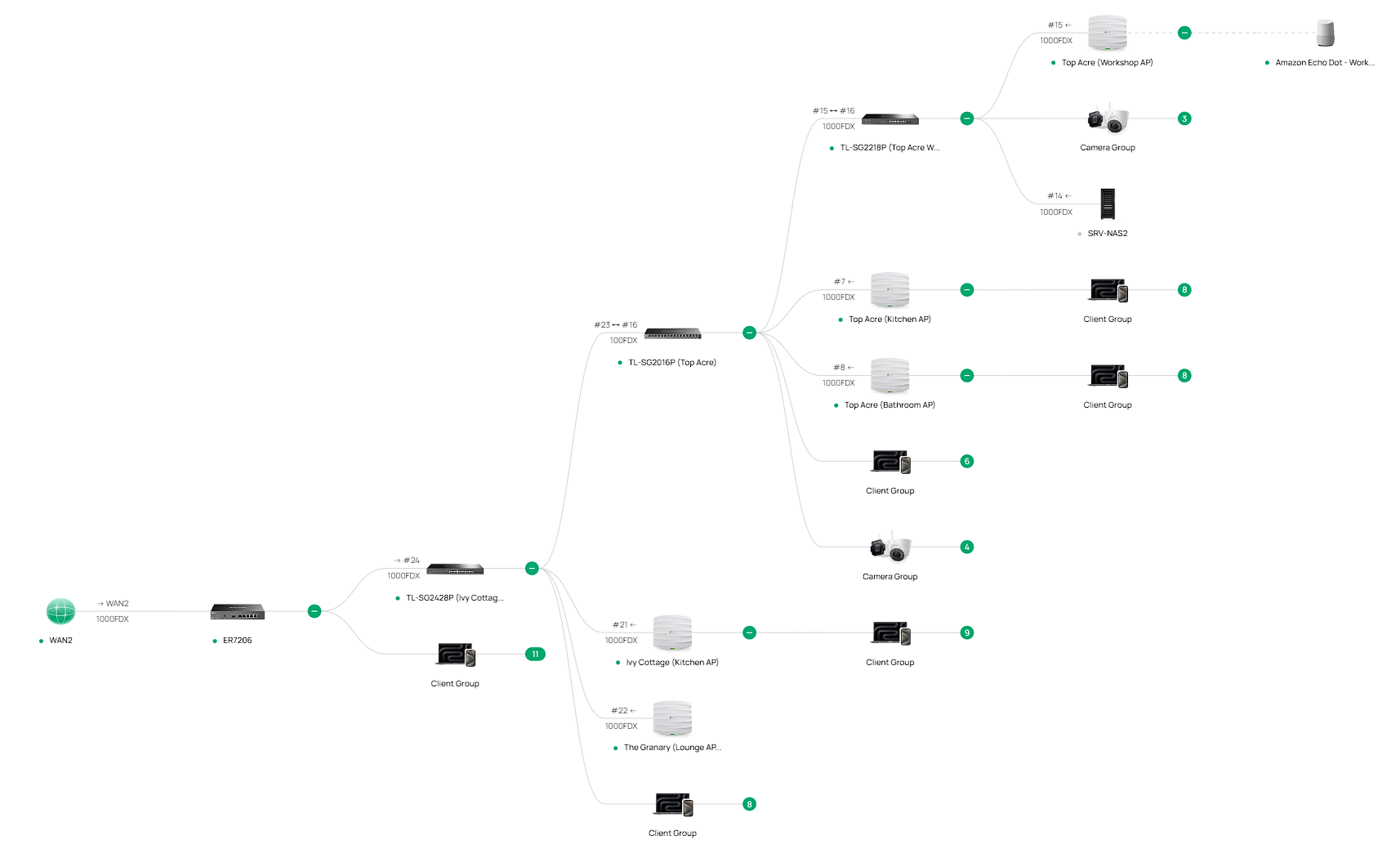
Regarding the second point you raised, it prompted me to re-evaluate my configuration, and I believe I have made an error without realising. The CPE510 had been connected directly to the ER7206 gateway, which then upstreams—via the bridge—to the TL‑SG2016P. This effectively bypassed the TL‑SG2428P within the data path, although it was not entirely excluded, as it still reported ICMP responses when clients were connected via the TL‑SG2016P or TL‑SG2218P.

I have since reconnected the CPE510 to originate from the core switch (TL‑SG2028P), and as a result, the network topology now appears more accurate.


The only thing that remains is to include CPE510 on the topology and the Cisco switch, which you can see from ER7206 is just called 'Client Group'.


Recommended Solution
  0  
  0  
#4
Options
2 Reply
Re:Incorrect topology and not showing a managed L3 Cisco switch
Yesterday

 Hi,@Ben_Hall 

Thank you very much for your feedback.


Please find our official response and recommendations below:

1.Per current design specifications, the Controller is unable to recognize third-party devices. We sincerely appreciate you bringing this up to our attention. You are welcome to create a separate post to submit this improvement suggestion and initiate a public vote for it.
2.Regarding the topology identification issue, we would appreciate it if you could conduct a test with the following connection topology: ER7206→TL-SG2428P→TL-SG2016P, to verify whether the abnormal topology identification still persists.

Please do not hesitate to inform us if there is any updates. Thank you again for your understanding.


  0  
  0  
#3
Options
Re:Incorrect topology and not showing a managed L3 Cisco switch-Solution
23 hours ago - last edited 7 hours ago

 Hi @Jeremy_12,


I will certainly consider submitting a formal suggestion to enable administrators to incorporate third‑party devices into the network topology and establish logical associations between them.


Regarding the second point you raised, it prompted me to re-evaluate my configuration, and I believe I have made an error without realising. The CPE510 had been connected directly to the ER7206 gateway, which then upstreams—via the bridge—to the TL‑SG2016P. This effectively bypassed the TL‑SG2428P within the data path, although it was not entirely excluded, as it still reported ICMP responses when clients were connected via the TL‑SG2016P or TL‑SG2218P.

I have since reconnected the CPE510 to originate from the core switch (TL‑SG2028P), and as a result, the network topology now appears more accurate.


The only thing that remains is to include CPE510 on the topology and the Cisco switch, which you can see from ER7206 is just called 'Client Group'.


Recommended Solution
  0  
  0  
#4
Options