
Deployment Difficulties - guidance needed

Deployment Difficulties - guidance needed

Deployment Difficulties - guidance needed
Saturday - last edited Monday
Model: ER7412-M2  
Hardware Version: V1
Firmware Version: 1.1.0 Build 20251015 Rel.63594

Hi Guys


Been Omada user for many years so familier with the usual VLN/LAN/AP/SWITCH setup.... however had a play with a Gateway for the first time - having used a variety of UTM devices with Omada previously. The alure of Omada to add Gateway/WAN visibility was worth exploring.


My primary issue is that (remember - only swapping out UTM to Gateway prividing DHCP services) - if a wifi guest using a SSID on a specific VLAN requests DHCP - it gets an address for another subnet (which is on another VLAN).


Any ideas what would cause this behaviour?


I have been around the loop server times to check and double check the Gateway itself and the switch ports its connected to (same ports as previously used UTM).


Second question - in the image below - why would the gateway switch connections show RED as in not active?
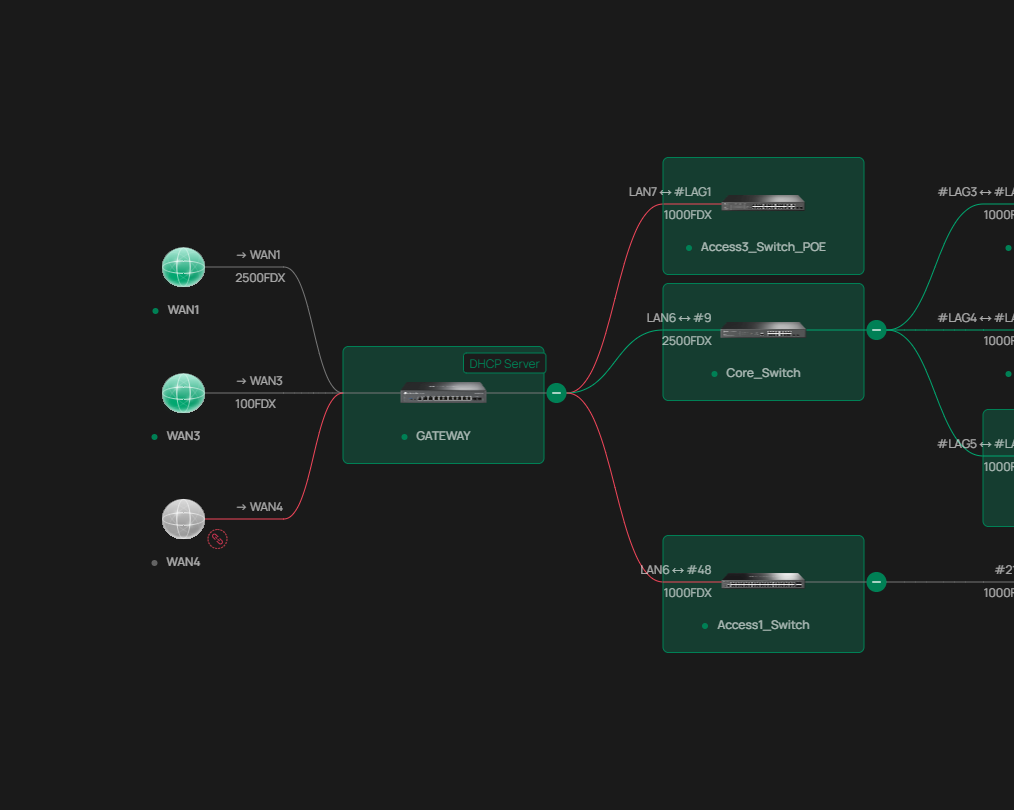


My last question - is there, other than the actual TP-Link manual, and decent references in terms of websites, Videos or other guides so I can read up and check what I have missed? Most google searches have resulted in basic Gateway setups (My gateway is using 10 ports and 9 VLANS).


Many thanks

  0      
  0      
#1
Options
2 Reply
Re:Deployment Difficulties - guidance needed
Yesterday

  @URL I'd double check your VLAN and SSID set up to make sure you have configured the VLANs correctly. Is that the only SSID/VLAN the issue occurs on? 


With regards to the red links, double check your connections or the device logs; it may be reporting some info that would be helpful in finding the problem. Normally I advise to check the physical cables first; are they testing correct? 


As for your last question, your network seems pretty standard; I recommend the official FAQ page, not just the user guides:
Documents | Omada Network Support

  0  
  0  
#2
Options
Re:Deployment Difficulties - guidance needed
23 hours ago - last edited 23 hours ago

  @URL 


This looks to me like you have trunking issues - somewhere you may be flipping a tagged network into an untagged, and/or your SSIDs are not set with the correct vlan tags


Its best practice to have only one untagged vlan on a trunk, and the rest tagged.  Generally this is management [untagged all the rest [tagged] and keep it consistent all along the chains from gateway to end devices


Access points simply insert the configured tag for the specified VLAN into the traffic for the clients - they dont actually move them onto other networks, so if, between the EAP and the Gateway or DHCP server that tag vlan gets muddled up or placed on an untagged trunk you can get weird stuff like this happen

  1  
  1  
#3
Options