Software Controller 6.x no longer shows uplink port speed

Software Controller 6.x no longer shows uplink port speed

Software Controller 6.x no longer shows uplink port speed
Monday - last edited 8 hours ago
Hardware Version:
Firmware Version:

Hello,


I recently updated from version 5.x of the software controller to version 6.x Specifically I am now running 6.2.0.17 from package Omada_Network_Application_v6.2.0.17_linux_x64_20260331104746_1775035422825.deb


The problem I have is that I can no longer see the Wired Uplink speed of my EAP670. In 5.x versions (as well as in the mobile app) I used to be able to view the speed that the uplink port negotiated. With the 6.x web GUI I can no longer view that information and this is annoying because it sometimes negotiates a 1Gbps link instead of 2.5Gbps that it is capable of and that was the easiest way to verify it and fix (typically with a reboot).


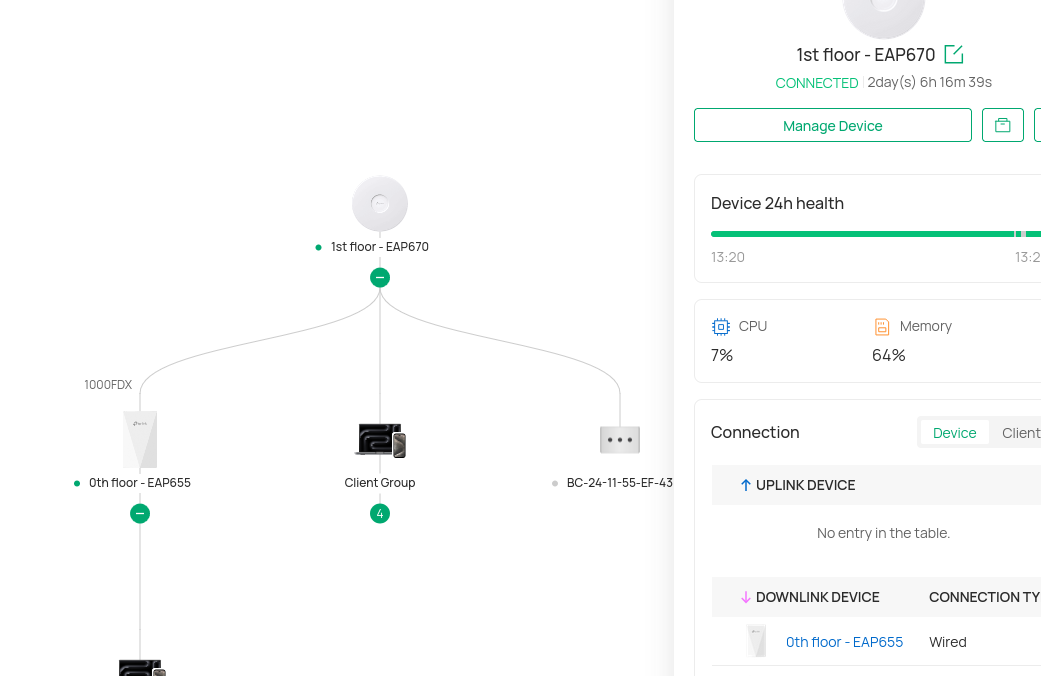
The problem is that when I click on "Manage Device" there is no longer an "Uplink" section where I used to be able to view the port speed. My switch is unmanaged, and my router is an OPNSense box, so the "uplink device" section is empty and reads "No entry in the table". Regardless, it used to at least display the port information (2500 Mbps, full-duplex). It no longer does.


Can you please restore this information? It should be visible either way (rather than require an Omada hardware controller/router). 


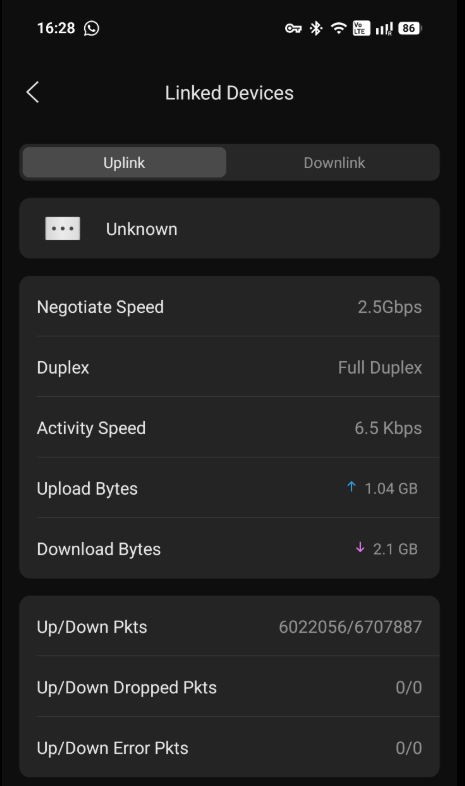
I can now only check the uplink port speed in the Omada mobile App. I can now only check the uplink port speed in the Omada mobile App as there I can still select the "unknown device" that is my OPNSense:


Thanks!


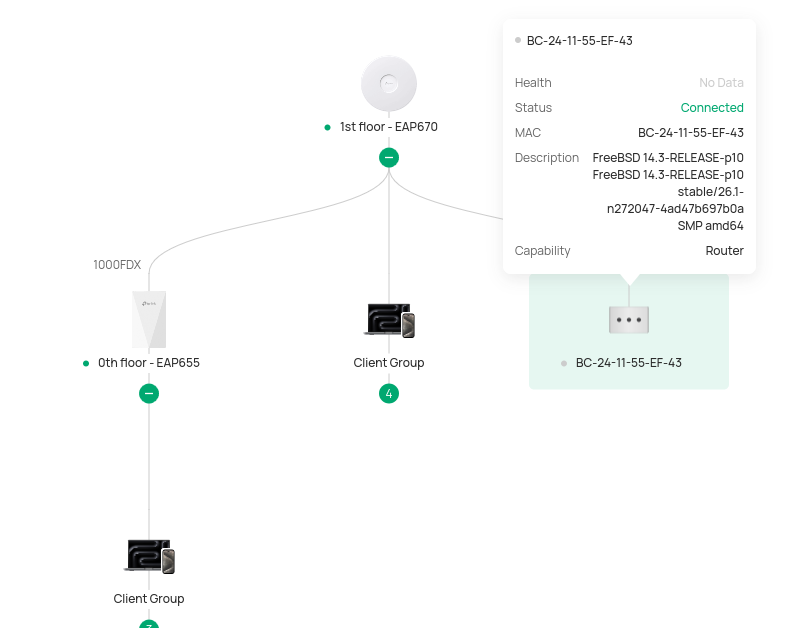
P.S. In an attempt to see if adding the router to the topology would fix this, I enabled LLDP in OPNSense which is now visible in Topology, but the link from the EAP670 to it is not marked with the speed (should be 2500FDX). I can only see the 1000FDX toward the EAP655.



  0      
  0      
#1
Options
1 Accepted Solution
Re:Software Controller 6.x no longer shows uplink port speed-Solution
8 hours ago - last edited 8 hours ago

  @alxtp  @GRL 


We have a feature request post to gather votes. If you're interested, please visit the main post to cast your vote.


Add ability to view EAP access point Ethernet link speed via OC200 Omada interface


If there are others with similar requirements, we aim to gather detailed descriptions of these needs to ensure that the relevant departments fully understand and can conduct thorough assessments for functional support.

Recommended Solution
  0  
  0  
#6
Options
5 Reply
Re:Software Controller 6.x no longer shows uplink port speed
Monday - last edited Monday

Screenshot of managfe device showing the empty uplink section (I used to be able to see 2500Mbps/FDX in 5.x version in this area)::


  0  
  0  
#2
Options
Re:Software Controller 6.x no longer shows uplink port speed
Monday - last edited Monday

 And here is the screenshot of the mobile app where I see an "unknown device" in the uplink area and clicking on it reveals the information.


  0  
  0  
#3
Options
Re:Software Controller 6.x no longer shows uplink port speed
Yesterday

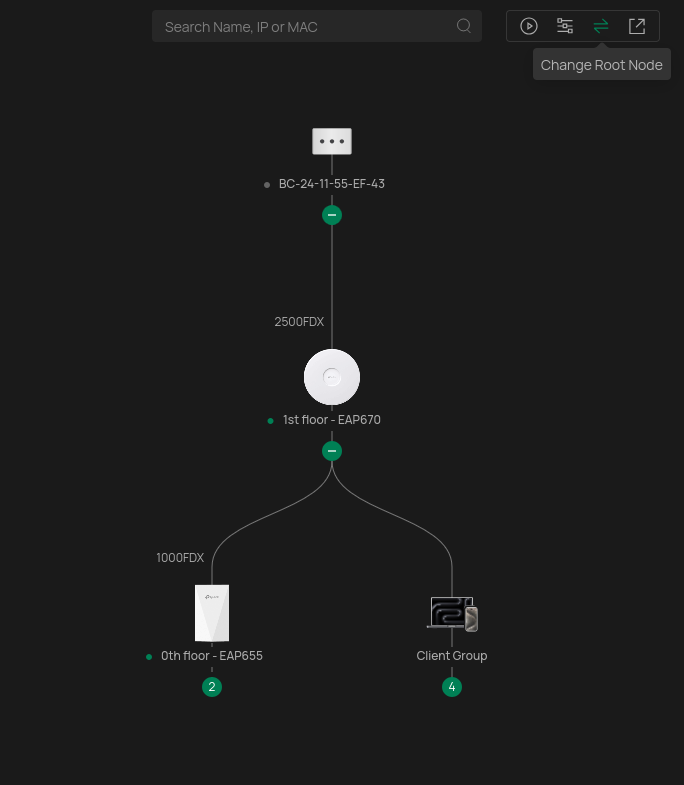
On the top-right of the new topology view, there is a button that allows you to manually set the root node (Change Root Node). I manually set my OPNSense router as the root node and now the line between it and the EAP670 shows "2500FDX" which shows the information I need (so this is a workaround) and also demonstrates that the Controller is aware of the information but fails to visualize it.


I consider this a bug in the new UI. Please fix it in some future version. User should not have to jump through hoops to see this:


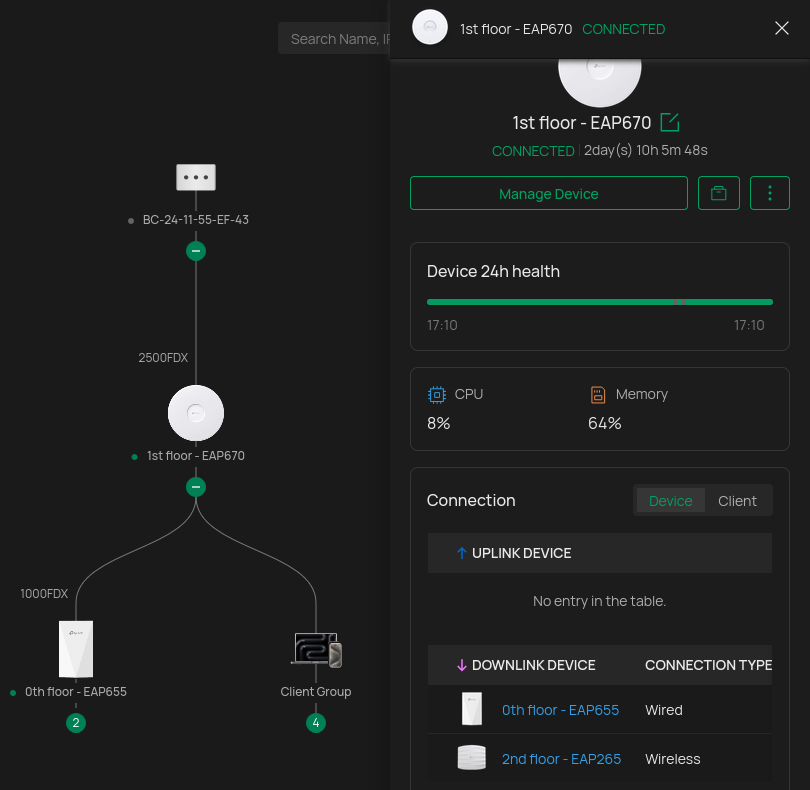
Furthermore, clicking on the EAP670 still does not show the information in the "Uplink Device" section. It should still be visible here the same way it used to be in the previous 5.x version and as is currently in the Omada mobile app:


Please fix this.


  0  
  0  
#4
Options
Re:Software Controller 6.x no longer shows uplink port speed
Yesterday

  @alxtp 


I have had lengthy discussion with the support team about this (and some related reported link speed things), i believe it will be addressed in the future

  1  
  1  
#5
Options
Re:Software Controller 6.x no longer shows uplink port speed-Solution
8 hours ago - last edited 8 hours ago

  @alxtp  @GRL 


We have a feature request post to gather votes. If you're interested, please visit the main post to cast your vote.


Add ability to view EAP access point Ethernet link speed via OC200 Omada interface


If there are others with similar requirements, we aim to gather detailed descriptions of these needs to ensure that the relevant departments fully understand and can conduct thorough assessments for functional support.

Recommended Solution
  0  
  0  
#6
Options