
No puedo conectar a internet

Buenas noches. He adquirido un TL-ER7206 y no conectan los ISP. En Wan1 con ip estática conecta y a los segundos desconecta. En Wan 2 tengo con PPPoE directamente no conecta. Actualmente estoy usando un ER6020 que tengo un problema para ingresar a la administración pero funcionan los isp, red, etc. He reseteado a fábrica y configurado lo mínimo las Wan y Lan. Nada me da resultado. He consultado con AI e hice todas las pruebas y nada.
- Copy Link
- Subscribe
- Bookmark
- Report Inappropriate Content

Si has copiado correctamente la configuración de las conexiones a internet del ER6020, todo debería funcionar en el ER7206. Si no puedes acceder al ER6020 para comprobarlo todo, es posible que tengas algo incorrecto en la configuración. Los moderadores probablemente te pedirán el nombre de los proveedores de internet y capturas de pantalla para ayudarte.
- Copy Link
- Report Inappropriate Content
Gracias por la respuesta. Si, he verificado los datos que en su momento hice backup del ER6020 y captura de pantallas. Como lo indiqué es raro cuando el que configuro con IP estática se conecta y a los segundos desconecta y ya no vuelve más.
Cambiando los datos reales de la IP Pública para mostrar, así configuro.
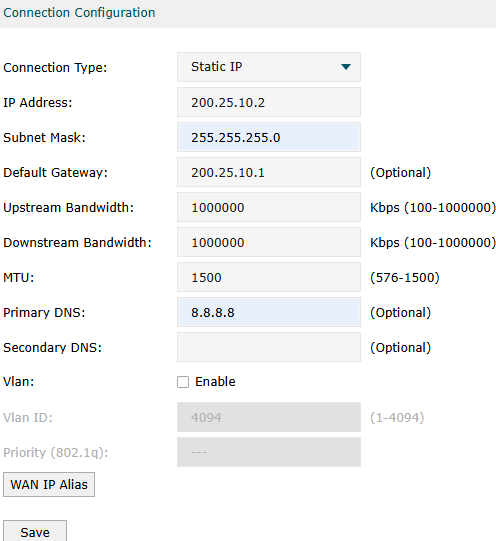
- Copy Link
- Report Inappropriate Content
¿Es posible que su proveedor requiere una dirección MAC específica (la de tu antiguo router)?
- Copy Link
- Report Inappropriate Content
Estoy aguardando la respuesta del proveedor para descartar que sea ese el problema. Muchas gracias
- Copy Link
- Report Inappropriate Content


Hi @KNet_Jorge
Thanks for posting here.
You mentioned that you can't access the ER6020's web interface. Could you let me know which device the screenshot is from?
Please try to set the MTU to 1480 and see if it works.
To confirm if your ISP has restricted the MAC address, you can manually input the old router's MAC address on the ER7206's interface (Network > MAC):
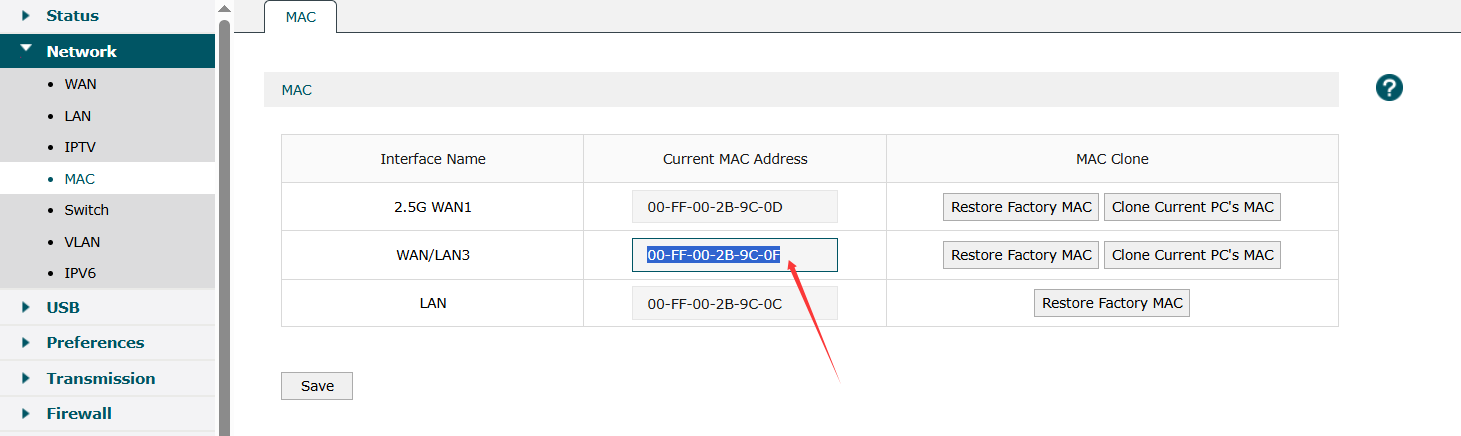
- Copy Link
- Report Inappropriate Content
Hello and thank you for responding.
The data is from the ER7206. In the ER6020, when I took a screenshot, they are the same. The only thing is that I cannot enter to obtain the MAC Address data.
I am waiting for the provider to verify and release it so I can test, or for them to assign the new data.
Regards
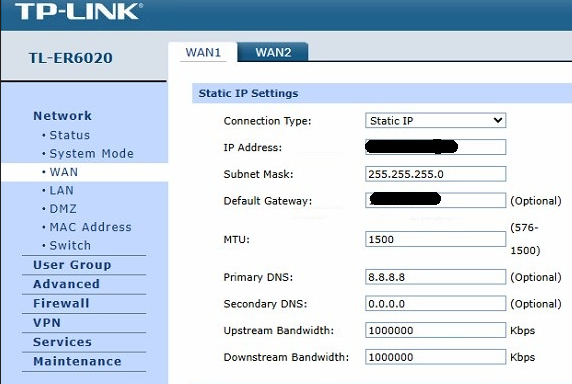
- Copy Link
- Report Inappropriate Content
Hi @KNet_Jorge
Thanks for your reply.
If it's caused by MAC binding, go to the page to get the WAN MAC address for the ER6020 and enter it on the ER7206 page; it should work.
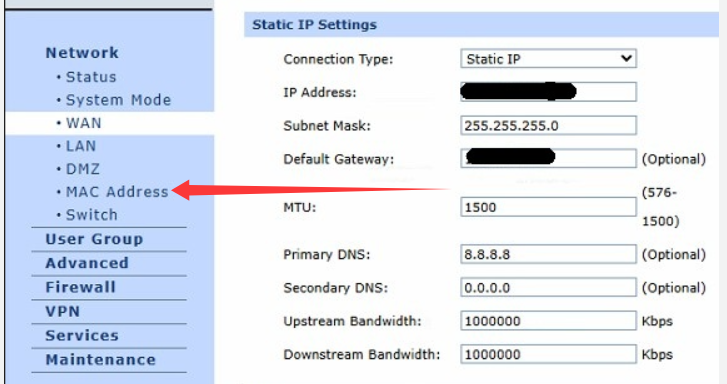
You can test it on your end and share the results with your ISP.
KNet_Jorge wrote
Hello and thank you for responding.
The data is from the ER7206. In the ER6020, when I took a screenshot, they are the same. The only thing is that I cannot enter to obtain the MAC Address data.
I am waiting for the provider to verify and release it so I can test, or for them to assign the new data.
Regards
- Copy Link
- Report Inappropriate Content
For some reason, I can no longer access the ER6020 administration to get the MAC Address, but I asked the ISP provider to reset it.
Thank you
- Copy Link
- Report Inappropriate Content
Hi @KNet_Jorge
Understood.
Any update, don't hesitate to let us know.
KNet_Jorge wrote
For some reason, I can no longer access the ER6020 administration to get the MAC Address, but I asked the ISP provider to reset it.
Thank you
- Copy Link
- Report Inappropriate Content
Information
Helpful: 0
Views: 126
Replies: 9
Voters 0
No one has voted for it yet.