
Wireguard VPN Server with s/w controller 6.2

Hi
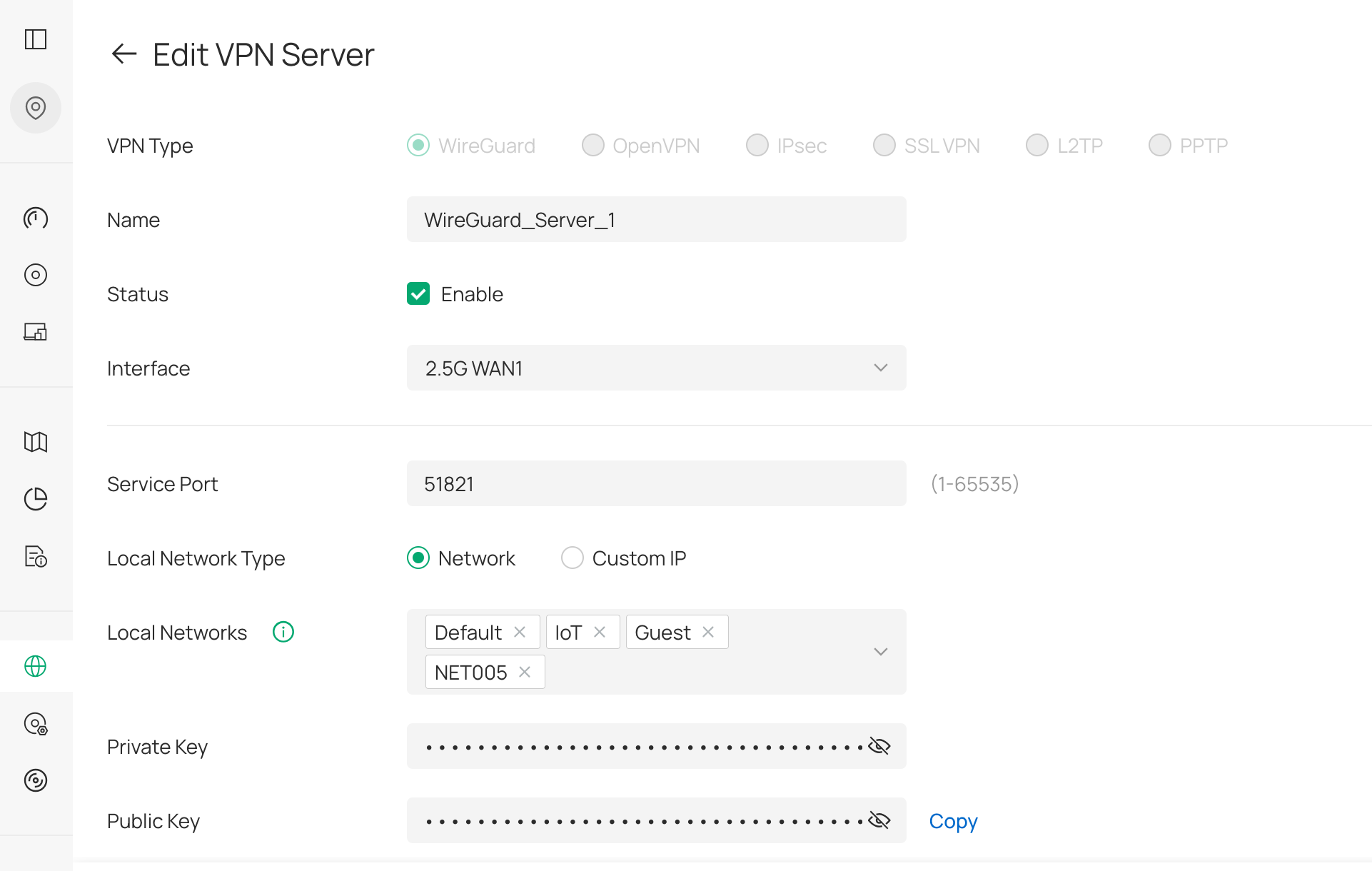
I have followed the document to set up a Wireguard VPN Server on the software controller 6.2 - https://support.omadanetworks.com/cac/document/118322/
My gateway is ER707-M2 with the latest firmware that support Omada 6.2 (1.4.1 Build 20260325 Rel.78146).
I created a client and connected my iphone using the Wireguard ios client. All seems to work fine. I can connect the local resources on my LAN, I can connect to internet sites etc.
However, when I check whatsmyip it shows the location of my 4G provider on the phone.
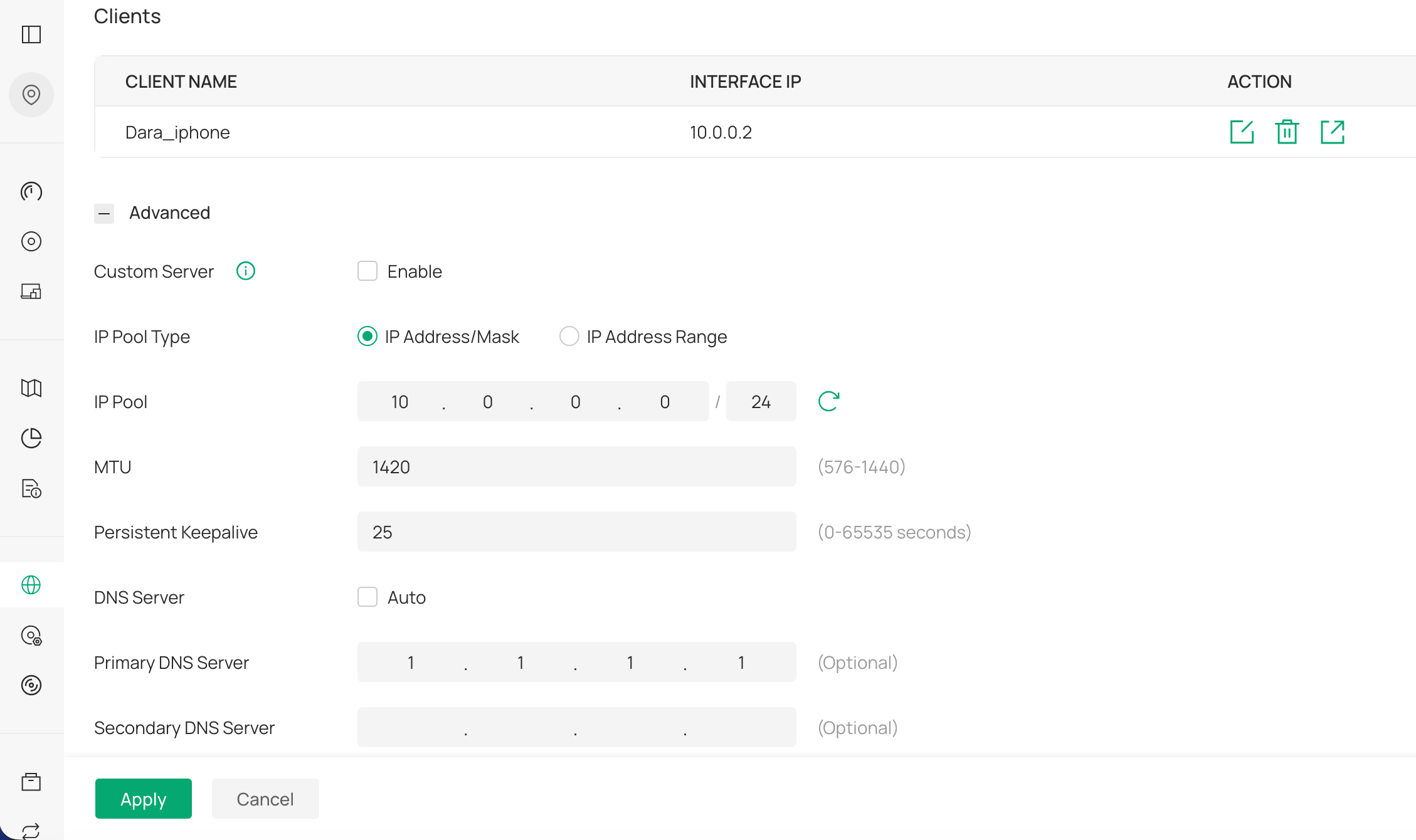
After some research I changed the Allowed IPs on the iphone from 192.168.0.0/24, 192.168.20.0/24, 192.168.200.0/24, 192.168.100.0/24, 1.1.1.1/32 -> 0.0.0.0/0 but now only LAN sites work and not the internet. The internet just times out.
Any ideas what could be wrong?
- Copy Link
- Subscribe
- Bookmark
- Report Inappropriate Content

From what I understand (being new to WireGuard), setting the Allowed IPs on the iPhone to 0.0.0.0/0 forces all iPhone internet traffic through the tunnel and the iPhone then loses the capability to access the internet apart from the WireGuard connection.
- Copy Link
- Report Inappropriate Content
I should have said earlier, I have a docker service called WG-EASY where it works with Allowed IPs as 0.0.0.0/0. https://github.com/wg-easy/wg-easy
I was just trying to set it up on Omada in case the docker service is ever down when I am away from home.
- Copy Link
- Report Inappropriate Content
The setups are slightly different. I used to use WG-Easy on my Synology NAS and it worked well. With the Allowed IPs set to 0.0.0.0/0 (full tunnel mode) on the client, I was able to access the NAS and also reach the internet with a browser on the iPhone with whatsmyip showing the gateway's IP. This was due to the NAS routing the internet traffic back out on the same physical WAN connection of the router. In other words, the internet traffic would come in through the tunnel and the NAS would forward it back out the normal WAN connection. With a WireGuard server on an Omada gateway, full tunnel mode on the client doesn't work as the gateway only routes tunnel traffic to a destination within the LAN. This is known as split tunnel mode which means traffic destined for the LAN goes through the tunnel and everything else goes through the client's normal internet connection.
- Copy Link
- Report Inappropriate Content


Hi @DaraM
Thanks for reaching out to TP-Link Business Forums.
The Server side's allowed IP should be the Client side's Local IP.
For more detailed setup, please refer to this thread: How to Configure WireGuard VPN on Omada Controller - Business Community
Hope this may help.
- Copy Link
- Report Inappropriate Content
@jra11500 Thanks. I just assumed that it would the same.
- Copy Link
- Report Inappropriate Content
@Gabriel-TP Thanks for your reply.
I am not sure where to set the Allowed-IPs on the server side. I have set an ip pool 10.0.0.0/24 as per the screen shot.
The documentation that you linked to is a bit different to the newer one that I followed for Omada 6.2 - https://support.omadanetworks.com/cac/document/118322/
The client connects fine but I am trying to get the server to route traffic to the internet via the WAN interface rather than the client doing it. I want to have my servers ip address so that when I connect from outside my network I get my home ip. Is that possible with the Omada wireguard VPN server?
- Copy Link
- Report Inappropriate Content
I have the same question as @DaraM. I have been testing this all afternoon with a Windows laptop and have been unsuccessful in getting the client to access the internet through the VPN. No internet access usually means a DNS problem or a routing problem.
Setting the client's Allowed IPs to 0.0.0.0/0 is routing all client traffic to the gateway through the VPN and that part is OK. Setting the client's DNS servers in the WireGuard configuration to 8.8.8.8 (or 1.1.1.1) causes DNS to fail and no domain names can be resolved on the client. Reverting the DNS server back to the local IP address of the gateway's WG server solves the DNS issue. Names are resolved correctly in a terminal window on the client,
It appears now to be a question of routing within the gateway. Any traffic destined for the internet is not being forwarded, A domain name can be resolved on the client but any ping attempt from the client fails at the gateway. Hopefully there is a fix or a workaround to make this work, otherwise users are stuck with using a split tunnel configuration.
- Copy Link
- Report Inappropriate Content
Information
Helpful: 0
Views: 156
Replies: 7
Voters 0
No one has voted for it yet.