
BUG?: custom DDNS config is ignoring https://

hi all,
I wanted to go away from my previous DDNS provider coding my own API, but it seems, there is apparently a bug.
Even if the URL contains https://
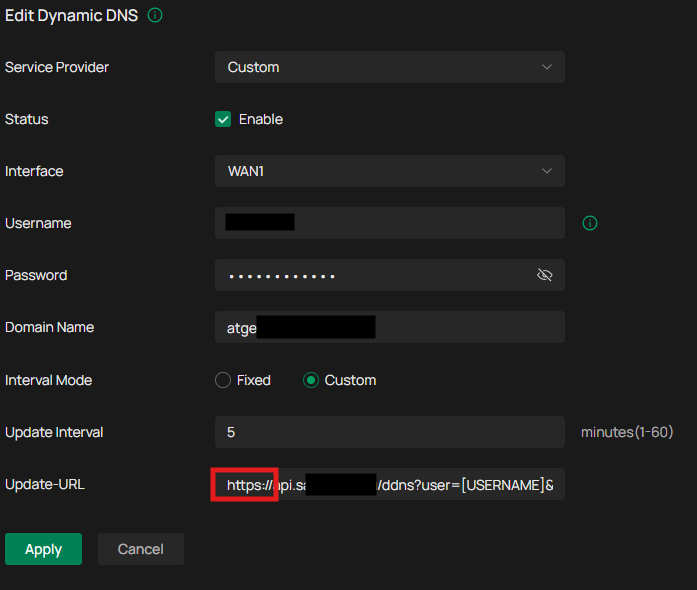
it is apparently ignored as I get always http response 301 - moved permanently - which occurs when I try to access the API via plain http://.....

any idea? did I something wrong or is this a bug?
- Copy Link
- Subscribe
- Bookmark
- Report Inappropriate Content
Hi @Gabriel-TP,
while writing the anwer to the support case, I've found my own error in the URL - I have forgotten one "/" character in Update-URL:
https://api.**********.eu/ddns/?user=[USERNAME]&passwd=[PASSWORD]&host=[DOMAIN]
custom DDNS is now working as expected, case closed.
- Copy Link
- Report Inappropriate Content


Hi @ZoloNN
Thanks for reaching out to TP-Link Business Forums.
Thank you for bringing your topic to our forums.
May I know who is your DDNS provider?
What is the firmware and hardware version of your gateway?
Please always update your gateway to the latest version to ensure better performance.
Also, please make sure that you have entered the correct custom URL.
You can refer to this Custom DDNS Is Not Working - Business Community
Have a nice day!
- Copy Link
- Report Inappropriate Content
Hi @Gabriel-TP,
answers can be found in the thread header and in text, but to summarize (I've added the Gateway info too):
- Controller type: Windows version
- Software version: 6.2.10.15
- Gateway type: ER605 v2.0
- Gateway FW: 2.3.3
- DDNS provider: my own API on my webserver written in PHP
bug symptoms:
even the URL contains "https://" (see picture above) I receive "301 - Moved Permanently", which occurs when accessing via plain unencrypted "http://"
(which sane person sends unencrypted username/password via public internet????)
proof:
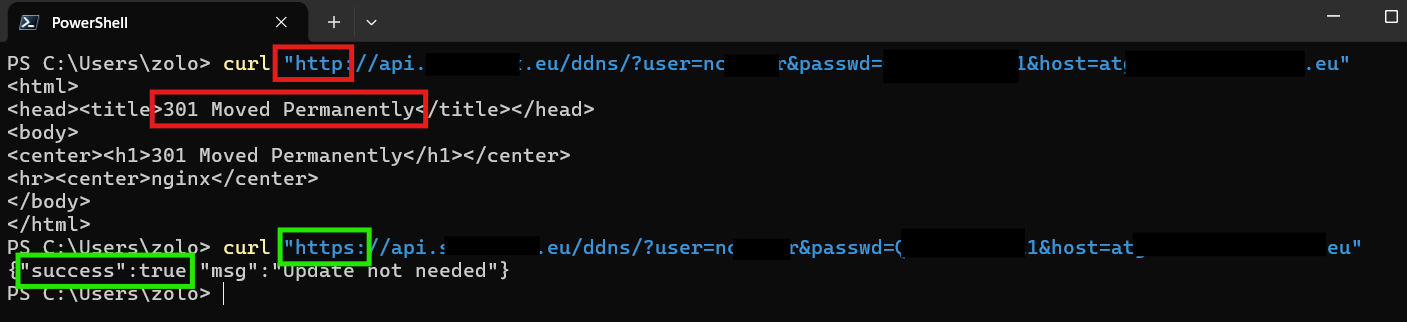
- Copy Link
- Report Inappropriate Content
Hi @ZoloNN
This seems to be related to the WAN configuration. Could you provide us with the WAN configuration settings here?
Thanks for your understanding.
- Copy Link
- Report Inappropriate Content
Hi @Gabriel-TP,
WAN on site 1 is using static IP address, on site 2 DHCP is used and both are working fine. no advanced settings are used.
- Copy Link
- Report Inappropriate Content
Hi @ZoloNN
To better assist you, I've created a support ticket via your registered email address and the ticket ID is TKID260457348. Please check your email box and ensure the support email is well received. Thanks!
- Copy Link
- Report Inappropriate Content
Hi @Gabriel-TP,
while writing the anwer to the support case, I've found my own error in the URL - I have forgotten one "/" character in Update-URL:
https://api.**********.eu/ddns/?user=[USERNAME]&passwd=[PASSWORD]&host=[DOMAIN]
custom DDNS is now working as expected, case closed.
- Copy Link
- Report Inappropriate Content
Information
Helpful: 0
Views: 341
Replies: 6
Voters 0
No one has voted for it yet.