
Random devices and SSID showing up

Hi
I just notice a random device that I don't recognize and the SSID name associated is also random. The data usage is also very high, does anyone else also have this iisue ? Please see the screen Shot attached.

- Copy Link
- Subscribe
- Bookmark
- Report Inappropriate Content
@Vincent-TP sorry I have deleted my last response, as per the unknown client and unknown SSID showing up in my device list has gone for now. I haven't seen any of those clients or SSID after last stable update. Thanks
- Copy Link
- Report Inappropriate Content

Hi @Vishlamba
Thanks for posting here.
When you say random device, do you mean its MAC address will change? If you search the MAC address from the logs, will there be any result?
Also, will the SSID be changed?
How about the AP/port info? What's the model number of the AP?
- Copy Link
- Report Inappropriate Content
HI, with random device I mean, a device i don't recognize. mac address remain the same, when i check the log there is no result.
No the SSID doesn't change it remain the same (mesh_30689335dbfd) please note that SSID doesn't belong to me.
AP that connects to this device is EAP 725, 1.3.0 Build 20260414 Rel. 11903,
APs one 1 port is in use that the Sonos amp directly connect to it.
Thanks
- Copy Link
- Report Inappropriate Content
Hi @Vishlamba
Thanks for the info. It's difficult to determine the cause for now; we will need the controller's running log to identify it.
Before that, you may try the following to see if the client will disappear:
1. Reboot the EAP725; btw, we don't have EAP725, it's EAP725-wall v1, right?
2. Reboot the controller OC300.
3. Clear the cache of the web browser.
4. Log in to the controller via a new incognito tab;
If the client still presents here, please also include the Uptime of the client:
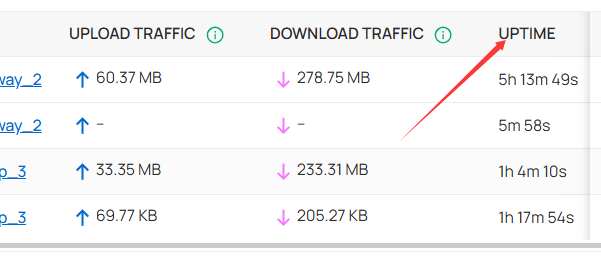
Please also share a screenshot of the device page of the controller.
Vishlamba wrote
HI, with random device I mean, a device i don't recognize. mac address remain the same, when i check the log there is no result.
No the SSID doesn't change it remain the same (mesh_30689335dbfd) please note that SSID doesn't belong to me.
AP that connects to this device is EAP 725, 1.3.0 Build 20260414 Rel. 11903,
APs one 1 port is in use that the Sonos amp directly connect to it.
Thanks
- Copy Link
- Report Inappropriate Content
- Copy Link
- Report Inappropriate Content

Hi @Vishlamba
I believe that's a different case?
This post says there is an unknown client showing on your controller client page---Could you please confirm whether this unknown client is still there?
While the other case is that some known online clients are showing as offline.
- Copy Link
- Report Inappropriate Content
@Vincent-TP sorry I have deleted my last response, as per the unknown client and unknown SSID showing up in my device list has gone for now. I haven't seen any of those clients or SSID after last stable update. Thanks
- Copy Link
- Report Inappropriate Content
- Copy Link
- Report Inappropriate Content
Information
Helpful: 0
Views: 375
Replies: 7
Voters 0
No one has voted for it yet.