
No communication between VLAN's

No communication between VLAN's

No communication between VLAN's
a week ago
Hardware Version: V6
Firmware Version: 6.1.0.19

Hello everyone,


I made a VLAN setup with a ER605 v2.0 gateway and three switches:

 - SG2210MP v5.0

 - T1500G-10PS v2.0

 - SG2008 v4.20

and 2 access points:

 - EAP772 v2.0

 - EAP770 v2.0.

I use omada software controller 6.1.0.19 I installed on a raspberry pi 5 with 8GB. The ER605 is connected in a DMZ behind an internet modem. The SG2210MP is connected with the ER605. The T1500G, SG2008 and EAP772 are connected with the SG2210MP. EAP770 is via mesh connected with EAP772.
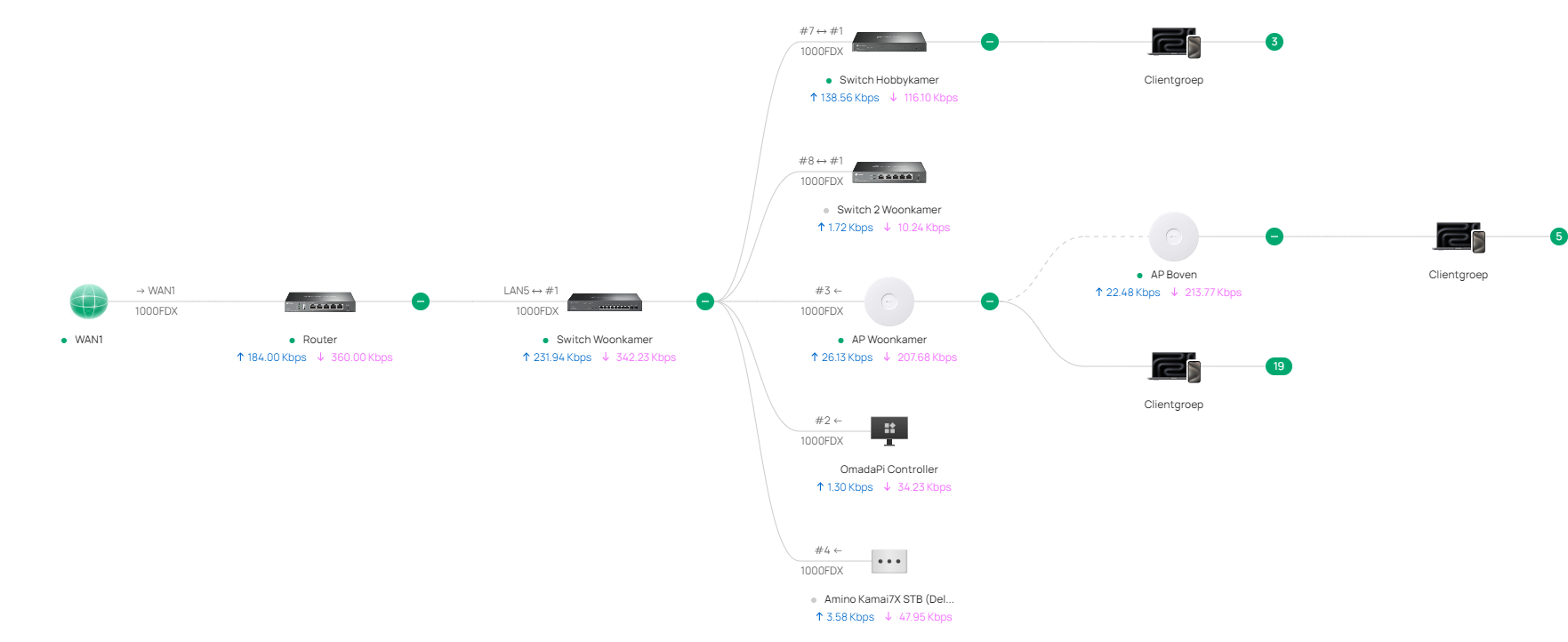
Topology

I made five VLAN's: VLAN 10, VLAN 2, VLAN 3, VLAN 12 and VLAN 13. VLAN 2 an VLAN 12 are for PC's etc. VLAN 3 and VLAN 13 are for IoT devices. VLAN 10 is the mgmt VLAN. VLAN 2 and VLAN 3 are set-up with the controller on the T1500G. VLAN 12 and VLAN 13 are set-up on the SG2008. On the T1500G i connected a Synology NAS with LACP. It has two tagged VLAN's: VLAN 2 and VLAN 3. It has to be found on the LAN network and the IoT network. On a port which is assigned as native VLAN 3 on the T1500G is also a home automation controller connected. Both have static ip-addresses.

In VLAN 10 the ER605 is the DHCP-server. In the other VLAN's the SG2210MP is the DHCP-server. The ER605 has a static route to 192.186.0.0/16 with the SG2210MP as next hop. The SG2210MP has a static route to 0.0.0.0/0 with the ER605 as next hop. It also has two static routes: VLAN 2 and VLAN 3 to next hop the T1500G. VLAN 12 and VLAN 13 to next hop the SG2008. In VLAN 10 I have a PC wich connects to the internet and the Omada controller. But it can't communicate with the other VLAN's Another PC on a port assigned to native VLAN 2 can't communicate with internet. Also the other VLAN's except VLAN 10 can't communicate with internet.


What am I doing wrong? Will someone please help me?


Thanks in advance.

0
0
#1
5 Reply
Re:No communication between VLAN's
a week ago

  @Gaijin66 Check your ACL rules; what do you have that could be blocking traffic to the internet? 

Similarly, if you run traceroute from a PC on VLAN2, where does it stop? That might be a way to check where your traffic is being stopped. 

Check out our subreddit, r/Omada_Networks! Want to help test and give feedback on new products? Sign up for the US Enterprise Beta Program here! Need a ticket? Contact Technical Support
0
0
#2
Re:No communication between VLAN's
a week ago

  @Gaijin66 


I think the problem might be in your static routes

But, i cant really understand how they are laid out with how you have written it down


Can you try and write it a bit more clearly then it will be easier to understand

0
0
#3
Re:No communication between VLAN's
a week ago

  @GRL 


ER605:

Target Routertype Next hop Unit of measurement
192.168.0.0 / 16 Next hop 192.168.10.10 (SG2210MP) 1


SG2210MP (DHCP Server):

Target Routertype Next hop Unit of measurement
0.0.0.0 / 0 Next hop 192.168.10.1 (ER605) 1
192.168.2.0 / 24
192.168.3.0 / 24
Next hop 192.168.10.11 (T1500G) 1
192.168.12.0 / 24
192.168.13.0 / 24
Next hop 192.168.10.12 (SG2008) 1


0
0
#4
Re:No communication between VLAN's
a week ago - last edited a week ago

@NeilR_M


I had two deny rules at the bottom of the list. I disabled them, but it makes no difference.


If I run a traceroute to the gateway (192.168.10.1) from the PC on VLAN2 it sees 192.168.2.1. Then the next hops give a request timeout.

From this PC I can't ping 192.168.10.1.

0
0
#5
Re:No communication between VLAN's
Friday

Hi  @Gaijin66 


Thanks for posting here.

By default, different VLAN interfaces can access each other. We do not need to configure additional static routes to make it work.

If you need to isolate access between certain VLANs, we recommend setting up ACL rules.

For unidirectional isolation, you can configure stateful ACL.


I suggest reorganizing your network by removing static routes and reconfiguring accordingly.

Below are some guidelines I mentioned.


How to configure Multi-Networks & Multi-SSIDs on Omada SDN Controller


How to implement unidirectional VLAN access through ACL configuration on the Omada Gateway in Controller mode


ACL Guide Compilation


Some screenshots were captured from old controllers, but the steps are basically the same.

0
0
#6
