
VPN naming convention change

hi all,
my I ask why was the naming convention for VPNs (and WireGuard peers) suddenly changed?
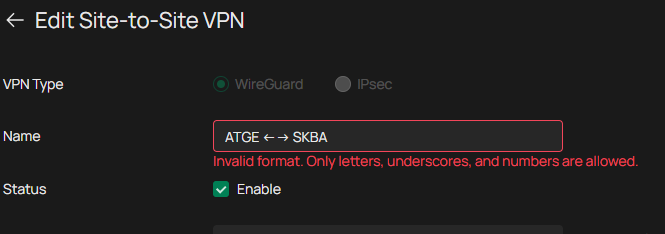
I now can't make any changes to the Wireguard VPN itself / add new peer / delete peer till I don't rename the VPN and all associated peers - what is quite annoying.......................
I've opened a request for rollback, but apparently no reactions yet
- Copy Link
- Subscribe
- Bookmark
- Report Inappropriate Content


Hi @ZoloNN
Thanks for posting here.
Here are some reasons for this change:
The main reason is usually not “looks good/bad,” but compatibility and security concerns: allowing all kinds of special characters (arrows, spaces, punctuation, Unicode characters, etc.) to flow between different systems/components can easily cause parsing, encoding, rendering, and sorting issues. Once this field is used in configuration files, command lines, URLs, logs, scripts, or database queries, it can also introduce injection-type risks. Restricting names to a “safe character set” such as [A-Za-z0-9_] can significantly reduce failures and security hazards.
Common motivations include:
Cross-platform and client compatibility
- Unicode support varies across OSes, browsers, terminals, and mobile fonts, which can result in garbled text/squares/truncation.
- Some clients or older libraries treat input as ASCII only; special characters can cause import failures or abnormal connection lists.
Encoding and serialization issues
- Names may end up in JSON/YAML/INI/XML configurations or API responses. Special characters require escaping; mishandling can lead to parse failures.
- The same character can have different Unicode normalization forms (looks identical but is actually different), causing weird issues like “duplicate names” or “object not found.”
URL/path/command-line safety
- If the name is concatenated into a URL, filename, certificate CN, system command, shell script arguments, etc., characters like
&,;,|,.., newlines, and quotes can create ambiguity or even enable command injection/path traversal. - Even if you only allow “arrows,” similar-looking characters and invisible characters (zero-width characters) may be abused.
Backend indexing and uniqueness/predictability
- Many systems want to use the “name” as an identifier (or derive a slug, resource ID, DNS label, etc.). Restricting characters keeps it predictable, stable, and easy to index.
- Prevents homoglyph attacks/confusion (e.g., Latin
avs Cyrillicа).
Log and audit readability
- Special characters can break log formats (newlines, tabs), affecting auditing and alert-rule matching.
This is a recent optimization change, and it’s very unlikely to be reverted in the short term. Please rename and reconfigure these VPN settings, and we sincerely apologize for the inconvenience this may cause. We also hope you can understand the intention behind this change.
- Copy Link
- Report Inappropriate Content
Hi @Vincent-TP,
thanks for the answer.
on one hand, I fully understand the possible risk of allowing any character in the names (SQL injection, etc....)
but then the change should be then implemented consistently everywhere in input fields across the whole controller. it seems, only VPN section is affected, as I've successfully tried create new entries with the arrows in following sections: ACL, Groups, Routing, VLAN....
please allow at least space and "-" characters ("-" is a hostname allowed characted according RFC 952 and 1123)
- Copy Link
- Report Inappropriate Content
Hi @ZoloNN
Thanks for your suggestion.
"-" is already under consideration. I will also add the suggestion about adding space.
- Copy Link
- Report Inappropriate Content
Hi @Vincent-TP,
thank for at least some positive news
just still wondering about the inconsistency - why is this change hitting apparently only the WireGuard VPN section?
btw: even the VPN User section hat its own (another set of) rules:
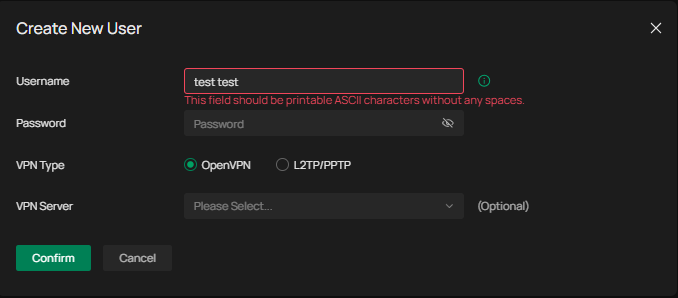
- Copy Link
- Report Inappropriate Content
Hi @ZoloNN
The exact reason isn’t clear to me either. I believe product improvements need to be made step by step.
ZoloNN wrote
Hi @Vincent-TP,
thank for at least some positive news
just still wondering about the inconsistency - why is this change hitting apparently only the WireGuard VPN section?
btw: even the VPN User section hat its own (another set of) rules:
- Copy Link
- Report Inappropriate Content
Information
Helpful: 0
Views: 355
Replies: 5
Voters 0
No one has voted for it yet.