Updated EAP787 to latest v1.5.2, 6 GHz discovery takes ages

Updated EAP787 to latest v1.5.2, 6 GHz discovery takes ages

Updated EAP787 to latest v1.5.2, 6 GHz discovery takes ages
Yesterday - last edited Yesterday
Model: EAP787  
Hardware Version: V1
Firmware Version: v1.5.2

I've recently updated my EAP787 to latest v1.5.2.


The infamous "TP_TX_VAP" AP on 6 GHz band is now gone, but now, it takes ages for client devices to discover 6 GHz AP, often times never using 6 GHz until I initiate an explicit discovery.


I don't use MLO and I have 6 GHz to a separate SSID for stationary wireless clients.


I recall the "TP_TX_VAP" AP was specifically for making clients to discover 6 GHz properly. Is there a way to bring it back?


Am I the only one to encounter this issue?

0
0
#1
4 Reply
Re:Updated EAP787 to latest v1.5.2, 6 GHz discovery takes ages
Yesterday - last edited Yesterday

Hi  @arter97 


Thanks for posting here. To better understand the situation, please let us know the following info:

1. How long will the 6G SSID show up? above 10 seconds? Or even longer?

2. Did you test this with different clients? Do they all behave the same? Please also let us know the brand of the clients you are using.

3. If try to scan the 6G SSID with a wifi scanner, will it show up quicker?


Please also share a screenshot of the 6G SSID settings page. 


0
0
#2
Re:Updated EAP787 to latest v1.5.2, 6 GHz discovery takes ages
19 hours ago

  @Vincent-TP 


1. Yeah, often times more than 10s.


2. Yes, multiple clients. Windows 11 with AX211 on latest drivers, multiple Android phones with varying wireless generations.


3. Yes, that's what I meant by explicit discovery. It sometimes never show up before I initiate a scanning.


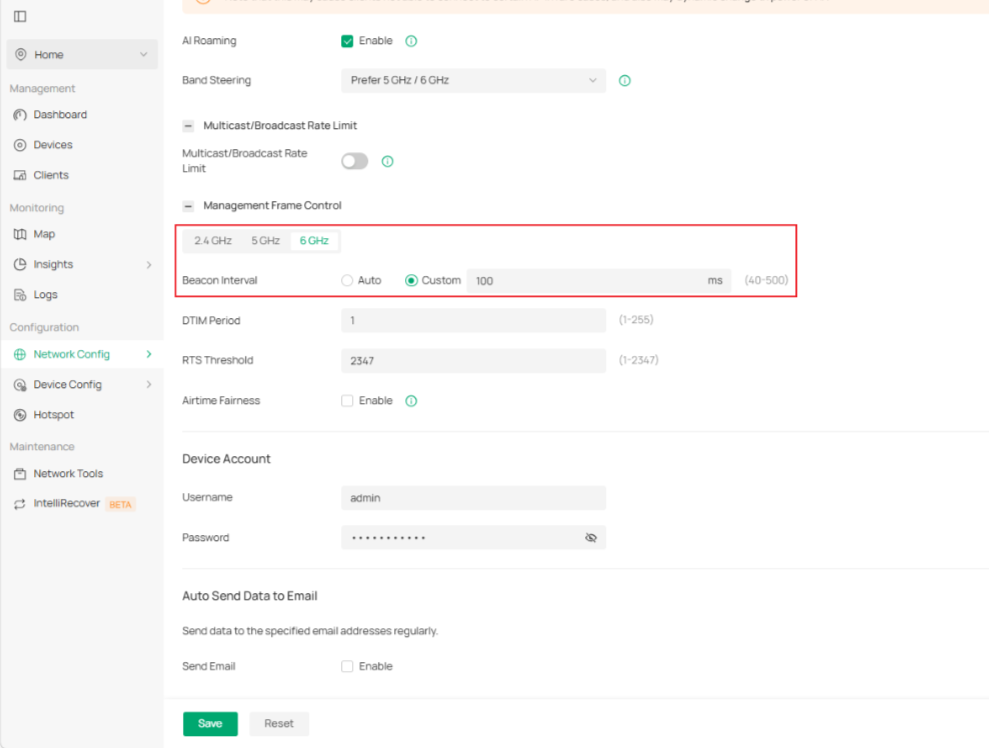
Attached the settings page.

File:
Screenshot From 2026-05-20 03-45-35.pngDownload
0
0
#3
Re:Updated EAP787 to latest v1.5.2, 6 GHz discovery takes ages
19 hours ago
File:
Screenshot From 2026-05-20 03-45-13.pngDownload
0
0
#4
Re:Updated EAP787 to latest v1.5.2, 6 GHz discovery takes ages
10 hours ago

Hi  @arter97 


Thanks for the information.

Please change the following config and let us know the behavior:

1. Change the channel to a different one.

2. lower the channel width to 40MHz or 80MHz, 

3. Change the Beacon Interval to 100 ms on Site settings.


We will also test it locally and keep you posted. Thanks.


0
0
#5