
Error in eventlog: "from AP" display name is incorrect

Hi all,
just found an error in eventlog regarding WiFi roaming message:

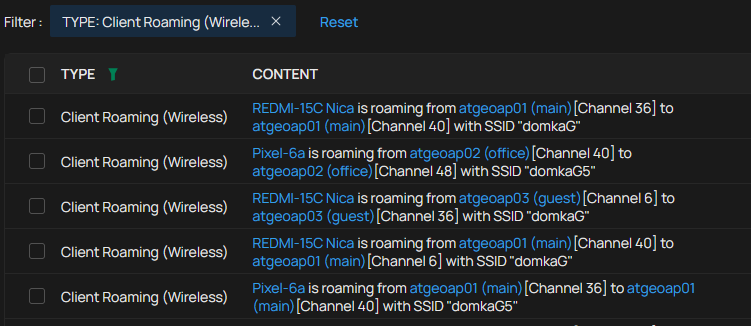
- the first AP display name is wrong - it always equals the second one (which is correct)
- the channel number is OK
- when I click on the link, the correct AP configuration is opened (which isn't, of course, the one with the displayed name...)
- Copy Link
- Subscribe
- Bookmark
- Report Inappropriate Content


Hi @ZoloNN
Thank you for your feedback.
Please give us the following details before we test it locally:
1. What's the model number, firmware version, and hardware of the APs?
2. Is your controller the latest firmware version 6.2.10.17?
3. Does this happen on all roaming logs? Or related to certain wireless clients, such as the one in the screenshot REDMI?
- Copy Link
- Report Inappropriate Content
Hi @Vincent-TP,
my answers:
- the APs are EAP615-Wall(EU) V1.0 with FW 1.5.4 Build 20250515 Rel. 67108
- yes, Controller Windows version 6.2.10.17
- yes, all roaming entries for all devices contains the same display error.
please note: the log entry itself is correct (incl. channel numbers) - when I click on the "from" AP name, the configuration of correct one is opened. The only problem is that wrong "from" AP name is displayed in log entry.
- Copy Link
- Report Inappropriate Content
Hi @ZoloNN
Thanks for the reply.
We had tested locally, and everything works correctly in our local lab.
Would you please try the following and see if it helps:
1. Clear the cache of the web browser you are using.
2. Log out of the controller and log in.
3. Forget the EAPs and re-adopt them.
I have also created a support ticket for this error via your registered email address. The ID is TKID260583664. If still the same, please reply to the ticket with the info we asked. We will try to locate the reason. Thank you in advance.
ZoloNN wrote
Hi @Vincent-TP,
my answers:
- the APs are EAP615-Wall(EU) V1.0 with FW 1.5.4 Build 20250515 Rel. 67108
- yes, Controller Windows version 6.2.10.17
- yes, all roaming entries for all devices contains the same display error.
please note: the log entry itself is correct (incl. channel numbers) - when I click on the "from" AP name, the configuration of correct one is opened. The only problem is that wrong "from" AP name is displayed in log entry.
- Copy Link
- Report Inappropriate Content
Hi @Vincent-TP,
tried all....
even tried another computer, another browser (chrome, edge, freshly installed firefox, chrome on android) - the result is always the same....
more interesting is, when I open Omada App on my Android mobile - the logs are displayed correctly......
and looking into running logs, there is all fine too:
05-28-2026 11:16:15.459 DEBUG [remote-log-event-pool-13572] [] c.t.s.o.l.p.c.d.c(): syslog message: <142>1 2026-05-28 11:16:14 Omada Controller ATGE - - - [client:REDMI-15C Nica:88-B9-51-00-79-20] is roaming from [ap:atgeoap01 (main):D8-44-89-27-BA-C0][Channel 6] to [ap:atgeoap03 (guest):D8-44-89-27-CF-1C][Channel 36] with SSID "domkaG"
05-28-2026 11:16:20.459 DEBUG [remote-log-event-pool-13573] [] c.t.s.o.l.p.c.d.c(): syslog message: <142>1 2026-05-28 11:16:16 Omada Controller ATGE - - - [client:Pixel-6a:24-29-34-88-D9-6C] is roaming from [ap:atgeoap01 (main):D8-44-89-27-BA-C0][Channel 40] to [ap:atgeoap02 (office):D8-44-89-27-CE-DE][Channel 48] with SSID "domkaG5"
screenshot from freshly installed firefox (was never installed on my computer):
screenshot from Android Omada App:
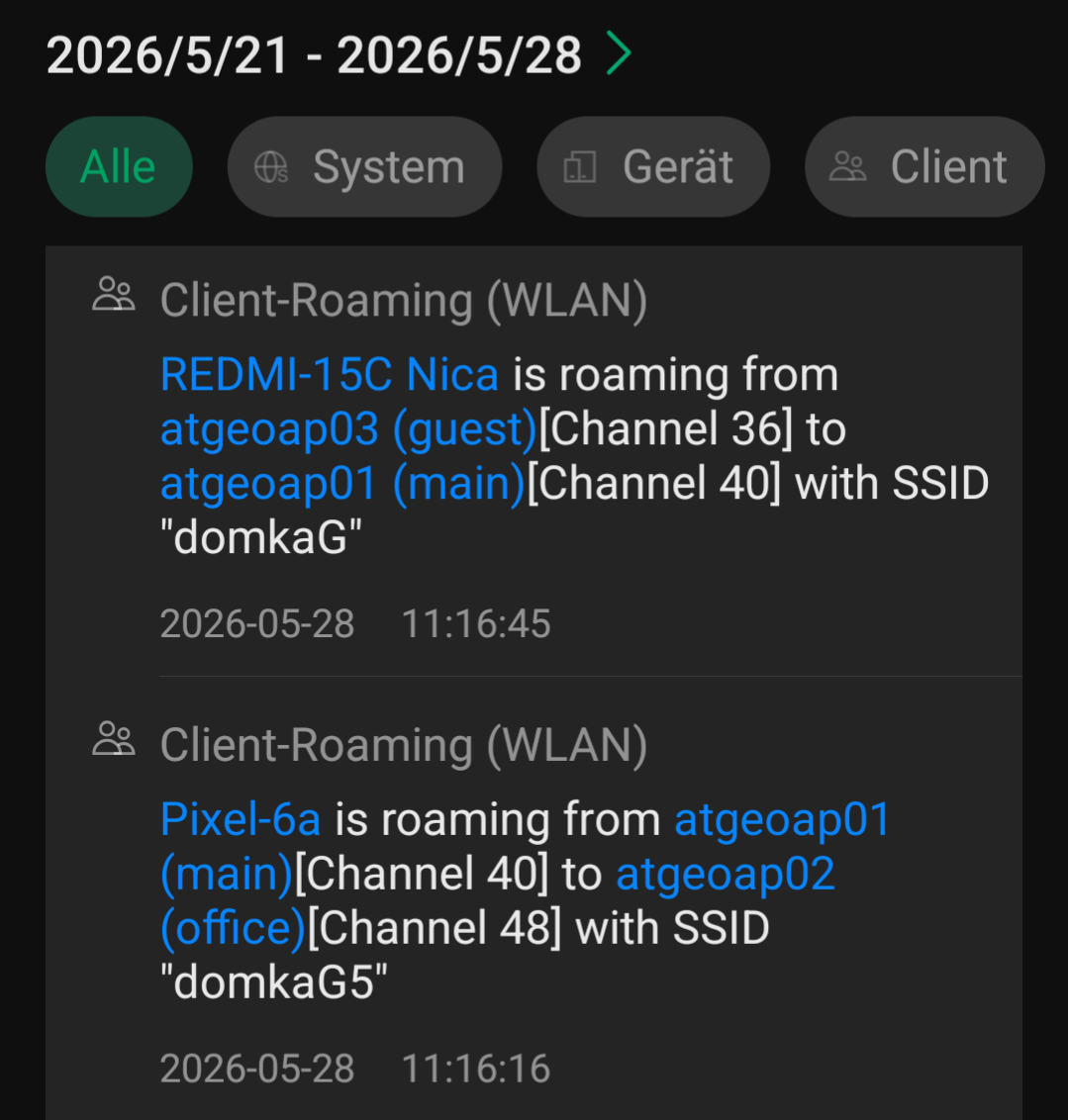
conclusion: underlying data in controller are OK - displaying is false.........
- Copy Link
- Report Inappropriate Content

I can confirm that some devices are displayed wrong in the event log. I observed this serveral times.
sometimes the name is also not resolved in the "Lock to wireless device -> Select wireless device" Combobox, (if a device is already selected) (Config Tab of a wireless device)
- Copy Link
- Report Inappropriate Content
Hi @Vincent-TP,
I've upgraded the Windows Controller to version 6.2.14.6 and looked into the logs, and found following:
- the displayed names of client, "from AP" and "to AP" are now correctly displayed - perfect!

but:
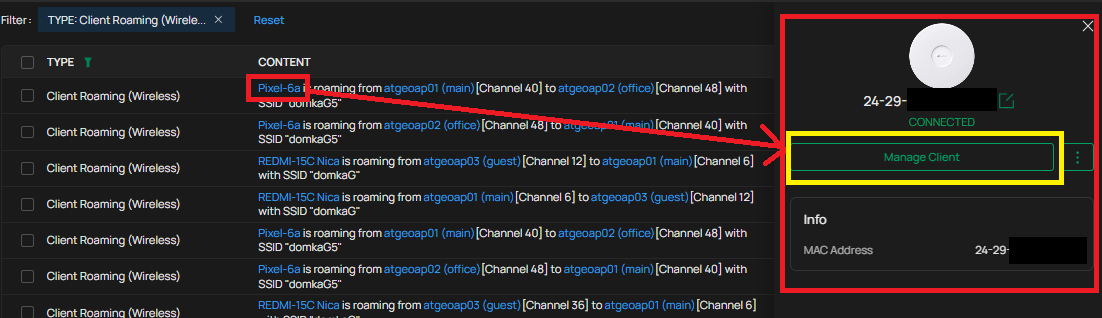
- when I click on client, right menu opens - but with no information except MAC and Manage client button:
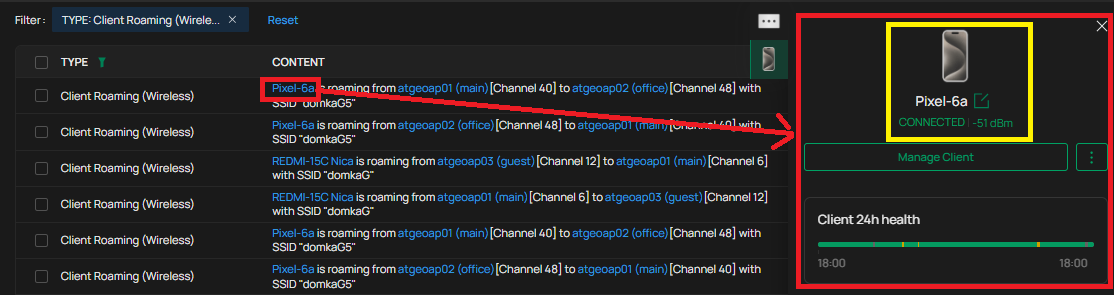
- after cca one and half minutes later the correct information is displayed:
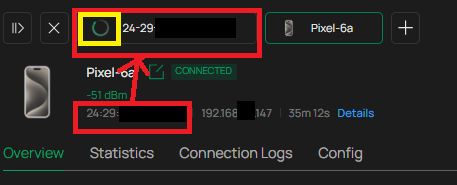
- when I click on "Manage" button, full screen details are opened - but with TWO tabs:
- one with only the MAC address - and spinning wheel icon
- second the correct one
- when I click on the MAC tab - UI switches automaticaly to the correct tab
- when I click in log wiev on the AP names, again only MAC info is displayed - just this time without "Manage" button
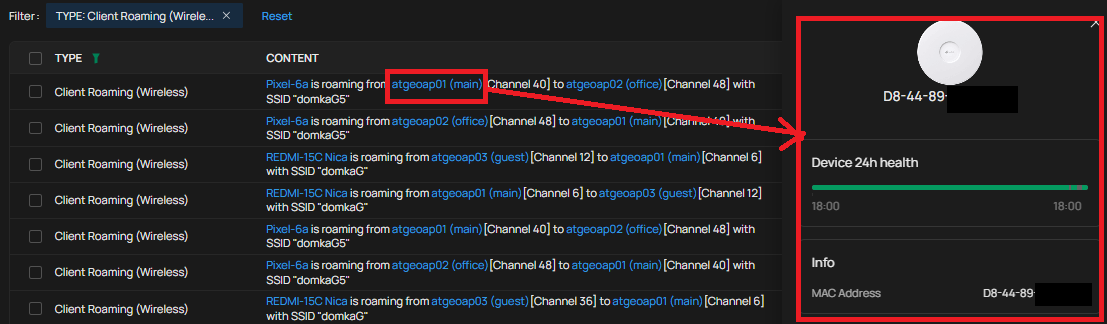
- after approx 1,5 minutes the behavior is the same as at client - correct info displayed, two tabs when managing.....
I've tried Chrome and Firefox, restarting the app, restarting windows - still the same......
- Copy Link
- Report Inappropriate Content
Information
Helpful: 0
Views: 306
Replies: 6
Voters 0
No one has voted for it yet.