SG3452P Repeatedly Disconnecting from Omada Cloud Controller

SG3452P Repeatedly Disconnecting from Omada Cloud Controller

SG3452P Repeatedly Disconnecting from Omada Cloud Controller
a week ago
Model: TL-SG3452P  
Hardware Version: V3
Firmware Version: 3.30.0 Build 20230818 Rel.73626

Hi all,

We are experiencing a recurring issue across 10 sites where the SG3452P repeatedly goes into a heartbeat missing loop and disconnects from the Omada Cloud-Based Controller throughout the day and night, then reconnects automatically after 10 to 13 minutes. This cycle repeats indefinitely with no manual intervention.


Setup at each affected site:

  • Switch: SG3452P V3.30, firmware 3.30.0 Build 20230818 Rel.73626
  • Controller: Omada Cloud-Based Controller (CBC)
  • Gateway: FortiGate FG40F
  • APs: EAP613


Symptoms:

  • Switch cycles between Heartbeat Missed, Disconnected, and Reconnected repeatedly all day
  • Recovery time is consistently 10 to 13 minutes across every event
  • APs at the same sites remain connected to the Cloud Controller throughout every event
  • All client devices remain online and network traffic is unaffected during every event
  • Switch responds to ping from the FortiGate during every disconnect event


What we have ruled out:

  • Network path issue: switch is pingable throughout every event and APs stay connected on the same path
  • ISP instability: confirmed via FortiGate, no WAN drops during events
  • Firmware as a blanket issue: other sites running the same firmware and hardware have zero occurrences


Screenshot:
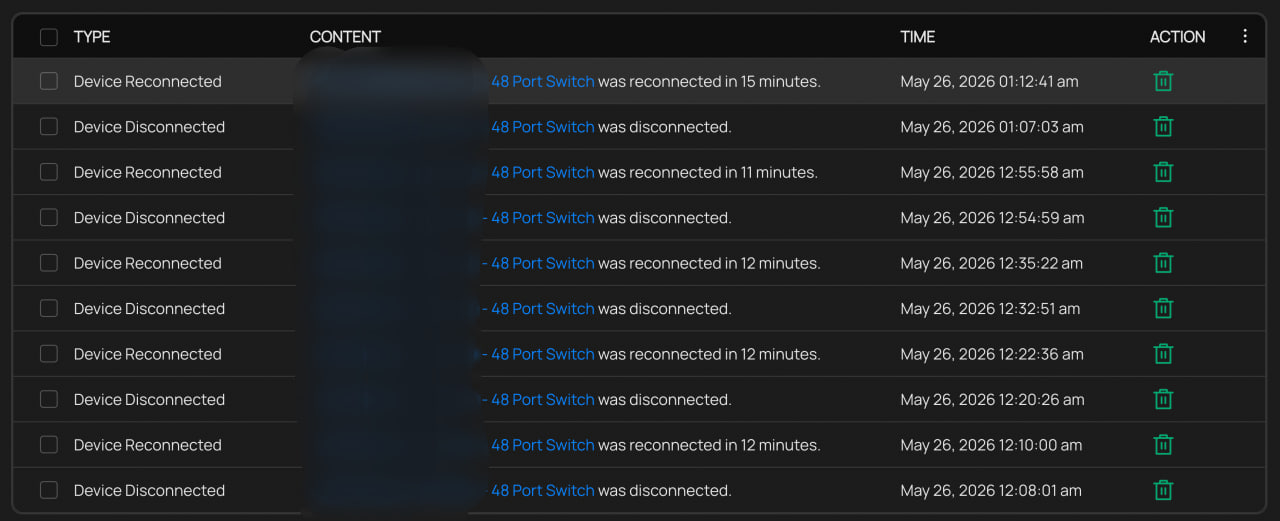

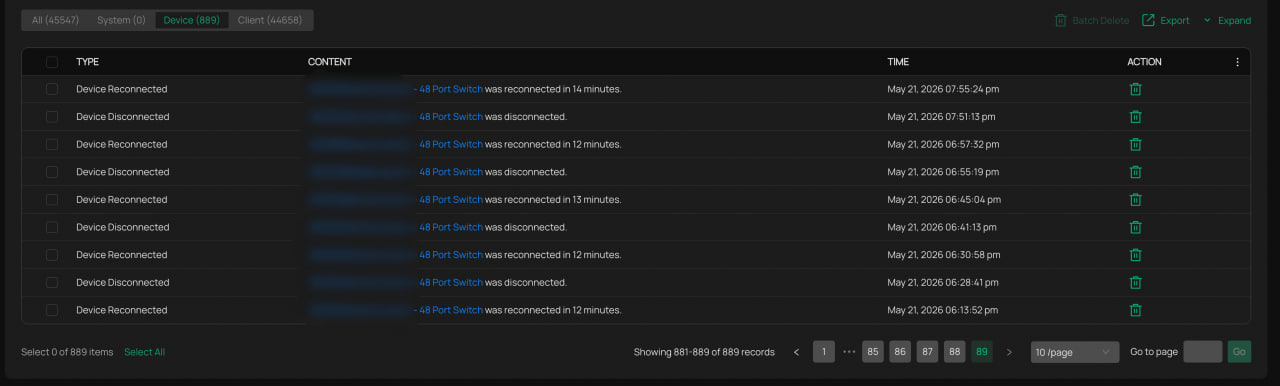
What we have found: As shown in the screenshot above, log analysis from one affected site over 7 days recorded 379 disconnect events averaging 54 per day. The consistent 10 to 13 minute recovery time across all events points to an internal management process crashing and restarting rather than a network-level issue.

The only consistent difference between affected and stable sites is wired client activity volume. Affected sites generate 2,000 to 5,500 wired client connection and disconnection events per day. Stable sites with the same switch, firmware, and topology generate approximately 40 to 44 per day. Affected sites are high-traffic retail environments with frequent device turnover throughout the day.

We also note that firmware versions 3.30.4 through 3.30.14 include fixes for abnormal spanning tree convergence under high client counts and adoption stability improvements. Our affected switches have not received any of these updates as they remain on the August 2023 build.

We are planning to test a firmware upgrade on one site and monitor results. Has anyone experienced something similar or found a resolution? Any input from TP-Link engineers would be appreciated.

 

0
0
#1
7 Reply
Re:SG3452P Repeatedly Disconnecting from Omada Cloud Controller
Tuesday

Hi  @oewncj 


Thanks for posting here.


All client devices remain online and network traffic is unaffected during every event

Affected sites generate 2,000 to 5,500 wired client connection and disconnection events per day.


These two statements seem somewhat contradictory. I want to confirm whether wired clients connected to the switch are affected during the switch’s heartbeat-miss period. The EAP is powered by the switch’s PoE, correct? Was the EAP's wireless network functioning normally when the problem occurred?


Are the gateways for all 10 affected sites FortiGate FG40F? 

To confirm, is your controller cloud-based standard version, or the Essential version?

0
0
#2
Re:SG3452P Repeatedly Disconnecting from Omada Cloud Controller
Wednesday

Hello @Vincent-TP,

Thank you for your response. Kindly refer below for the answers to your inquiries:


1. I want to confirm whether wired clients connected to the switch are affected during the switch’s heartbeat-miss period. 
> No, the wired clients that are connected to the switch is not affected during the switch’s heartbeat-miss. It’s able to browse and access to internet normally. 


2. The EAP is powered by the switch’s PoE, correct? 
> Correct, AP is powered by Switch PoE


3. Was the EAP's wireless network functioning normally when the problem occurred?
> Yes, EAP connected to the switch has no issues and remains to be in connected state as well.


4. Are the gateways for all 10 affected sites FortiGate FG40F? 
> Yes, correct.


5. To confirm, is your controller cloud-based standard version, or the Essential version?
> We are using the standard version cloud controller.


I look forward to your assistance. 

0
0
#3
Re:SG3452P Repeatedly Disconnecting from Omada Cloud Controller
Wednesday

Hi  @oewncj 


Thanks for the detailed reply.

One more question: when did you first notice this issue? During the initial occurrence of the issue, did you perform any operations? For example, did you upgrade the switch firmware or make any other configuration changes?

oewncj wrote

Hello @Vincent-TP,

Thank you for your response. Kindly refer below for the answers to your inquiries:


1. I want to confirm whether wired clients connected to the switch are affected during the switch’s heartbeat-miss period. 
> No, the wired clients that are connected to the switch is not affected during the switch’s heartbeat-miss. It’s able to browse and access to internet normally. 


2. The EAP is powered by the switch’s PoE, correct? 
> Correct, AP is powered by Switch PoE


3. Was the EAP's wireless network functioning normally when the problem occurred?
> Yes, EAP connected to the switch has no issues and remains to be in connected state as well.


4. Are the gateways for all 10 affected sites FortiGate FG40F? 
> Yes, correct.


5. To confirm, is your controller cloud-based standard version, or the Essential version?
> We are using the standard version cloud controller.


I look forward to your assistance. 


0
0
#4
Re:SG3452P Repeatedly Disconnecting from Omada Cloud Controller
Wednesday

Hi  @oewncj 


I have also emailed your registered email address to collect the controller logs for further analysis, but I received a return message that the email was not sent.

Please send me a private message with one available email address, or contact the support team.


0
0
#5
Re:SG3452P Repeatedly Disconnecting from Omada Cloud Controller
Thursday

Hello @Vincent-TP 

When did you first notice this issue?

> We just noticed the issue this week, it went under our radar due to no complaints from these sites regarding connectivity issues. It seems that the event log per site only retains up to one week of logs. Kindly refer to the screenshot below:


During the initial occurrence of the issue, did you perform any operations? For example, did you upgrade the switch firmware or make any other configuration changes?

> We did not make any firmware upgrades or configuration changes during initial occurences of the issue.

1
1
#6
Re:SG3452P Repeatedly Disconnecting from Omada Cloud Controller
Friday

Hi  @oewncj 


Thanks for the reply.

To better assist you, I've created a support ticket via your registered email address and escalated it to our support engineer to look into the issue. The ticket ID is TKID260581383. Please check your inbox and confirm that the support email was received. Thanks!


Once the issue is resolved, please update this thread with your solution to help others who may encounter the same problem.
Many thanks for your excellent cooperation and patience!

0
0
#7
Re:SG3452P Repeatedly Disconnecting from Omada Cloud Controller
Yesterday

Hi  @oewncj 


We noticed that your switch firmware is quite outdated, dating back to 2023. This behavior is similar to a known issue we had previously, which has since been resolved through a firmware update. Please follow the steps below to update:

  1. Temporarily reduce the WAN port MTU on the FortiGate (the default is usually 1500—you can set it to 1300). At this point, the switch should remain stably connected.
  2. Upgrade all switches to the latest version.  https://support.omadanetworks.com/en/product/sg3452p/v3.30/?resourceType=download
  3. Restore the MTU value on the FortiGate.


Looking forward to your update. Thanks.

0
0
#8