
Interference Detection Results Not Displaying Properly

Interference Detection Results Not Displaying Properly

Interference Detection Results Not Displaying Properly
Sunday - last edited Yesterday
Model: OC300  
Hardware Version: V1
Firmware Version: 1.34.18 Build 20260506 Rel.79284

After performing an Interference Detection scan with all EAPs selected and then viewing the detailed results in the controller interface, all the records are not being displayed as one would expect.


In my case, a scan was performed with 5 EAPs resulting in a total of 309 records.  In exporting the results to a CSV or XLSX file, all 309 records are listed.  However, when viewing the results in the controller interface with All AP selected, only a total of 90 records are displayed instead of 309.  


A closer examination of the displayed records with the available selections revealed the following:
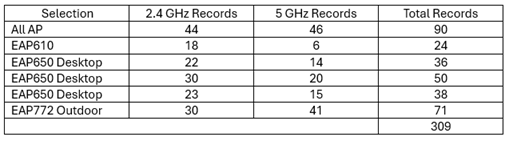
 

Furthermore, when selecting All AP, it was discovered that only one instance of each Name/SSID + BSSID combination is listed.  If the combination is detected by more than 1 AP, then only one record is shown.  Additionally, the record that is shown is not necessarily the one with the strongest signal but rather appears to be the first one detected. One would think that all detections should be listed with All AP selected, otherwise there is no way to compare detections without examining each and every other EAP.


Another problem is that the exported CSV or XLSX file contains many duplicate entries.  It seems that the single instance Name/SSID + BSSID combination in the All AP display is being stored as an additional record apart from the record stored for the respective EAP.




1x ER7406 1x OC300 4x SG2008 1x EAP610 3x EAP650-Desktop 1x EAP772-Outdoor
  0      
0
#1
Options
1 Accepted Solution
Re:Interference Detection Results Not Displaying Properly-Solution
Yesterday - last edited Yesterday

Hi  @jra11500 


Thanks for the reply.

During our local testing of this feature, overall, the number of detected items meets expectations. When selecting “all APs” on the web page, it aggregates and displays all entries scanned by each AP while removing duplicates. This aligns with your situation and matches the data exported in spreadsheet format.

I believe this design is indeed more reasonable; otherwise, displaying a large amount of duplicate information would make it difficult to locate effective contents.


However, during deduplication, the system displays the first scanned result instead of the one with the highest received signal strength. This approach makes it difficult for users to identify the source of interference, and indeed, this design aspect requires improvement.


We have already reported this situation to the relevant department, and they will consider optimizing it. Thank you so much for bringing this to our attention.

Recommended Solution
  0  
0
#6
Options
6 Reply
Re:Interference Detection Results Not Displaying Properly
Tuesday

Hi  @jra11500 


Thanks for posting here.

We would like to test it locally. To build a similar installation and configuration as yours, please give us the following info:

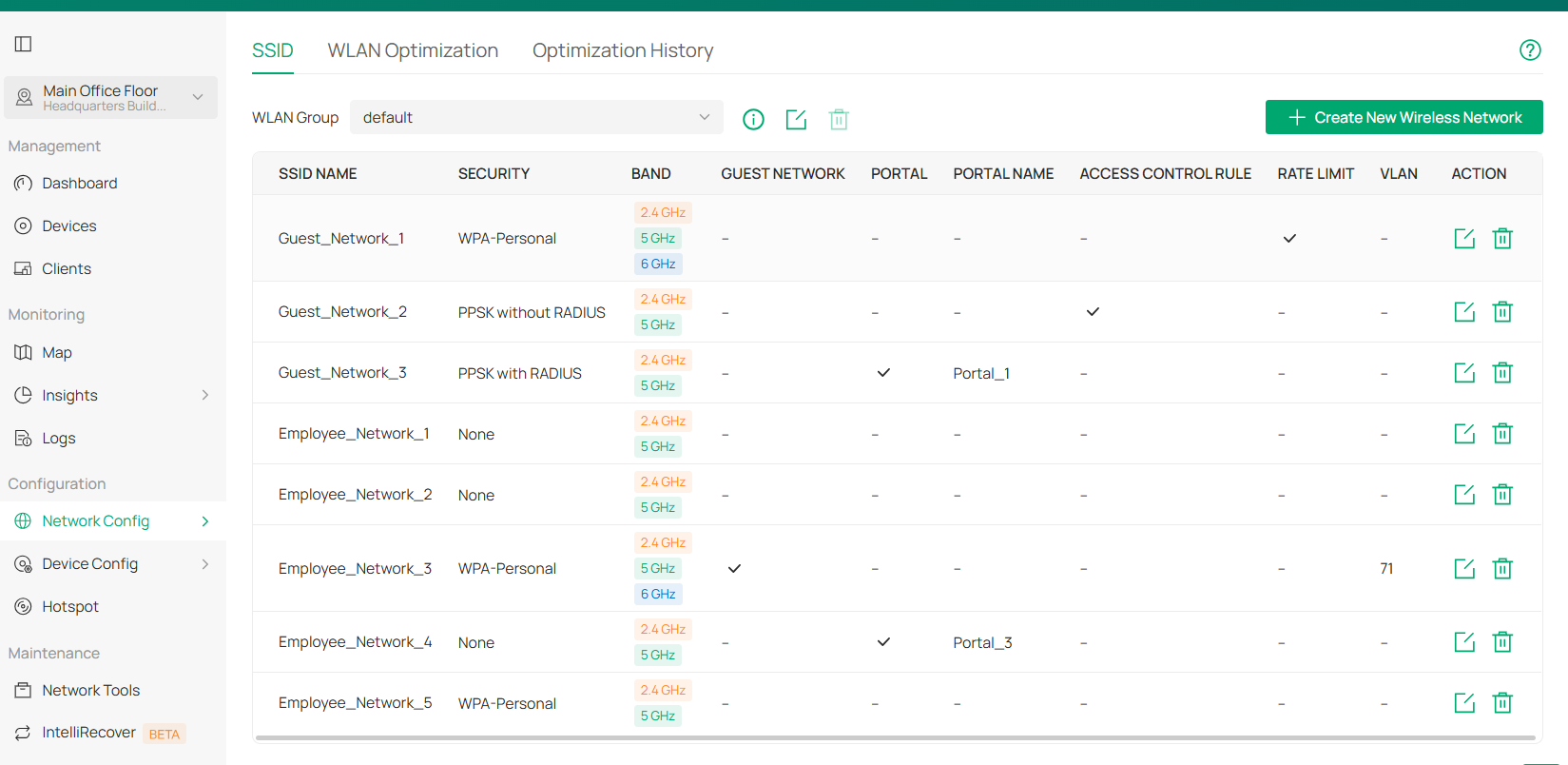
1. A screenshot of the SSID list page;

2. The topology of the network, better to mark the distance between different EAP units.

  0  
0
#2
Options
Re:Interference Detection Results Not Displaying Properly
Tuesday

  @Vincent-TP 


What SSID list page are you referring to?


1x ER7406 1x OC300 4x SG2008 1x EAP610 3x EAP650-Desktop 1x EAP772-Outdoor
  0  
0
#3
Options
Re:Interference Detection Results Not Displaying Properly
Tuesday

Hi  @jra11500 


I mean this page. So we can know how many SSIDs you created and which bands you enabled.

  0  
0
#4
Options
Re:Interference Detection Results Not Displaying Properly
Tuesday - last edited Yesterday

  @Vincent-TP 


Regarding the topology distances, the EAPs are distributed on 3 floors;  the ground floor, first floor, and attic.  The building is constructed of concrete floors and brick and mortar walls.  The top 2 floors each measure approximately 10 x 5.5 meters.  The ground floor is slightly larger due to the Den extension on one end.


1x ER7406 1x OC300 4x SG2008 1x EAP610 3x EAP650-Desktop 1x EAP772-Outdoor
  0  
0
#5
Options
Re:Interference Detection Results Not Displaying Properly-Solution
Yesterday - last edited Yesterday

Hi  @jra11500 


Thanks for the reply.

During our local testing of this feature, overall, the number of detected items meets expectations. When selecting “all APs” on the web page, it aggregates and displays all entries scanned by each AP while removing duplicates. This aligns with your situation and matches the data exported in spreadsheet format.

I believe this design is indeed more reasonable; otherwise, displaying a large amount of duplicate information would make it difficult to locate effective contents.


However, during deduplication, the system displays the first scanned result instead of the one with the highest received signal strength. This approach makes it difficult for users to identify the source of interference, and indeed, this design aspect requires improvement.


We have already reported this situation to the relevant department, and they will consider optimizing it. Thank you so much for bringing this to our attention.

Recommended Solution
  0  
0
#6
Options
Re:Interference Detection Results Not Displaying Properly
Yesterday

  @Vincent-TP 


Thank-you for the detailed explanation which cleared up my concerns and questions.


1x ER7406 1x OC300 4x SG2008 1x EAP610 3x EAP650-Desktop 1x EAP772-Outdoor
  1  
1
#7
Options