Finding Link Speed

Finding Link Speed

Finding Link Speed
Finding Link Speed
Sunday - last edited Wednesday
Model: DR3650v-4G  
Hardware Version: V1
Firmware Version: DR3650v-4G_V1_1_0 1.0.1 Build 20250317 Rel.75695(4555)

I have just bought a DR3650v-4G.

It is connected vis DSL with a SIM for fall back.

Is there a way to find the connection speed of my DSL connection? The instructions I have found via AI bear no relationship to what exist on the ground!

Is there any reason why Windows 10 would keep turning off File Sharing? Every time my laptop sleeps turns off file sharing for my home network and I have to turn it back on.

  0      
0
#1
Options
1 Accepted Solution
Re:Finding Link Speed-Solution
Monday - last edited Wednesday

Hi @Jeff-Gaines 

Thanks for reaching out to TP-Link Business Forums.


May I know how you manage this gateway? Do you manage it through the Omada Controller or in Standalone mode?

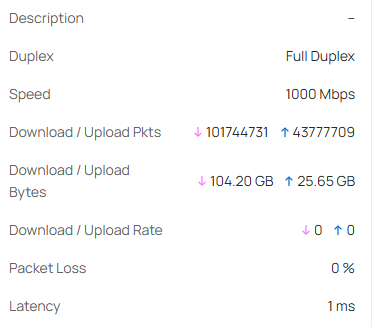
If you are using Omada Controller, you can navigate to Site View > Devices > DR3650v-4G > Ports to check the link speed.

Currently, it does not support checking link speed in Standalone mode.


As for file sharing, this is typically because the Network adapters power down when the PC sleeps, and Windows may temporarily disable network discovery.

Or, your network is switched to Public rather than Private.

Recommended Solution
  0  
0
#2
Options
3 Reply
Re:Finding Link Speed-Solution
Monday - last edited Wednesday

Hi @Jeff-Gaines 

Thanks for reaching out to TP-Link Business Forums.


May I know how you manage this gateway? Do you manage it through the Omada Controller or in Standalone mode?

If you are using Omada Controller, you can navigate to Site View > Devices > DR3650v-4G > Ports to check the link speed.

Currently, it does not support checking link speed in Standalone mode.


As for file sharing, this is typically because the Network adapters power down when the PC sleeps, and Windows may temporarily disable network discovery.

Or, your network is switched to Public rather than Private.

Recommended Solution
  0  
0
#2
Options
Re:Finding Link Speed
Monday

  @Gabriel-TP 

Many thanks. I am managing in standalone mode.

I note your point about the modm powering down, it is arther more sophsticated than I am used to!

  0  
0
#3
Options
Re:Finding Link Speed
6 hours ago

  @Jeff-Gaines 

May I ask a follow up on power management. Can I control when it powers down or goes into power save mode? It is proving a nuisance waiting for it to fully power up/on when it's asleep.

  0  
0
#4
Options