Omada_Network_Application_V6.3.0.1xx Pre-Release Firmware (Closed)

This thread has been locked for further replies. You can start a new thread to share your ideas or ask questions.

Omada_Network_Application_V6.3.0.1xx Pre-Release Firmware (Closed)

This thread has been locked for further replies. You can start a new thread to share your ideas or ask questions.
Omada_Network_Application_V6.3.0.1xx Pre-Release Firmware (Closed)
2026-09-14 09:26:03 - last edited 3 weeks ago

This Article Applies to


Omada_Network_Application_v6.3.0.1xx _Windows (Windows 10/11/Server, 64-bit Recommended)

Omada_Network_Application_v6.3.0.1xx_linux_x64.tar.gz

Omada_Network_Application_v6.3.0.1xx_linux_x64.deb


Overview


We hope to offer you the opportunity to experience the new features added in Controller v6.3.0.1xx in advance, and to allow TP-Link to thoroughly test the firmware in your real network environment and across scenarios before the official release. All feedback is welcome, including reports of successful upgrades.


Release Notes


Version Info

This version of the Controller is fully compatible with the Omada App version 5.3.x or above.


Supported Device Models

For device models Omada Software Controller supports, refer to the Omada Cloud SDN Platform Compatibility List.


New Features

None.
 

Enhancements

  1. Optimized Incident presentation, available at Site > Incidents. Improved incident titles, root cause analysis, and troubleshooting recommendations for better readability. Device and client MAC address information is now displayed in the incident details page.
  2. Enhanced OUI-Based VLAN functionality, available at Site > Network Config > Transmission > OUI-Based VLAN > Switch Rules. Added support for compatible Agile switches and improved deployment efficiency by automatically applying Untagged Networks to selected device ports. (Requires Switch 6.4 firmware and Agile Switch 6.3 firmware support.)
  3. Optimized AP management performance for legacy firmware versions. Improved roaming-related performance when managing APs running older firmware versions.
  4. Optimized OpenAPI documentation, available at Global View > Settings > Platform Integration > Online API Document. Improved document loading performance and introduced a unified online documentation experience
     

Bug Fixed:

  1. Fixed a security issue related to gRPC communication. Enhanced communication security by restricting unnecessary service exposure in standalone deployments and improving encryption protection in cluster environments.
  2. Fixed an issue where Local User authentication was not properly updated after user deletion, available at Site > Hotspot > Local Users.


Notes

  1. Please note that Controllers on different platforms may support different features, even when the first three digits of the version number are the same. For example, the Linux Controller currently supports Cluster Mode, while the Windows Controller does not yet support this feature.
  2. The Omada SDN Controller can only manage devices running supported firmware versions. Please verify that your devices are compatible with the SDN Controller before upgrading.
  3. Since Controller v5.14.32, upgrading directly from Controller v4 is no longer supported by the Omada Software Controller.
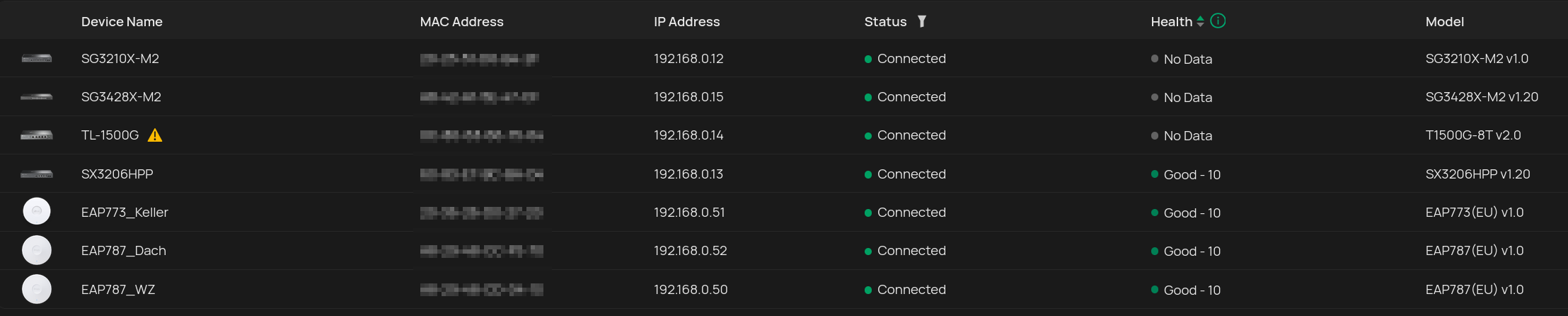
  4. Please note that devices marked with a "!" in the device list are running legacy firmware versions that will no longer be supported in Omada SDN Controller v6.4 and later. To avoid compatibility issues, upgrade the firmware on these devices as soon as possible


Firmware Download


Before the Upgrade

(1) Please be sure you have read the Beta Test Agreement before upgrading the Pre-release firmware!

(2) For the sake of insurance, it's always recommended to save a copy of the controller Backup Config file before upgrading or downgrading.

(3) You may follow the following guide to upgrade your Omada Controller. How to Upgrade or Downgrade Omada SDN Controller.


Firmware Download Link


Direct Download


Omada_Network_Application_v6.3.0.111_Windows (Windows 10/11/Server, 64-bit Recommended)

Omada_Network_Application_v6.3.0.111_linux_x64.tar.gz

Omada_Network_Application_v6.3.0.111_linux_x64.deb


Omada_Network_Application_v6.3.0.110_Windows (Windows 10/11/Server, 64-bit Recommended)

Omada_Network_Application_v6.3.0.110_linux_x64.tar.gz

Omada_Network_Application_v6.3.0.110_linux_x64.deb


Omada_Network_Application_v6.3.0.108_Windows (Windows 10/11/Server, 64-bit Recommended)

Omada_Network_Application_v6.3.0.108_linux_x64.tar.gz

Omada_Network_Application_v6.3.0.108_linux_x64.deb


Omada_Network_Application_v6.3.0.106_Windows (Windows 10/11/Server, 64-bit Recommended)

Omada_Network_Application_v6.3.0.106_linux_x64.tar.gz

Omada_Network_Application_v6.3.0.106_linux_x64.deb


Additional Information

If somehow you encounter an issue during or after the controller upgrade, it's suggested to contact us with the following info:

  • Omada Controller version (previous and current)
  • Device Model(s), Hardware and Firmware versions
  • (if possible) A copy of the Log file and Backup Config file


If you decide to downgrade the controller before reporting the issue to TP-Link, it's recommended to save a copy of the current Log file and Backup Config file, which could help TP-Link investigate and address the problem quickly.


>> How to get the Log file and Backup Config file for Omada SDN Controller:

  • If your Windows software controller failed to launch, please locate the controller installation path for the Log file.

  • If it's not a launch issue, you can export the Log file and Backup Config file to the local network. Please refer to the following steps:

    • In the Global View, go to Settings > Maintenance > Backup & Restore > Retained Data Backup, select Settings Only, then click Export for the Backup Config file. On the same page, scroll down to Export for Support, then click Export Running Logs to download the desensitized Log file.


Update Log


Oct 22nd, 2026

Closed this trial. Please click here to download the official version.


Oct 10th, 2026

Provide the following firmware:
Omada_Network_Application_v6.3.0.111_Windows (Windows 10/11/Server, 64-bit Recommended)

Omada_Network_Application_v6.3.0.111_linux_x64.tar.gz

Omada_Network_Application_v6.3.0.111_linux_x64.deb

Update Content:

Fixed some known issues.


Sep 24th, 2026

Provide the following firmware:

Omada_Network_Application_v6.3.0.110_Windows (Windows 10/11/Server, 64-bit Recommended)

Omada_Network_Application_v6.3.0.110_linux_x64.tar.gz

Omada_Network_Application_v6.3.0.110_linux_x64.deb

Update Content:

Fixed some known issues.


Sep 18th, 2026

Provide the following firmware:

Omada_Network_Application_v6.3.0.108_Windows (Windows 10/11/Server, 64-bit Recommended)

Omada_Network_Application_v6.3.0.108_linux_x64.tar.gz

Omada_Network_Application_v6.3.0.108_linux_x64.deb

Update Content:

Fixed some known issues.


Sep 14th, 2026

Provide the following firmware:

Omada_Network_Application_v6.3.0.106_Windows (Windows 10/11/Server, 64-bit Recommended)

Omada_Network_Application_v6.3.0.106_linux_x64.tar.gz

Omada_Network_Application_v6.3.0.106_linux_x64.deb


Recommended Threads

ER7212PC V2 (Built-in Omada V6.3.0.60 ) Pre-Release Firmware (Released on Aug 26th, 2026)
ER7206 V2 Pre-Release Firmware Fully Adapted to Omada Controller V6.3(Released on Aug 14th, 2026) 

EAP65x | EAP603-Outdoor Pre-release Firmware Adapted to Omada v6.3 (Updated on 31st Aug 2026) 
ESxxx-M2 V1 Pre-Release Firmware Fully Adapted to SDN Controller 6.3.0 (Updated on Sep 3rd, 2026) 
Hardware Omada SDN Controllers V6.3.0.1xx Pre-Release Firmware (Updated on Sep 20th,2026) 

  0      
0
#1
Options
31 Reply
Re:Omada_Network_Application_V6.3.0.1xx Pre-Release Firmware (Released on Sep 14th,2026)
2026-09-15 04:51:17

  @Nathan-TP 


Installed Omada Network Application v6.3.0.106 successfully on Red Hat Linux. Installation was smooth, and everything is working fine so far.

Omada & VIGI | Using at 4 Locations | Controller: V6.4.x (Linux) | GW: ER7206 | SW: SG2428P & SG2210P | APs: 2 × EAP610 | WAN: Jio&Airtel | NVR2016H.
  1  
1
#2
Options
Re:Omada_Network_Application_V6.3.0.1xx Pre-Release Firmware (Released on Sep 14th,2026)
2026-09-17 11:57:45

Hi @Vincent-TP


I noticed some issues and questions:


* If there is an update available for device controller sends email notification to all users, even they don't have email notifications ticked or user even expired in the system. Support ticket has been raised but no promise that it would be fixed (I can share ticket number). Also device update email is sent once a day starting from last controller restart with no option to configure that.


* I am trying to upload certificate to Controller (Ref: https://www.reddit.com/r/Omada_Networks/comments/1wcjahf/comment/p8yklub) but it does not allow to upload one with "Private Key Password". Would it be possible to check if it is possible to upload PFX with "Private Key Password" set or I would need to generate PFX without the password in order to use the API upload?


* I am trying to find an API endpoint which will allow me to restart the Controller after Certificate upload as it looks like uploading certificate does not come in effect until reboot.


Kind Regards,

Areg


  0  
0
#3
Options
Re:Omada_Network_Application_V6.3.0.1xx Pre-Release Firmware (Released on Sep 14th,2026)
2026-09-18 03:42:12

  @vrtareg 

Hi,

Thank you for posting here.

We have recorded some of the requirements you raised and forwarded them to the relevant team for evaluation. However, the issue you described does not appear to be directly related to this trail version. To keep the discussion focused, we suggest creating a new thread so we can better address your issue.

Thank you for your cooperation.


vrtareg wrote

Hi @Vincent-TP


I noticed some issues and questions:


* If there is an update available for device controller sends email notification to all users, even they don't have email notifications ticked or user even expired in the system. Support ticket has been raised but no promise that it would be fixed (I can share ticket number). Also device update email is sent once a day starting from last controller restart with no option to configure that.


* I am trying to upload certificate to Controller (Ref: https://www.reddit.com/r/Omada_Networks/comments/1wcjahf/comment/p8yklub) but it does not allow to upload one with "Private Key Password". Would it be possible to check if it is possible to upload PFX with "Private Key Password" set or I would need to generate PFX without the password in order to use the API upload?


* I am trying to find an API endpoint which will allow me to restart the Controller after Certificate upload as it looks like uploading certificate does not come in effect until reboot.


Kind Regards,

Areg


  0  
0
#4
Options
Re:Omada_Network_Application_V6.3.0.1xx Pre-Release Firmware (Released on Sep 14th,2026)
2026-09-23 09:54:24

  @vrtareg Concerning the certificate issue:


Do you use RSA or ECC certificates?

ECC certificates are not supported yet. See https://community.tp-link.com/en/business/forum/topic/838382?page=1 for details.

  0  
0
#5
Options
Re:Omada_Network_Application_V6.3.0.1xx Pre-Release Firmware (Released on Sep 14th,2026)
2026-09-23 11:17:18

Hi @relvy 


I had no issues with ECDSA LetsEncrypt certificates packed to PFX to upload until v 6.2.x.x upgrade.


Then Support confirmed the issue and later on 6.3.x.x resolved it.


Now I can use ECDSA LetsEncrypt certificates packed to PFX but can't upload same certificates individually ... like fullchain and privkey pem files.

Both HW and Software Controllers only accept RSA ones but works absolutely ok with ECDSA ones in PFX format.

  0  
0
#6
Options
Re:Omada_Network_Application_V6.3.0.1xx Pre-Release Firmware (Released on Sep 14th,2026)
2026-09-27 20:41:57

  @Nathan-TP - raised this one https://community.tp-link.com/en/business/threads/topic/873014

  0  
0
#7
Options
Re:Omada_Network_Application_V6.3.0.1xx Pre-Release Firmware (Updated on Sep 24th, 2026)
2026-09-29 08:06:20

  @Nathan-TP 
 

Dear Omada Development Team,

I manage an enterprise network infrastructure comprising approximately 120 access points (APs), 8 different AP groups, and over 8 SSID broadcasts. I would like to report critical operational issues we are experiencing with the changes made to the SSID configuration and AP Group assignment logic in the Omada Software Controller v6.3.0 release.

While the new "many-to-many" SSID assignment model aims to simplify basic configurations, it has severely restricted the flexibility and customization capabilities we require at the enterprise level. In previous versions, we could manage the same SSID name across different AP groups with completely different rules in a highly flexible manner.

The loss of this flexibility has led to the following issues in the field:

  • AP Group-Specific Rate Limits: Previously, an SSID named "X" could operate with a 5 Mbps rate limit in AP Group "A", while the exact same broadcast could have a 10 Mbps limit in AP Group "B". It is now impossible to make this distinction under a single SSID definition.

  • AP Group-Specific WLAN Schedules: The "X" SSID could be subjected to specific Wi-Fi time restrictions in AP Group "C", while broadcasting smoothly without any time restrictions in AP Group "D".

  • Lack of SSID Clone Feature: Another significant issue that drastically reduces our operational efficiency is the absence of the SSID cloning capability. Previously, cloning an existing SSID significantly sped up our workflow when creating new ones. Now, we are forced to manually open, check, and re-enter all settings from other SSIDs for every new configuration. This not only causes a massive waste of time but also paves the way for potential manual configuration errors.

The consolidation of SSID configurations has eliminated professional AP grouping and customization capabilities in the name of simplification. Our existing setup has been disrupted by this update, and managing the system has frankly become much more complex and cumbersome than before.

Feature Request: To resolve these issues, we highly request the addition of an "AP Group Override" feature within the consolidated SSID structure. This would allow critical rules like Rate Limits, WLAN Schedules, or VLANs to be flexibly customized per AP Group once again. Furthermore, we urgently request bringing back the SSID Clone feature to restore our operational speed.

We kindly ask you to restore the balance between a "simplified" and "professional/advanced" structure in future releases so that the Omada ecosystem can maintain its strength in the professional market.

Sincerely,

  0  
0
#8
Options
Re:Omada_Network_Application_V6.3.0.1xx Pre-Release Firmware (Updated on Sep 24th, 2026)
2026-09-29 14:23:02

  @kasva7 Thank you for your post. For anyone in agreement, please vote on the existing Requests and Suggestions thread here. 

Check out our subreddit, r/Omada_Networks! Need a ticket? Contact Technical Support
  0  
0
#9
Options
Re:Omada_Network_Application_V6.3.0.1xx Pre-Release Firmware (Updated on Sep 24th, 2026)
2026-10-02 15:38:43

  @Nathan-TP Just updated from v6.3.0.108 Linux DEB to .110 - and now Two of my switches with latest FW show "no data" on Health ??


  0  
0
#10
Options
Re:Omada_Network_Application_V6.3.0.1xx Pre-Release Firmware (Updated on Sep 24th, 2026)
2026-10-02 15:47:37
Looks like I had to wait longer - seems to work now
  1  
1
#11
Options