
Due to disabled NAT by internet provider, my router's login page on laptop is no more accessible
 This thread has been locked for further replies. You can start a new thread to share your ideas or ask questions.
Hi, NAT has been disabled by my internet service provider in order to arrange the wifi connection for our new smart boiler.
As a result of this I have lost my existing, previously properly working access to the admin page of my AX3000 4 series Wifi 6 router on webpages http://tplinkwifi.net or http://192.168.0.1/.
I cannot access anymore with my email and pw to my admin page on my laptop, on my mobile phone it still works. What can I do to have the connection on my laptop again?
Thank you, Edit
- Copy Link
- Subscribe
- Bookmark
- Report Inappropriate Content

Hi,
Please clarify whether the issue is that you cannot see the admin page at all or if you do get to the admin page but it doesn't login after you enter your email address and password?
Furthermore, do you know which NAT the Internet provider has disabled? Is it the NAT in the TP-Link AX3000 or a NAT somewhere in the Internet provider's hardware?
- Copy Link
- Report Inappropriate Content
@woozle Hi, Previously when I have searched for 192.168.0.1, I have landed on an admin page which required my local pw, and simply logged in. Currently, on my laptop, if I search for 192.168.0.1, I am landing on this page:
Your Internet access is blocked
Firewall or antivirus software may have blocked the connection.
xy
When I am searching for tplinkwifi.net, that directs me to this page:
Trying to configure the Router?
It looks like you aren't connected to your TP-Link network.
To access tplinkwifi.net, your device must be connected to TP-Link Router’s network. Please check your network connection and try again.
xy
This was the NAT disabled by my internet service provider which cannot be undone, not the NAT in my TP-Link AX3000, that did not cause such access issue, which I have tried before.
Strange that the access problem is only with my laptop, but no problem on my android mobile phone. If I check the NAT of my router (on my mobile) the 'Enable' is ticked. This is a different NAT than what the service provider has disabled.
My problem that I cannot access anymore to my router on my laptop searching for 192.168.0.1 , still exists:-(
Thank you for the help in advance,
Kind regards, Edit
- Copy Link
- Report Inappropriate Content
Try the following.
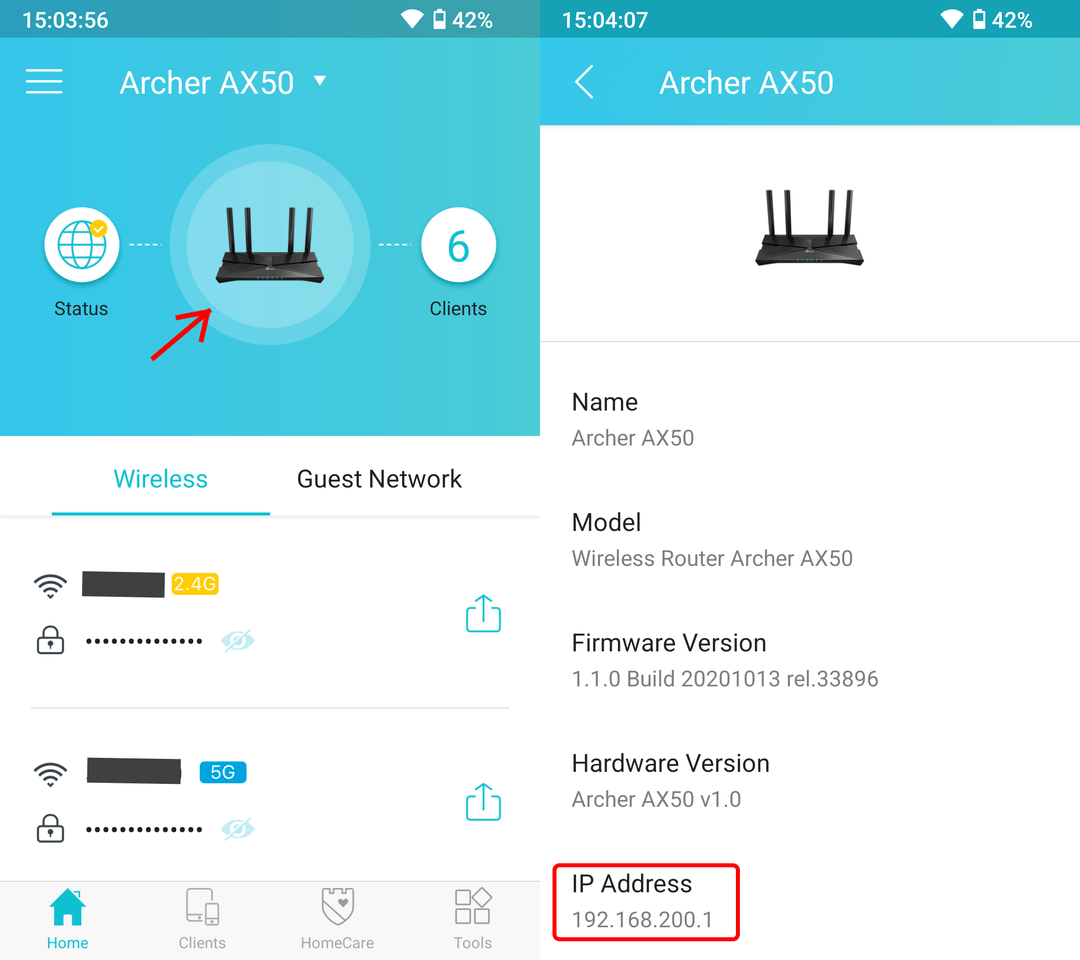
Access the settings of the AX3000 using your mobile phone, either via the Tether App (see picture below) or via the admin webpage. Verify that the AX3000's LAN IP address is indeed 192.168.0.1.
In case it turns out the AX3000's LAN IP address is different now, then use that new IP address to access the admin page of the router with your laptop. (i.e. http://192.168._._)
If you've double-checked and the LAN IP address of the AX3000 is still 192.168.0.1, then verify that your laptop computer is indeed connected to the network of the AX3000.
Do you perhaps have more than one Wi-Fi router in your home and they are using the same Wi-Fi name (SSID) and password, for convenience?
(of course the prime way to make sure you are connected to the AX3000 would be to use an Ethernet cable routed from the laptop to one of the router's LAN ports)
- Copy Link
- Report Inappropriate Content
Hi, Thank you for the advice and the provided help.
The result of my latest investigation is that 192.168.0.1 is not available only on my COMPANY laptop. On my private laptop 192.168.0.1 is still available and I am able to log in and manage my TP link router’s admin page, just like from my mobile.
I have also connected my COMPANY laptop directly with my router with Ethernet cable as advised below and 192.168.0.1 is still not available.
My AX3000's LAN IPv4 address is still 192.168.0.1, this information is available on several places like in the Tether app you have also mentioned.
My COMPANY computer is indeed connected to the network of my AX3000 router, not to different network.
I suppose that my problem might have something to do with my company’s antivirus settings, since this problem is limited to this only 1 COMPANY laptop.
On my COMPANY laptop I still receive this error message searching for 192.168.0.1:
Your Internet access is blocked
Firewall or antivirus software may have blocked the connection.
Try:
- Checking the connection
- Checking firewall and antivirus configurations
- Running Windows Network Diagnostics
ERR_NETWORK_ACCESS_DENIED
Hide details
Check your Internet connection
Check any cables and reboot any routers, modems, or other network devices you may be using.
Allow Chrome to access the network in your firewall or antivirus settings.
If it is already listed as a program allowed to access the network, try removing it from the list and adding it again.
Thank you for the help, Edit
- Copy Link
- Report Inappropriate Content
Ok. Thanks for letting us know the outcome!
So, I think we can assume your company laptop not being able to open the AX3000's admin page is intentional and on purpose.
It might just have been that your company's IT department has "tightended" the security of the company laptops coincidentally around the same time your ISP made changes to your network setup.
- Copy Link
- Report Inappropriate Content
Information
Helpful: 0
Views: 5373
Replies: 5
Voters 0
No one has voted for it yet.