
No DSL internet (on 2nd node).
 This thread has been locked for further replies. You can start a new thread to share your ideas or ask questions.
Installing decoM5(3-pack}(EU) today.
1. The WIFI is all operational, but there's No DSL internet (on 2nd node). Is there a setting for this?
Note this was previously working using a TL-PA4010.
2. Measuring the signlal on my Android phone using Speedtest It's between 350&450 MBPS When Node 1 is directly DSL connected to the Router and ~90 MBPS on Node 2 in an adjacent room When I put it through the PA4010 on adjacent sockets, the speed also drops to ~90mbps, with ~30 on Node 2 and under 10 on node 3. Is this amount of signal drop normal? Shoild I try using Wifi from Node to Node?
Cheers
JD
- Copy Link
- Subscribe
- Bookmark
- Report Inappropriate Content

Can you clarify one thing for me: when you are saying "DSL connection," I wonder if you mean "Ethernet connection." DSL is what ISP modem/router connects to and that type of connection goes from router to your ISP premises, Ethernet is what home devices use to connect to each other and also what M5 uses. M5 connects to the router with Ethernet cable.
Please tell what is your router brand name and model number. I may be able to help you with setup and troubleshooting if I know more details about your home network.
Deco M5 has two Ethernet ports. On Satellite Deco, you should be able to use its Ethernet port to connect wired device (such as Smart TV or desktop PC) to it and that device should get Internet connection. If it does not, I may need to ask you more questions to help with troubleshooting.
- Copy Link
- Report Inappropriate Content
Thanks Alexande,
Yes I mean an ethernet/internet connection (for a smart tv and sometimes a PC).
The router box was provided by my ISP "eir". Label says:
eir fibre box 1a 1.0
Manufactured by Sagemcom for eir
Sagemcom
CS 50001
92848 RUEIL CEDEX
FRANCE
Thanks
JD
- Copy Link
- Report Inappropriate Content
Sagemcom CS 50001 must be router/gateway. That makes troubleshooting Deco easier. A lot of configuration issues go away, if Deco is configured in Access Point mode. By default, Deco mesh runs in Router mode, there are too many settings in that mode that might interfere with troubleshooting.
I recommend you change Deco mesh to run in Access Point mode, here is how: How to set up Deco to work in Access Point mode
Same document in French: Comment configurer Deco pour qu'il fonctionne en mode Point d'Accès WiFi ?
After you made that change, see if all your home devices connect to Internet and if connecting device by Ethernet cable to Satellite Deco gives that device Internet access, as it should.
If device still refuses to connect to Internet, reboot it (power off and on if it is Smart TV), and see if it can connect after that.
If problem with devices does continue, I can provide mode troubleshooting tips.
If every device has Internet access, the next step will be to figure if you can get better Internet speeds from Node 2 and Node 3. Your Node 1, which is Main Deco, provides expected speed. I have M5s as well, and this is what I observe on Main Deco: up to 450Mbps. As for Satellite Deco M5, I could never get more than 200-230Mbps in almost ideal conditions. You are getting less, so we may be able to find how to improve Node 2 and Node 3 speeds.
Also, don't put far away your powerline adapters, we might need to use them, too.
Two more questions for you: what is the speed of your Internet connection and how many powerline adapters do you have.
- Copy Link
- Report Inappropriate Content
Thanks again Alexandra,
I won't be back to try the changed settings until late tomorrow.
I have 2 powerline TL-PA4010 adaptors.
Fibre is rated 500mbps and 478/55 is the best I've seen on wifi, it's usually between 375 and 475.
The best I saw yesterday was 478/224/53(mbps download) with Node 2 about 12 mtrs from node 1 and node 3 a further 15 metres away. That looks similar to you.
My plan was to use the router/gateway plus 3 Decos,with Node 1 connected using TL-PA4010 - giving 4 access points.
Because of the slow speed I have now connected Note 1 directly, leaving only 2 other access points.
Regards,
JD.
- Copy Link
- Report Inappropriate Content
Hi again Alexandra
I have Changed the Deco configuration to Access Point Mode but still no internet connection at node 2 or 3.
TV and PC are located next to Node 3. Wifi at node 3 is 55MBPS (up to 72 sometimes). Powerline adapter is under 10MBPS on PC (using the same power sockets).
When I connect the Powerline adaptors using adjacent power points right next to the CS50001 the PC shows 90MBPS.
Right now the wifi signal from the CS50001 is 476MBPS. Node 1 is connected by cable and wifi is at 395MBPS. (Node 2 120; Node 3 53).
Now, I only gain 2 access points from the 3 Deco nodes because of the poor speed through Powerline adaptor. Hopefully we can get cable access to work for the TV and PC.
Regards,
JD
- Copy Link
- Report Inappropriate Content
Let's focus on Node 3 and Internet connectivity. You have PC, that would help to troubleshoot the issue.
Your Node 3 LED is solid green, correct?
You can see Node 3 in Deco app as ONLINE, right?
Open Node 3 page in Deco app and tell me the following:
1. Are there any devices reported connected to it?
2. What does it say under Signal Source. Example of what you should expect to see:

This tells me Satellite Deco is connected to Deco named "Living Room" on WiFi bands 2.4GHz and 5GHz, with good connection quality: two blue bars.
What do you see for Node 3?
Would be useful if you could make screenshot of Node 3 page in Deco app and put that screenshot in your reply.
----------------------------------------------------------
Internet connectivity.
1. Connect PC to powerline adapter and verify PC has Internet connectivity. Open Command Prompt on PC and run the following command:
ipconfig /all
Example of expected output:
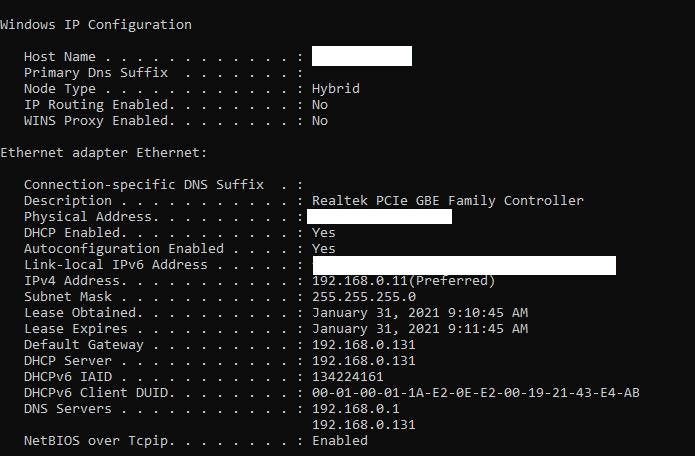
Make screenshot and place it in your reply.
2. Unplug one end of Ethernet cable from powerline adapter and plug that same cable end to Node 3. Reboot PC. Verify, if maybe PC got Internet connectivity. If not, open Command Prompt on PC and run again the following command:
ipconfig /all
Make screenshot and place it in your reply.
- Copy Link
- Report Inappropriate Content
Hi
Yes I have made sure that all 3 Deco LEDs have been green at all times.
Node 3 is shed with DESKTOP-RFTQW6QN (my laptop) and John's Galaxy-S10 connected.
Not sure if sending Screenshot of node3
Going to connect PC etc now will be slow (very old Dell).
JD

- Copy Link
- Report Inappropriate Content
- Copy Link
- Report Inappropriate Content
Much better speed now.
Do you get 2 pics?
RestRting now.
Yea, I have Internet 32.7 / 35.2.
Phone wufi 31.7 / 41.9.
Probably thr same.
Tha ks.
- Copy Link
- Report Inappropriate Content
- Copy Link
- Report Inappropriate Content
Information
Helpful: 0
Views: 2397
Replies: 26
Voters 0
No one has voted for it yet.