Deco satellite units connected behind a switch - one of 3 always uses WiFi connection to main deco

This thread has been locked for further replies. You can start a new thread to share your ideas or ask questions.

Deco satellite units connected behind a switch - one of 3 always uses WiFi connection to main deco

This thread has been locked for further replies. You can start a new thread to share your ideas or ask questions.

Deco satellite units connected behind a switch - one of 3 always uses WiFi connection to main deco
2022-12-09 12:02:58
Model: Deco X90   Deco M5  
Hardware Version:
Firmware Version:

I have an X90 connected to my main router in router mode (and it's the only thing connected to that router).

The 2nd port in the main X90 is connected to a switch together with 3 other decos. 


When I turn on my secondary deco units, two of them will use the ethernet backhaul and the 3rd will connect to the nearest deco using WiFi.


I tried changing the cables and the switch shows all 4 light blinking. Still, at no point I had backhaul active for all 4 units.


Any ideas why would that happen?


  0      
  0      
#1
Options
1 Reply
Re:Deco satellite units connected behind a switch - one of 3 always uses WiFi connection to main deco
2022-12-09 14:34:47 - last edited 2022-12-09 14:37:11

  @AdamTal 


What you describe points at switch which might not be compatible with Deco backhaul. There had been other reports when one or two Satellite Deco can use wired backhaul, but not all of them. This is a bit unusual, as one would expect switch either does support Deco backhaul for all Deco units or does not at all.

You haven't mentioned switch brand name and model number.


The topic of switches compatibility is discussed in the following TP-Link FAQ: General questions about Ethernet Backhaul feature on your Deco


Another possibility, even if less likely: Deco X90 has 2.5 gigabit and 1 gigabit Ethernet ports. If you have X90s as Satellites, what if their 2.5 gigabit Ethernet port can't negotiate proper link speed with the switch. Should not be happening, but who knows.


I would suggest you run two tests:


1. Make sure all your Deco X90 units, Main and Satellites, connected to Ethernet switch with their gigabit Ethernet port, not 2.5 gigabit port.


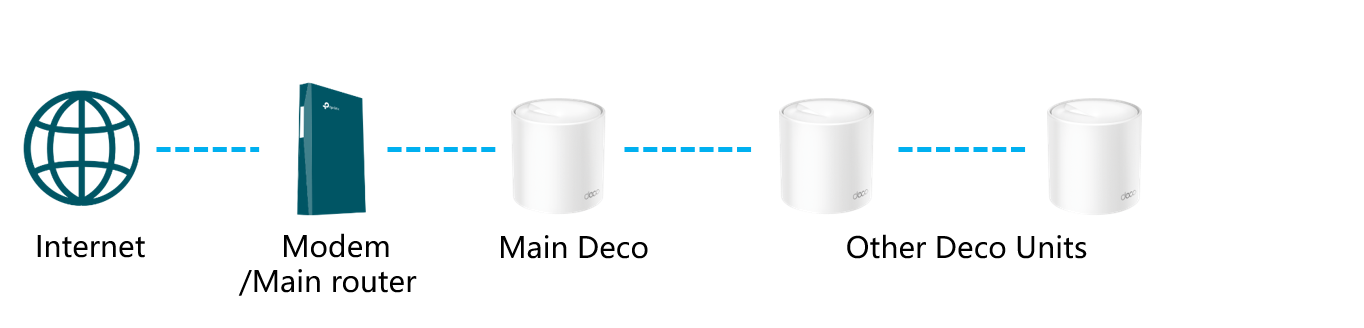
2. If that didn't fix the issue, bring all Satellite Deco units together and daisy chain them all, with Ethernet cables, like picture below but with all your three Satellites:


If all your three Satellite Deco in daisy chain report Ethernet backhaul, the switch is prime suspect.

  2  
  2  
#2
Options