Using AX53 as outbuilding access point on a BT broadband network

This thread has been locked for further replies. You can start a new thread to share your ideas or ask questions.

Using AX53 as outbuilding access point on a BT broadband network

This thread has been locked for further replies. You can start a new thread to share your ideas or ask questions.

Using AX53 as outbuilding access point on a BT broadband network
2023-03-20 10:54:27
Model: Archer AX53  
Hardware Version: V1
Firmware Version: 1.1.2 Build 20221019 rel.33889(4555)

I'm trying to extend my BT broadband connection to an outbuilding. The main router in our house is a BT Smart Hub 2, and I've run a Cat6 ethernet cable from the yellow Lan 1 on this hub to the outbuilding.

After trying a second BT Smart Hub 2 as an access point (didn't work even when changing IP address to outside home hub's range and turning off DHCP) and an old EE router (which did work intermittently while disrupting the internet back in the house for some reason) I bought a TP Link Archer AX53 to act as an easy access point in the outbuilding. 

I've changed the Archer AX53 to an access point via the admin portal and plugged the Cat 6 in the outbuilding into the WAN port on the AX53, powered on/off the AX53 and the modem/ smarthub 2 back in the house, but still no internet connection. The AX53 's first three lights are on. The Internet isn't.

I know the Cat 6 cable works because it allows wifi through an old EE router, and the AX53 even worked as an access point when daisy changed from the EEs Lan 1 yellow port to the AX53s WAN port with an additional ethernet. But the house internet turns on and off sporadically when connected to the EE router and I'd prefer to simplify everything and find a way to use the AX53 as the sole access point in our outbuilding. I've googled and searched and tried everything recommended that I can find, but still no luck.

To avoid all doubt, I brought the AX53 into the house and connected it to the same port on the smart hub, and it worked fine. So the AX53 works, the ethernet cable to the outbuilding works (in another router), but for some reason the AX53 doesn't connect to the internet when in the outbuilding. I'm stumped!

I'm hoping I've missed a simple setting and somewhere here can advise on the easiest way to get my AX53 working as an access point.

Thanks!

  0      
  0      
#1
Options
5 Reply
Re:Using AX53 as outbuilding access point on a BT broadband network
2023-03-20 11:39:26 - last edited 2023-03-20 17:38:52

  @ugandave 


Configuring AX53 in AP mode is very simple. Use this guode - Case 1. Use kit's AX53 ethernet cable for initial configuration and tests.

If everything works as expected inside the building, connect the AX53 into the outbuilding. If there are problems then you should check/change the outbuilding cabling.

If this was helpful click on the arrow pointing upward to make it blue. If this solves your issue, click the star to make it blue and mark the post as a "Recommended Solution".
  0  
  0  
#2
Options
Re:Using AX53 as outbuilding access point on a BT broadband network
2023-03-20 17:49:51

  @terziyski thanks for your thoughts. I have followed the steps in this film and on the face of it, yep, should be easy. It just doesn't work on the final step when I plug the ethernet in at the outbuilding. No lights, no recognition of a cable, nada.


The cable running from home hub to outbuilding is the obvious changing factor here, but I know it works in the outbuilding plugged into an old EE router used as an access point, giving speeds of 100mbps + , so I'm just trying to find out another reason why the connection isn't working through the AX53. I've spent hours on this trying every different recommendation I've found online.

  0  
  0  
#3
Options
Re:Using AX53 as outbuilding access point on a BT broadband network
2023-03-20 18:51:45

  @ugandave 


Well, if AX53 works as expected with the cable from its kit, but doesn't work with the outbuilding cable that means for some reason AX53 doesn't like outbuilding cable.

What you could do is to check the outbuilding cable with a ethernet cable tester and re-crimp (one of its ends or both because of loose wire) if neccessary. If your old EE router works with this cable it doesn't confirm that it will work with AX53. A quality cable with Catt 5E/6 will be enough for this type of connection.

If this was helpful click on the arrow pointing upward to make it blue. If this solves your issue, click the star to make it blue and mark the post as a "Recommended Solution".
  2  
  2  
#4
Options
Re:Using AX53 as outbuilding access point on a BT broadband network
2023-03-21 08:21:35

  @terziyski I hear you. I've re-crimped both ends and used a tester, it appears to work fine. It's a brand new high quality Cat6 cable, has internet connectivity. Just frustrating that the AX53 doesn't like it and was hoping for a solvable reason for this, or that there was a setting I'd missed that could turn this little project into a win. Thanks for trying to help, appreciate it. 

  0  
  0  
#5
Options
Re:Using AX53 as outbuilding access point on a BT broadband network
2023-03-21 22:29:23

  @ugandave 


If you're keen to get to the bottom of this issue you could:


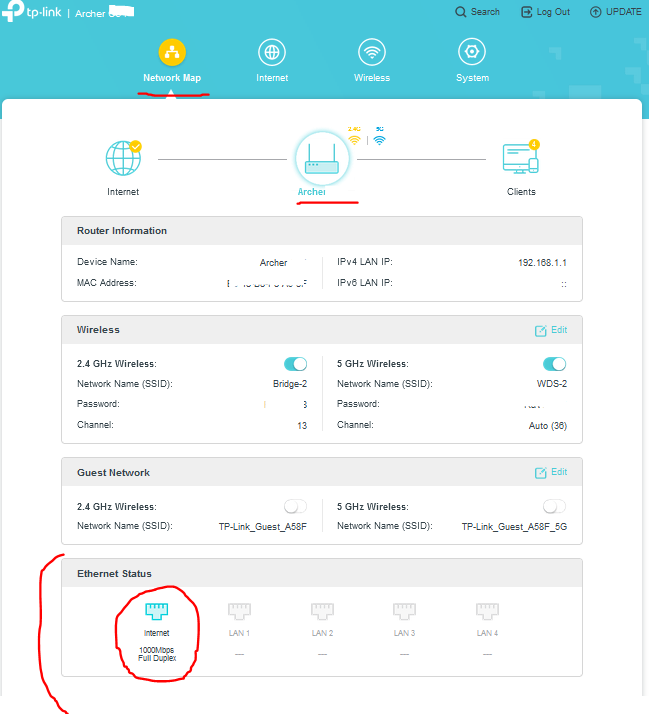
1. Compare the Internet port status of AX53 while in AP mode and using the kit's cable, then outbuilding cable:


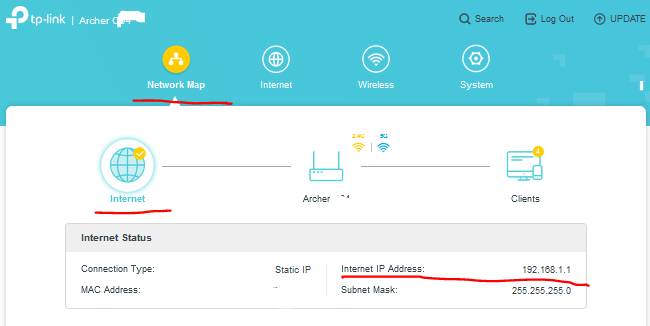
2. It would be informational if you also can compare the Internet status in both cases mentioned above:


If this was helpful click on the arrow pointing upward to make it blue. If this solves your issue, click the star to make it blue and mark the post as a "Recommended Solution".
  1  
  1  
#6
Options