Archer C7 portsharing

This thread has been locked for further replies. You can start a new thread to share your ideas or ask questions.

Archer C7 portsharing

This thread has been locked for further replies. You can start a new thread to share your ideas or ask questions.

Archer C7 portsharing
2023-04-03 12:37:20
Model: Archer C7  
Hardware Version: V4
Firmware Version: 1.0.7 Build 20180425 rel.62587(4555)

Hello, 

I need to get some ports free to use my 3CX Server. 

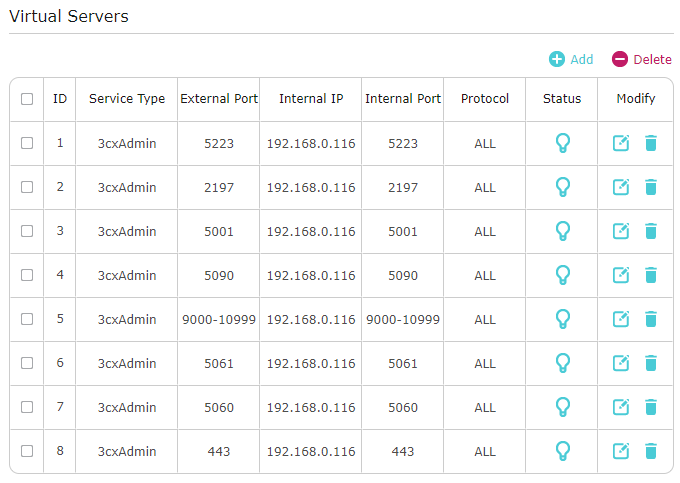
I tried this with NAT Forwarding / Virtual Servers, but it seems not to work. 


How could I do this correctly? 


This is what they say that I need: 
 

Open these ports to allow 3CX to communicate with the VoIP Provider/SIP Trunk and WebRTC:

  • Port 5060 (inbound, UDP) and 5060-5061 (inbound, TCP) for SIP communications.
  • Port 9000-10999 (inbound, UDP) for RTP (Audio) communications, i.e. the actual call. Each call requires 2 RTP ports, one to control the call and one for the call data, so the number of ports you need to open is double the number of simultaneous calls.

For Remote 3CX Apps & SBC

To allow users to use their 3CX apps remotely, on Android, iOS or Windows, you need to ensure that these ports are open:

  • Port 5090 (inbound, UDP and TCP) for the 3CX tunnel.
  • Port 443 or 5001 (inbound, TCP) HTTPS for Presence and Provisioning, or the custom HTTPS port you specified.
  • Port 443 (outbound, TCP) for Google Android Push.
  • Port 443, 2197 and 5223 (outbound, TCP) for Apple iOS Push.


I can do a "Firewall Check" in the 3CX WebGUI and it says that none of this ports are free... 


This is what I did (i actually just changed the IP address to 192.168.0.3): 
 

greets 

Roy

  0      
  0      
#1
Options
5 Reply
Re:Archer C7 portsharing
2023-04-03 17:42:53

  @thiro 


Hi,


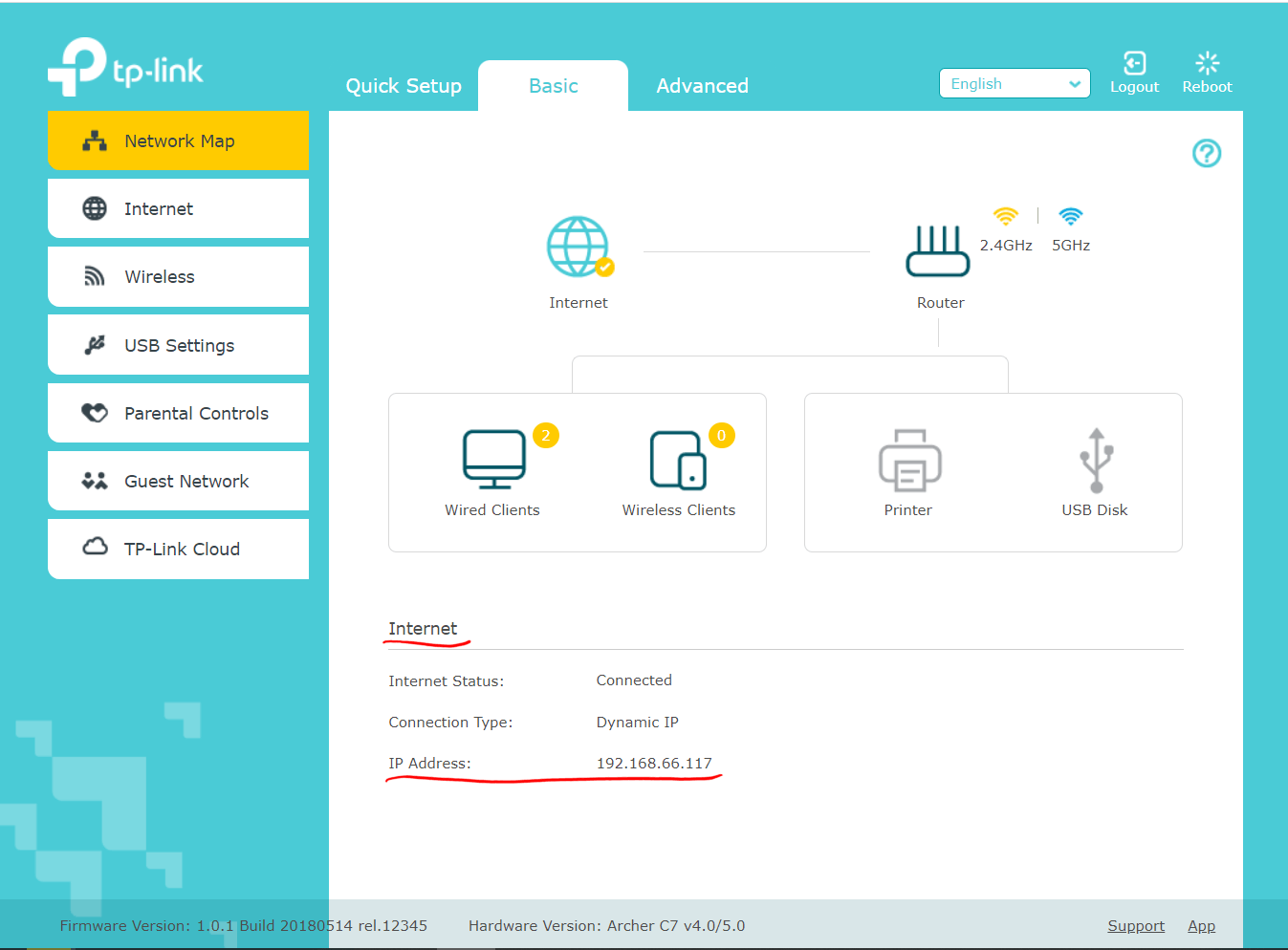
Could you please first confirm that the Internet IP address your Archer C7 is acquiring is a public IPv4 address?


In case you are unsure what I mean, log into your Archer C7's admin webpage and verify that the IP address I tagged in the screenshot below does not fall within the following segments of IP addresses:
10.0.0.0 - 10.255.255.255
172.16.0.0 - 172.31.255.255
192.168.0.0 - 192.168.255.255
100.64.0.0 - 100.127.255.255


  0  
  0  
#2
Options
Re:Archer C7 portsharing
2023-04-04 16:50:12

  @woozle 


Hello, 


The Public IP is in the 100.68.144.xxx 


greets 
Roy

  0  
  0  
#3
Options
Re:Archer C7 portsharing
2023-04-04 18:21:14 - last edited 2023-04-04 18:22:15

  @thiro 


I see.


The address 100.68.144.xxx falls within the range 100.64.0.0 - 100.127.255.255, which are not public IP addresses. (according to Wikipedia since April 2012)


This IP address range is used by Internet Service Providers to implement what is called a "CG-NAT".

It is basically a large scale "router" that shares a given number of actual public IP addresses between a much larger number of end users. (somewhat similar to your Archer C7 sharing one Internet connection via NAT to all your phones, tablets, computers at home)


That CG-NAT is the reason why you can't access your 3CX Server's services from the Internet.


  0  
  0  
#4
Options
Re:Archer C7 portsharing
2023-04-05 03:47:41

  @woozle 


So I bought a NUC Mini-PC for nothing? 

Is there any way to get this working? 


I'm very disappointed now :-( 

I bought first a Raspberry Pi4 8GB (200 bugs), which is no longer supported by 3CX, after this I tried to use FreePBX, which is only supported for the 4GB, and not for the 8GB, so I decided to bux an Intel NUC Mini PC which is good for 3CX (again like 200 bugs) and now there is no way to get it working? 


That's not even sad, that's heartbreaking :-( 


greets

Roy

  0  
  0  
#5
Options
Re:Archer C7 portsharing
2023-04-05 17:54:04 - last edited 2023-04-05 17:54:47

  @thiro 


Yes, there are ways to get this working. Here is what you can do, from best case to worst case.


Contact your Internet Service Provider (ISP) and kindly ask them if they can assign a "public IPv4 address" to your Internet connection. 
(whether that be a "static" public IPv4 address or "dynamic" public IPv4 address won't matter much. Normally it will be a dynamically assigned address that changes every so often, so you will have to utilize DDNS)


  Case 1: ISP will switch your Internet connection to a public IPv4 address and everything is fine.


  Case 2: ISP will tell you that you need to pay an additional (montly) fee or switch to another (usually more expensive) Internet package to get a public IPv4 address. 
  -> Then it's up to you if you accept their offer or not.


  Case 3: ISP tells you they cannot give you a public IPv4 address.
  -> In this case you would need to terminate business with you ISP and look for another available ISP that does assign public IPv4 addresses, either by default or upon user's request.


  Finally, the very worst case would be if your current ISP is the only one available at your place and also refuses to give you a public IPv4 address.


  0  
  0  
#6
Options