
MR600 band 1/3/28 not working
 This thread has been locked for further replies. You can start a new thread to share your ideas or ask questions.
MR600 band 1/3/28 not working
Posts: 2
Helpful: 0
Solutions: 0
Stories: 0
Registered: 2023-07-21

2023-07-21 16:55:22
Posts: 2
Helpful: 0
Solutions: 0
Stories: 0
Registered: 2023-07-21
MR600 band 1/3/28 not working
2023-07-21 16:55:22
Tags:
Model:
Archer MR600
Hardware Version: V3
Firmware Version: Version: 1.1.0 0.9.1 v0001.0 Build 220727 Rel.74013n
Model: Archer MR600
Hardware Version: V3
Firmware Version: 1.1.0 0.9.1 v0001.0 Build 220727 Rel.74013n
MR600 band 1/3 not working
Its function is gone.
there is only 28 40 41
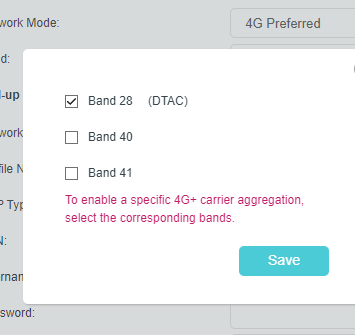
model mr600 v3
#1
Options
- Copy Link
- Subscribe
- Bookmark
- Report Inappropriate Content
Thread Manage
Module Manage
Announcement Manage
3 Reply


Posts: 7376
Helpful: 1374
Solutions: 941
Stories: 0
Registered: 2018-12-17
Re:MR600 band 1/3/28 not working
2023-07-26 09:29:31
Hi, the manual band searching will only find available bands nearby, please confirm if there is 4G signal with band 1 and 3 in the area.
You could also insert the same SIM card into your phone at the same location and check 4G band working on your phone:
Nice to Meet You in Our TP-Link Community.
Check Out the Latest Posts:
Archer GE550 - BE9300 Tri-Band Wi-Fi 7 Gaming Router
EasyMesh Is Available When Wi-Fi Routers Work in AP Mode as A Controller.
Archer BE550 New Software Enhances System Stability and Optimizes MLO Network Stability.
TL-WA3001 Supports EasyMesh, Speed Limit, Guest Network in AP Mode and/or Multi-SSID Mode.
If you found the post or response helpful, please click Helpful. If an answer solves your problem, click "Recommended Solution" so that others can benefit from it.
0
We appreciate your feedback. Feel free to let us know more. Log in to submit feedback.
0
We appreciate your feedback. Feel free to let us know more. Log in to submit feedback.
#2
Options
- Copy Link
- Report Inappropriate Content
Thread Manage
Module Manage
Announcement Manage
Posts: 2
Helpful: 0
Solutions: 0
Stories: 0
Registered: 2023-07-21
Re:MR600 band 1/3/28 not working
2023-08-20 06:57:26
I used to use b1 before the signal disappeared. Try changing the SIM card and it's the same.
0
We appreciate your feedback. Feel free to let us know more. Log in to submit feedback.
0
We appreciate your feedback. Feel free to let us know more. Log in to submit feedback.
#3
Options
- Copy Link
- Report Inappropriate Content
Thread Manage
Module Manage
Announcement Manage
Posts: 7376
Helpful: 1374
Solutions: 941
Stories: 0
Registered: 2018-12-17
Re:MR600 band 1/3/28 not working
2023-08-23 07:08:54
Hi, please try to insert the same SIM card into your phone at the same location and check if your phone is using band 1 or not:
Nice to Meet You in Our TP-Link Community.
Check Out the Latest Posts:
Archer GE550 - BE9300 Tri-Band Wi-Fi 7 Gaming Router
EasyMesh Is Available When Wi-Fi Routers Work in AP Mode as A Controller.
Archer BE550 New Software Enhances System Stability and Optimizes MLO Network Stability.
TL-WA3001 Supports EasyMesh, Speed Limit, Guest Network in AP Mode and/or Multi-SSID Mode.
If you found the post or response helpful, please click Helpful. If an answer solves your problem, click "Recommended Solution" so that others can benefit from it.
0
We appreciate your feedback. Feel free to let us know more. Log in to submit feedback.
0
We appreciate your feedback. Feel free to let us know more. Log in to submit feedback.
#4
Options
- Copy Link
- Report Inappropriate Content
Thread Manage
Module Manage
Announcement Manage
Posts: 2
Helpful: 0
Solutions: 0
Stories: 0
Registered: 2023-07-21
2023-07-21 16:55:22
Posts: 2
Helpful: 0
Solutions: 0
Stories: 0
Registered: 2023-07-21
Information
Helpful: 0
Views: 846
Replies: 3
Voters 0
No one has voted for it yet.
Tags
Report Inappropriate Content
Transfer Module
New message