Slow connection with TL-MR110

This thread has been locked for further replies. You can start a new thread to share your ideas or ask questions.

Slow connection with TL-MR110

This thread has been locked for further replies. You can start a new thread to share your ideas or ask questions.

Slow connection with TL-MR110
2024-05-17 10:58:20
Model: TL-MR100  
Hardware Version: V3
Firmware Version: 231101

I purchased a TL-MR110 a couple of days ago.


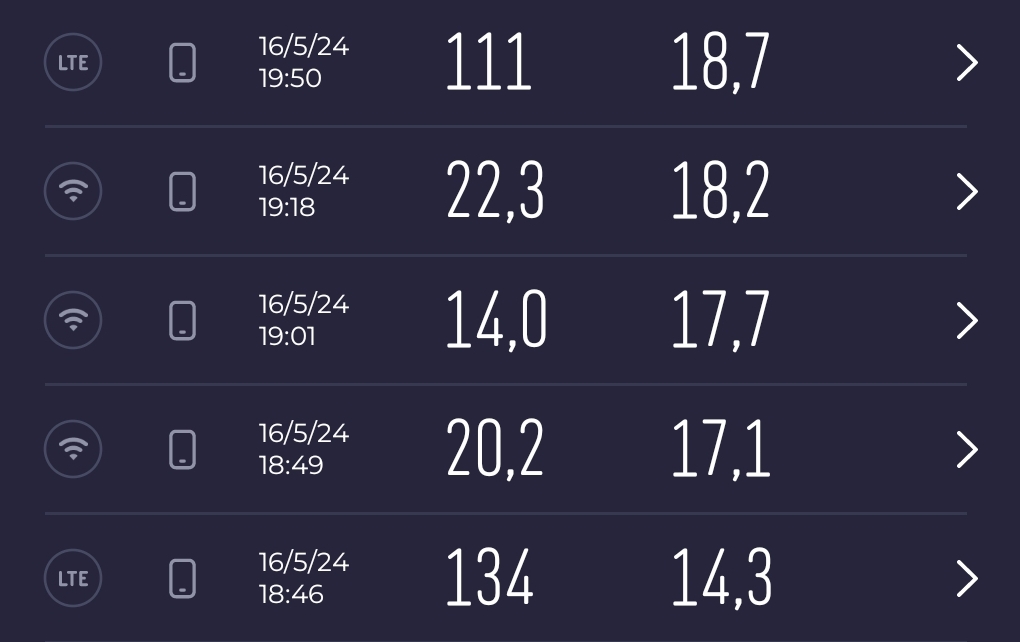
Through speedtest on Android smartphone I found a much lower speed when connected to the router's wifi, compared to that obtained from a direct LTE connection when the smartphone is equipped with the same SIM, as visible in the attached image (first column: download rate; second column: upload rate). A difference between the two cases is that in the second one the smartphone has a 4G+ connection.  Furthermore, it is clear to me that in the first case the data pass through the router before reaching the smartphone, while in the second one the connection is direct, but I don't expect such a noticeable difference in bandwidth. These measurements were taken in an indentical position inside my home, and within a few minutes between each other.


I would ask you to help me understand if this is the maximum performances I can achieve, and if not, to help me set the router correctly so as to have similar performance in the two cases.


Thank you in advance.


  0      
  0      
#1
Options
3 Reply
Re:Slow connection with TL-MR110
2024-05-20 06:11:33 - last edited 2024-05-20 06:14:44

  @backay1 


Hi, thanks for posting question here.

Can the router get 4G+ connection with the SIM card?

Please connect a wired PC to the router via Ethernet cable to test speed via speedtest.net, then compare the speed result when you insert the SIM card into your smartphone.

For your reference: How to troubleshoot if I have low speed with TP-Link Wireless 4G LTE Router working as 3G 4G Router Mode

  0  
  0  
#2
Options
Re:Slow connection with TL-MR110
2024-05-20 12:27:47

Hi @Marvin_S,


Thank you for your reply.

The router can't get 4G+ connection.

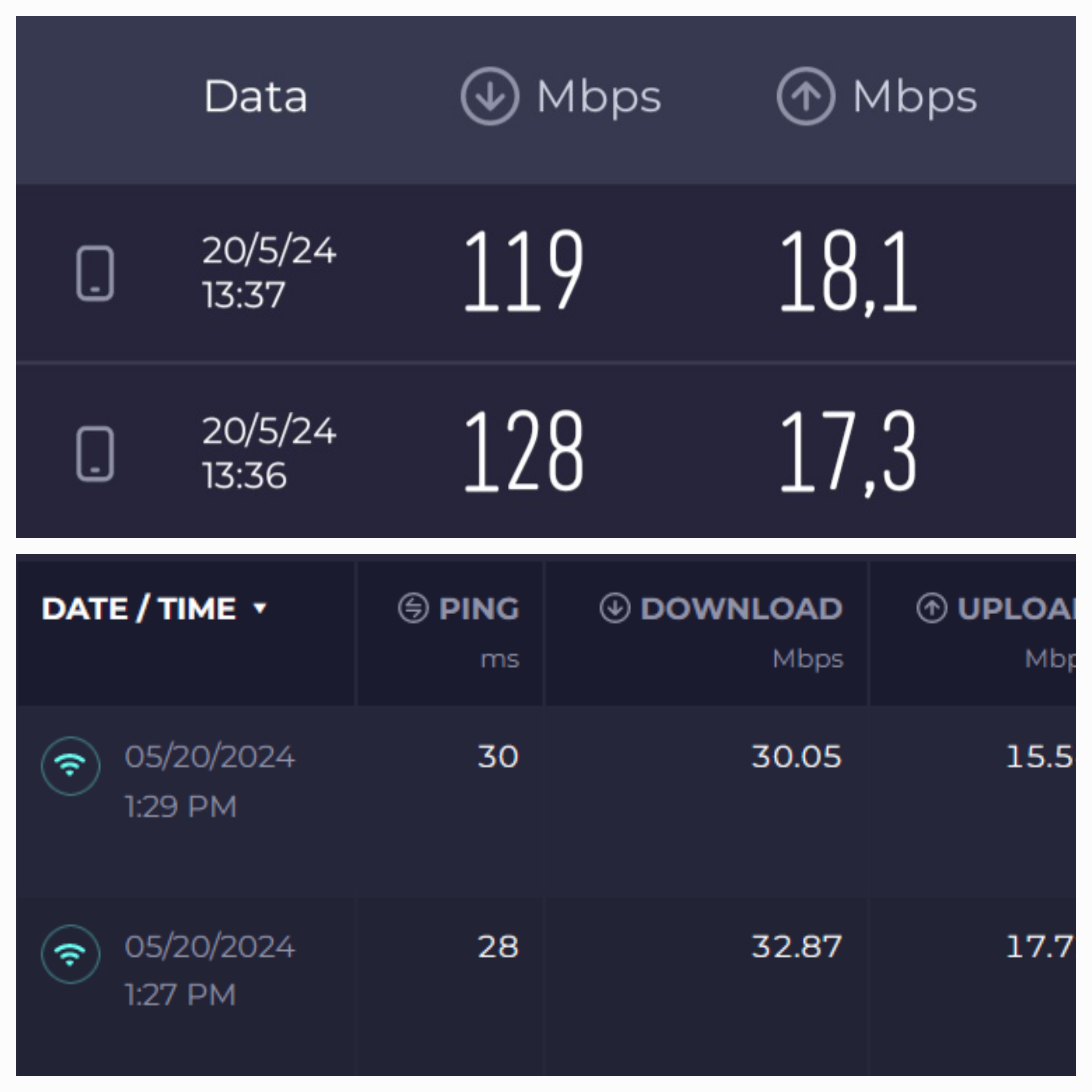
I've done the test you requested. The results are the same as those shared in the previous post (top image: 4G+ smartphone with SIM connection; bottom image: PC connected to the router via ethernet cable):


Link you attached links to: How to monitor data usage of TP-Link Wireless Dual Band 4G LTE Router (new logo)?. Is what you intended?

  0  
  0  
#3
Options
Re:Slow connection with TL-MR110
2024-05-22 02:42:02

  @backay1 


Sorry that I attached the wrong link. Also, TL-MR110 does not support 4G+.

Please follow the FAQ to troubleshoot: How to troubleshoot if I have low speed with TP-Link Wireless 4G LTE Router working as 3G/4G Router Mode

4G Internet speed can be affected by lots of factors, if you are experiencing low speed issue on TP-Link 4G LTE Router, please insert the same SIM card into another 4G device with the same UE Capability, such as LTE Cat4 or LTE-Advanced Cat6 etc., then compare the speed to see if it is really the router issue.

Also, in the FAQ, it explains why it is not suggested to compare speed using a phone.


  0  
  0  
#4
Options