Archer AX10 and EX220 Mesh Fail

This thread has been locked for further replies. You can start a new thread to share your ideas or ask questions.

Archer AX10 and EX220 Mesh Fail

This thread has been locked for further replies. You can start a new thread to share your ideas or ask questions.

Archer AX10 and EX220 Mesh Fail
2024-07-15 12:21:22 - last edited 2024-10-25 08:26:40
Model: EX220   Archer AX10  
Hardware Version: V1
Firmware Version:

Hi, 

I'm trying to create a mesh network between an EX220(A1800) and an Archer AX10, both TP-Link product, and both from my ISP, which claims to be possible.

The EX220 is set as the main router, with Internet connection and I'm trying to add the AX10 as a mesh device, but it always fails to add it. 

These are the steps I do:

Login to AX10, go to EasyMesh and reset as satellite router, disconnect the cable from it, wait for it to completely reboot while I login to EX220, to go Mesh, add mesh device, press WPS button on AX10(after the power led remains on) then click "I have pressed the WPS button" back in the EX220, it starts the search but always fails with "Error! Failed to add the device!"


Any tips and tricks on how to do it?


PS: I have tried the other way around, with the AX10 as the main router and EX220 as satellite router and it worked, but since the EX220 is a newer device, I would prefer it as the main one. 

  0      
  0      
#1
Options
5 Reply
Re:Archer AX10 and EX220 Mesh Fail
2024-07-16 03:38:37

  @Relutzzzu 


Hi, thanks for posting question here.

It seems that you tried two methods at the same time. You may follow the instructions in this guide to try again.


  0  
  0  
#2
Options
Re:Archer AX10 and EX220 Mesh Fail
2024-07-16 10:05:23 - last edited 2024-07-16 10:06:30

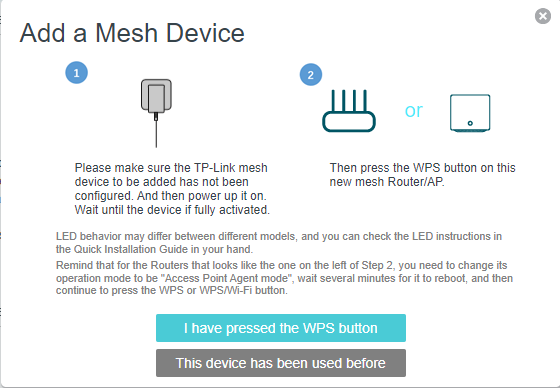
  @Marvin_S That quide seems a bit outdated. What I get for option on the EX220 looks different. This is what I get when I click add device on the Mesh page:

The first option will search for the other device and end in fail. The second option will give instruction on how to reset the other device and return back to this.

I followed the instructions multiple times and ended up with fail each time.

  0  
  0  
#3
Options
Re:Archer AX10 and EX220 Mesh Fail
2024-07-17 10:40:08 - last edited 2024-07-17 10:41:07

  @Relutzzzu 


Hi, thanks for your update.

EX220 is a customized model for ISPs only,  and its design may be dfferent from TP-Link common models, so it is normal that the guide is not totally suitable for your EX220.

When you add AX10 as satellite router and the error message "Error! Failed to add the device!" pops up, can you try to wait for several minutes then check whether AX10 showing in the network topology of EX220 on Network Map page?


  0  
  0  
#4
Options
Re:Archer AX10 and EX220 Mesh Fail
2024-07-17 13:17:25

  @Marvin_S I actually tried that before, but I tried once more and still nothing. 

I left it with the error message untile the page logged me out and even more than that.

The AX10 is also from my ISP and with their firmware on it, so maybe they messed something.


Thanks for trying though. 


I think I'll go to my ISP and replace the AX10 with another EX220. Maybe between 2 of the same model it will work from the first try. 


  0  
  0  
#5
Options
Re:Archer AX10 and EX220 Mesh Fail
2024-07-18 02:13:22

  @Relutzzzu 


Hi, thanks for your update.

After resetting Archer AX10, you may also try to press the WPS button on EX220 and Archer AX10 directly to check whether it works, without configuring via web UI.

It is not a bad idea to use same model to set up easymesh network.


  0  
  0  
#6
Options