
No Wifi
 This thread has been locked for further replies. You can start a new thread to share your ideas or ask questions.
I have just got my new BE9300 fresh out of the box.
Not getting any WIFI, switch on the front of the router does nothing.
Can only connect to the internet via Ethernet cable.
Cannot log in to the router to change any settings either via the app on my phone or on my laptop via 192.168.0.1 or http://tplinkwifi.net.
Not sure if I am an idiot, (More than likely), or there is a fault with this brand new unit?
Any help please?
- Copy Link
- Subscribe
- Bookmark
- Report Inappropriate Content


Hi @Horne65,
If you can get internet from this router via wired connection, that means you have configured the router.
If only WiFi is not broadcasting properly, it may be that WiFi is hidden during the configuration process.
Please try the following 2 methods:
1. How to check if you hide the network name (SSID) of a TP-Link router?
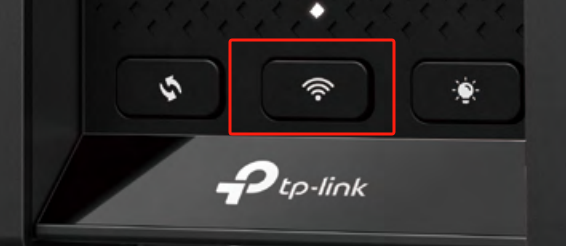
2. Press and hold this button for about 2 seconds to turn on or off the wireless function of your router.
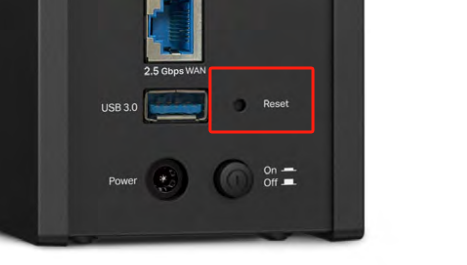
If the suggestions above don't resolve the issue, please press and hold the reset button until the LED blinks to reset the router to its factory default settings.Press and hold the button until the LED blinks to reset the router to its factory default settings.
- Copy Link
- Report Inappropriate Content
Hi @Horne65,
If you are experiencing issues with your devices not detecting the Wi-Fi network of your TP-Link Archer Router, please follow the troubleshooting steps below:
1. Check the WI-FI lights, if they are off, press the WI-FI/WPS button on the back of router for about 2 seconds to turn on or off the wireless function of your router, then confirm whether the WI-FI can be detected when lights are stable.
2. If WI-FI lights are on, open the Tether APP, go to More > Wi-Fi Settings, and make sure the wireless network is enabled and not hidden.
3. Check whether all your devices can't see the TP-LINK WI-FI, if only certain devices, update the driver or system on your wireless client device.
4. Try another Router with your wireless devices for a comparison.
5. Try to hard reset router.
- Copy Link
- Report Inappropriate Content
@Joseph-TP I have been in touch with TP who gave me a list of items to do, I did everything.
If I connect my laptop to the TP router via ethernet cable I get Internet but cannot connect to the router interface.
I am getting no TP WIFI SSID on my mobile, a Samsung Galaxy S22+, which may not be capable of connection.
I have installed a new Intel BE2000 WIFI card in my laptop, installed all the drivers and again getting no TP SSID connections.
I cannot suggest what you said try as the TP tether cannot find any devices.
On the BE9300, when I push the WIFI button which is on the front of the router nothing happens, does not matter if I quick press the button, hold it for two seconds as instructed or keep it pressed in, nothing happens.
- Copy Link
- Report Inappropriate Content
Hi @Horne65,
If you can get internet from this router via wired connection, that means you have configured the router.
If only WiFi is not broadcasting properly, it may be that WiFi is hidden during the configuration process.
Please try the following 2 methods:
1. How to check if you hide the network name (SSID) of a TP-Link router?
2. Press and hold this button for about 2 seconds to turn on or off the wireless function of your router.
If the suggestions above don't resolve the issue, please press and hold the reset button until the LED blinks to reset the router to its factory default settings.Press and hold the button until the LED blinks to reset the router to its factory default settings.
- Copy Link
- Report Inappropriate Content
Information
Helpful: 0
Views: 607
Replies: 3
Voters 0
No one has voted for it yet.