
Not able to login BE900 router admin webpage
 This thread has been locked for further replies. You can start a new thread to share your ideas or ask questions.
Not able to login BE900 router admin webpage
This thread has been locked for further replies. You can start a new thread to share your ideas or ask questions.
I just purchased BE900(main router) and BE550(satelitte Router).
At first, i am able to login to the BE900 admin webpage via my macbook pc.
After finished all the settings, setup BE550 as satelittle router.
Everything looks fine at Tether APP.
But things turn to weird at admin webpage level. I am not able to login the admin web page, via 192.168.0.1.
Specially, it requires me to input the local password, i filled the password and hit Login button, then nothing happens.
Maybe first time, it ask me if need to force other client out. I clicked yes, then input the local password, press the login button, nothing happens,
It just keep at that login page...
I have tried with other mac pc and all kinds of browser... All not working...
It just stay at that login page...
Please kindly help.
- Copy Link
- Subscribe
- Bookmark
- Report Inappropriate Content


Hi, thanks for posting question here.
It is a pity that most troubleshooting methods failed to help you.
It is more suggested to contact local technical support or retailer to confirm warranty.
You may provide your troubleshooting steps here as an evidence.
Thank you for your cooperation and patience.
Best regards.
- Copy Link
- Report Inappropriate Content
- Copy Link
- Report Inappropriate Content
Thanks a lot for the reply.
I have switched off the satelitte router BE550, and i am stil not able to login main router's admin webpage.
Could please let me know how to check the default gateway of the satelitte router BE550?
Below is the main Router(BE900) default gateway:
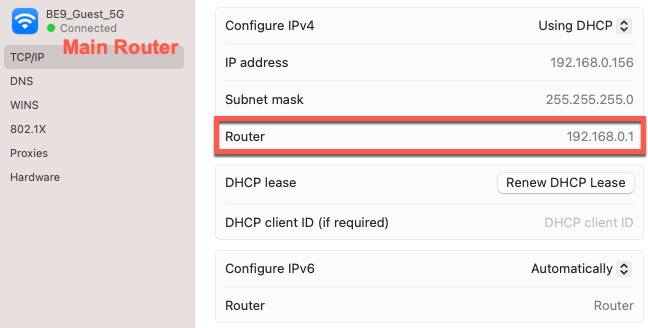
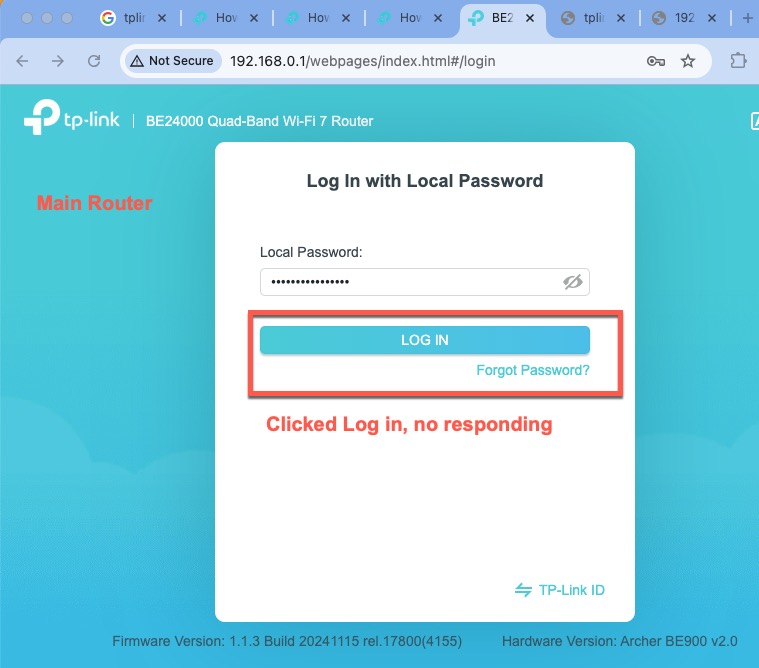
Thank you very much.
- Copy Link
- Report Inappropriate Content
I have restored the BE900 to factory set several times. Each time, the router is asking me to create a local password, and i did, then i press continue, it will say disconnected, operation failed. But when i visit 192.168.0.1 again, it shows the login window and asking for local password. Then i input the password i just created, click login, it just wont work, nothing happens, the screen kept showing login window...
- Copy Link
- Report Inappropriate Content
And it seems the tether app could login, but can not adjust any wifi settings, it said "operation failed" or "failed"
This means i could not do any settings to it.
I just noticed even when i set it to factory settings each time, it still has the old settings as my 1st time setup at tether app. Especially the wifi name and password.
Not sure if the issue is related to the binding between the Easy tplink ID with the equipment.
The cloud data saved in easy tplink id override the local equipment even when local equipment be restored to factory???
Thank you.
- Copy Link
- Report Inappropriate Content

- Copy Link
- Report Inappropriate Content
I found out that i could login to BE550's web admin page via 198.168.0.1
And inside the admin page settings, i changed it to 198.168.2.1, so that i could access BE550's Web UI via 198.168.2.1 and it works.
After factory reset, BE990 still have the issue, as no response and not able to login BE990 Web admin page.
Then i tried to change the TCP/IP to manually to the Router gateway to 198.168.9.1, and not success, as below showed...
Not sure what to do now, as BE990 seems never ever let me enter into the web admin page anymore......
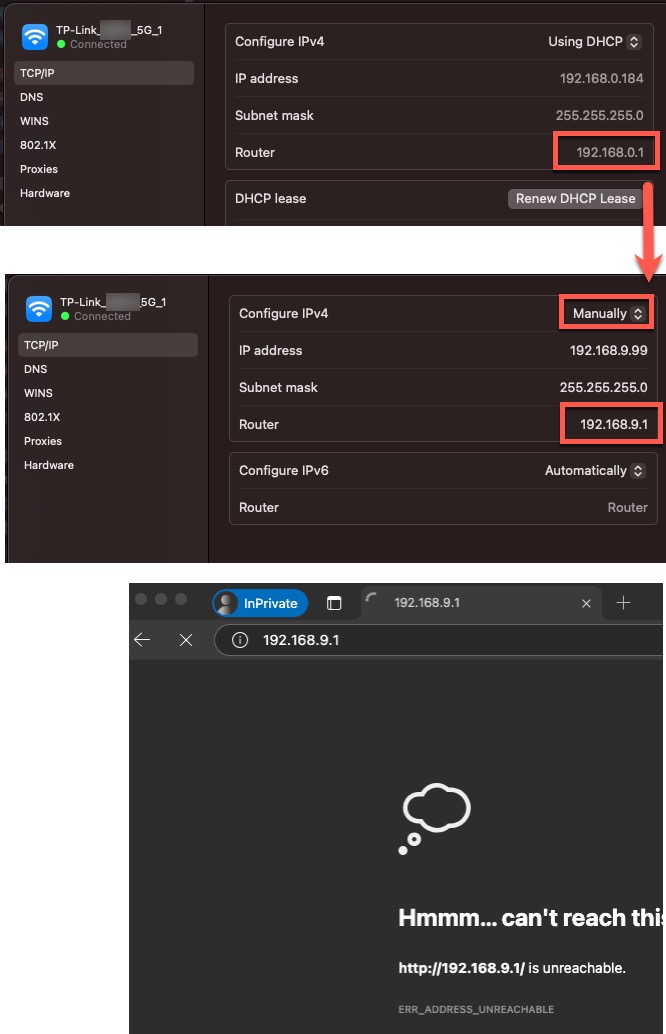
- Copy Link
- Report Inappropriate Content

Hi,
Have you ever been able to log into the admin webpage since you purchased the BE900?
Do you have any non-Apple devices you could use to try to login? (phone, Internet-capable TV, etc.)
After you reset the BE900 and then tried to login via the admin webpage, were you asked to set a new login password?
- Copy Link
- Report Inappropriate Content
Only the first time i successfully login BE900, everything is fine. I access the router via Wifi, as i dont have cable PC.
Then i started to setup BE550 as satelitte and i think i made a mistake, as it use same Router Gateway: 192.168.0.1
Since then, i am not able to login BE900 anymore...
I could only login BE550 via 192.168.0.1, later i changed BE550 to 192.168.2.1 and it works as well for BE550 with 2.1
But i just can not login BE900 with 192.168.0.1, even after Factory Reset...
I even thought is there any TPlink ID has cloud settings which will automatically set the BE900 even after factory settings...
--
Yes, i have andraid phone
Yes, it ask me to setup new local password, i put password and confirm passwork, then click next, no response
Then refresh, it goes to login window only ask for local password, then i put password, click login, no response
- Copy Link
- Report Inappropriate Content
I have tried with:
Macbookpro with wifi only - not able login BE900 web admin page - 192.168.0.1
Macbookpro with usbc-Lan adoptor LAN cable connect with BE900 - not able login BE900 web admin page - 192.168.0.1
iPhone with wifi only - not able login BE900 web admin page - 192.168.0.1
Andraid Phone with wifi only - not able login BE900 web admin page - 192.168.0.1
Chrome, Safari, Edge Browser - not able login BE900 web admin page - 192.168.0.1
Windows PC with wifi only - not able login BE900 web admin page - 192.168.0.1
... ...
Not sure what i could do? Thanks
- Copy Link
- Report Inappropriate Content
Is the BE900 connected to any other networks?
If so, then please unplug everything from the BE900 apart from the power cable and then try again to log into the admin webpage.
- Copy Link
- Report Inappropriate Content
Information
Helpful: 0
Views: 3140
Replies: 15
Voters 0
No one has voted for it yet.