
Failed login on 2.4GHz guest WIfI causes PC conn over LAN Cable lose connection for some programs
 This thread has been locked for further replies. You can start a new thread to share your ideas or ask questions.
Hello,
since several days both my 2.4 GHz and 5 GHz WIFi are targeted every half hour for one Login attempt.
The 5 GHz Login attempts cause nothing. But the 2.4 GHz attempts always disconnect me (PC (Win11) > LAN-cable > Router) from TeamSpeak. Automatic reconnect or manual connect to the TeamSpeak-Server does not work unitl I restart TeamSpeak. Then i can connect without problems until the next failed login attempt from the attacker happens. The same behavior for League of Legends. When the disconnect happens, I have to restart the game to reconnect. When automatic reconnects won't work, browsing the internet works just fine. The attack seems not to work with deauth. Because non of my WiFi connected devices have disconnects when the failed login attempts happen. So I guess it is a very slow paced bruteforce or so.
I tested another PC (Win10) connected with LAN-Cable to Router. It has no disconnects whatsoever.
I tested the affected PC with Linux. The disconnects happen in Linux too.
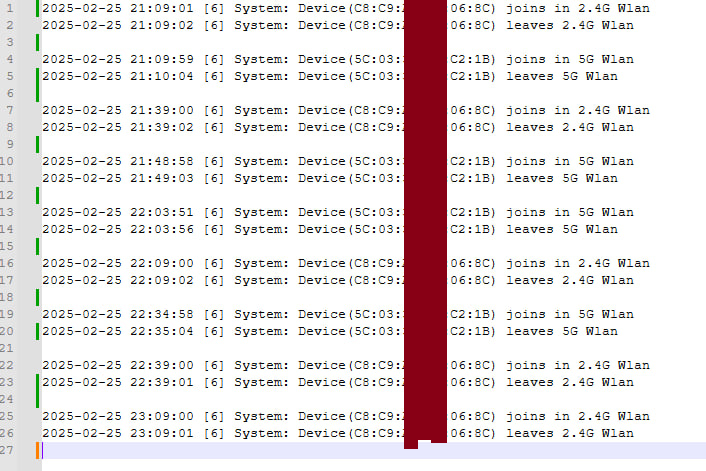
These are the failed login attempts in the router log. For every band one try every half hour.
Solution/Workaround: I changed encryption for the Guest-WiFis from WPA2 to WPA3 and the disconnects on my PC are gone. Alternatively disabling 2.4 GHz guest WiFi works also.
Why did the WPA2 failed login attempts made problems for a PC connect via LAN cable? It may be a bug.
One difference between the 2.4 GHz and the 5 GHz that caught my eye is the speed of the attempts. 2.4 GHz attempts need only 1 to 2 seconds. Whilst 5 G attempts need 6 seconds. The 2.4 GHz login attempts are so fast, that the syslog viewer (kiwi) that listens on port 514 for the router log often only logs "... joins in 2.4G Wlan" it misses "... leaves 2.4G Wlan". But of course "... leaves 2.4G Wlan" is stored properly in the local log on the router.
I cannot confirm if this happens on non guest 2.4G Wifi with WPA2 too. Because the attacks only happen on the Guest WiFis.
I just wanted to report this behavior if someone might run into the same problems or if it maybe is a firmware bug that could be ironed out.
Best regards

