Login details problem on app

This thread has been locked for further replies. You can start a new thread to share your ideas or ask questions.

Login details problem on app

This thread has been locked for further replies. You can start a new thread to share your ideas or ask questions.
Login details problem on app
2025-04-18 18:43:38 - last edited 2025-05-18 15:54:57
Model: RE450  
Hardware Version: V4
Firmware Version:

Setup the app and login Id and password 

When I click on the device it's asking for a login password which I haven't set up so won't let me go any further 

Please help

  0      
  0      
#1
Options
1 Accepted Solution
Re:Login details problem on app -Solution
2025-04-18 19:22:10 - last edited 2025-05-18 15:54:57

  @Chris227 


Hi,


If you are sure that password wasn't set by you, then reset the RE450 V4 by pressing and holding its "Reset" button (inside the small hole) and wait for a minute or two.

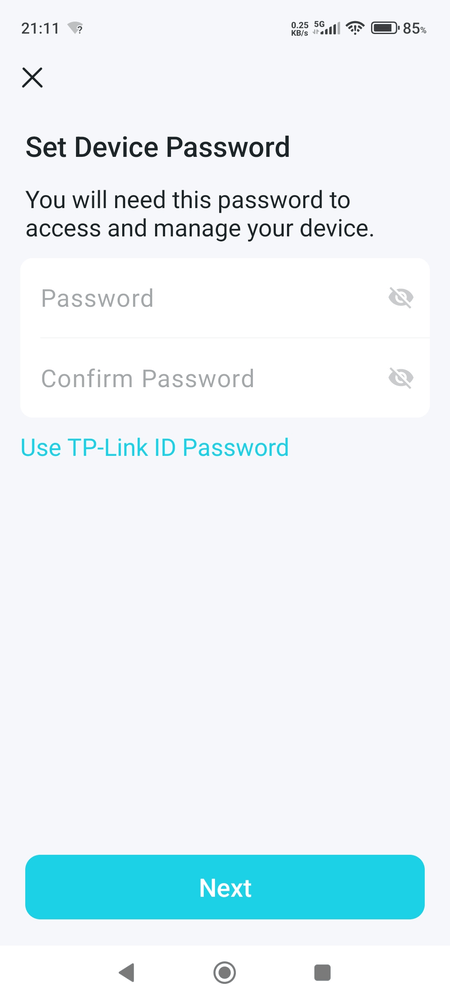
Then connect your phone or tablet with the Tether app again to the TP-Link-Extender network and click on the RE450 device. It should now ask you to set a device password, like shown in the screenshot below.


Recommended Solution
  0  
  0  
#2
Options
1 Reply
Re:Login details problem on app -Solution
2025-04-18 19:22:10 - last edited 2025-05-18 15:54:57

  @Chris227 


Hi,


If you are sure that password wasn't set by you, then reset the RE450 V4 by pressing and holding its "Reset" button (inside the small hole) and wait for a minute or two.

Then connect your phone or tablet with the Tether app again to the TP-Link-Extender network and click on the RE450 device. It should now ask you to set a device password, like shown in the screenshot below.


Recommended Solution
  0  
  0  
#2
Options