
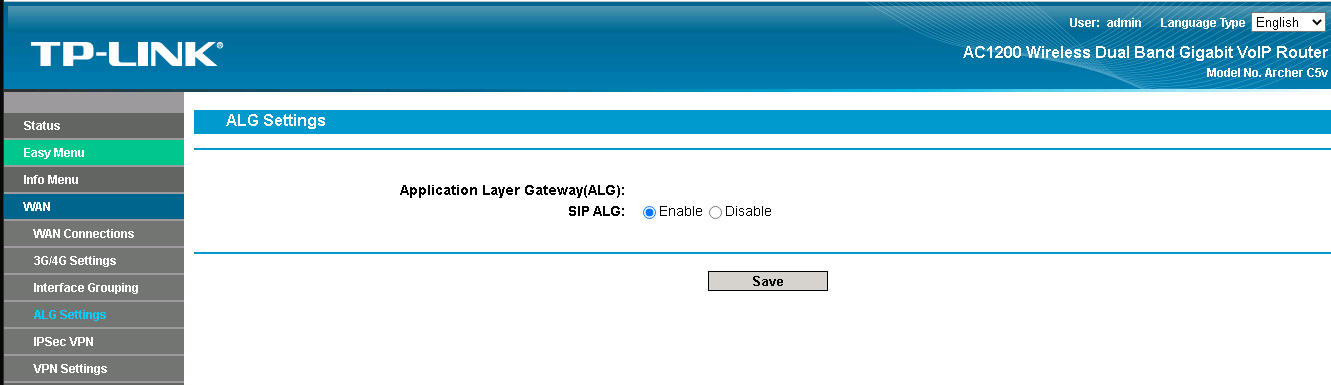
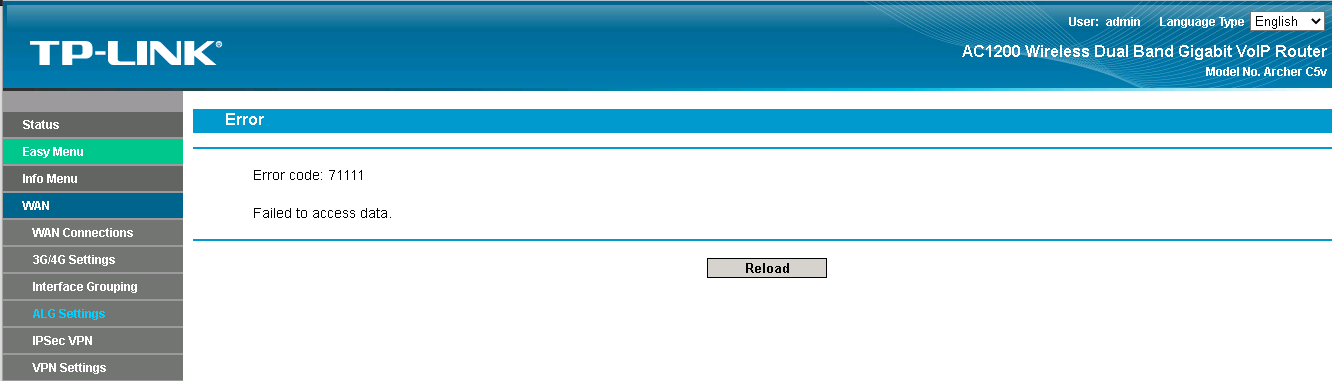
SIP ALG Settings "Error code: 71111 Failed to access data"
 This thread has been locked for further replies. You can start a new thread to share your ideas or ask questions.
Hi,
I am an IT manager in a textile company. I need to turn off the SIP-ALG setting from the router interface, but I get an error code of 71111. I need to turn off this setting so that the IP phones in our company work smoothly. The ISP in Turkey does not help me.TpLink's technical support team in Turkey is also not helping. This seems like the only place I can find a solution.Thanks in advance to those who help.
- Copy Link
- Subscribe
- Bookmark
- Report Inappropriate Content

@Baris64 Im having same problem. Did you manage to fix it ?
- Copy Link
- Report Inappropriate Content


Hi@Baris64,
Thank you for reporting your issue to our community.
Archer C5 is a customized device specifically designed for local Service Providers. Its software is tailored to meet the unique requirements of these providers, ensuring alignment with their specific needs. While our technical support team is adept at providing general guidance and suggestions for products with standard, generic firmware. However, due to the specialized nature of the firmware on your device, our ability to provide troubleshooting may be limited.
We can certainly offer some troubleshooting tips that may help resolve your issue. This error message may be caused by permissions, firmware restrictions, or configuration conflicts. Please consider the following:
- Please exit the router's web management interface and log in again;
- Please clear your browser cache and try to log in to the router again;
- Please change the device to log in to the router;
- If the above steps do not help, try resetting the router.
If the problem persists after trying these steps, we recommend contacting the technical support of your Service Provider who supplied the device, as they are best suited to provide the necessary assistance for your device.
- Copy Link
- Report Inappropriate Content
Hi @Rduna,
May I know what is the model number of your router? If it is also the Archer C5, please try the following suggestions and contact technical support of your Service Provider.
Joseph-TP wrote
Hi@Baris64,
Thank you for reporting your issue to our community.
Archer C5 is a customized device specifically designed for local Service Providers. Its software is tailored to meet the unique requirements of these providers, ensuring alignment with their specific needs. While our technical support team is adept at providing general guidance and suggestions for products with standard, generic firmware. However, due to the specialized nature of the firmware on your device, our ability to provide troubleshooting may be limited.
We can certainly offer some troubleshooting tips that may help resolve your issue. This error message may be caused by permissions, firmware restrictions, or configuration conflicts. Please consider the following:
- Please exit the router's web management interface and log in again;
- Please clear your browser cache and try to log in to the router again;
- Please change the device to log in to the router;
- If the above steps do not help, try resetting the router.
If the problem persists after trying these steps, we recommend contacting the technical support of your Service Provider who supplied the device, as they are best suited to provide the necessary assistance for your device.
- Copy Link
- Report Inappropriate Content
No, I did not solve the problem. They say the authorized person is the Service provider
- Copy Link
- Report Inappropriate Content
Information
Helpful: 0
Views: 791
Replies: 4
Voters 0
No one has voted for it yet.