
EASYMESH Not Working - RE605X + EX511
EASYMESH Not Working - RE605X + EX511

Hi community,
Recently, i have bought a Repeater RE605X and a router EX511 to create an EasyMesh network in my house but isn't working. In settings of the router, show that a connection was established but signal is terrible same the repeater near of th router:

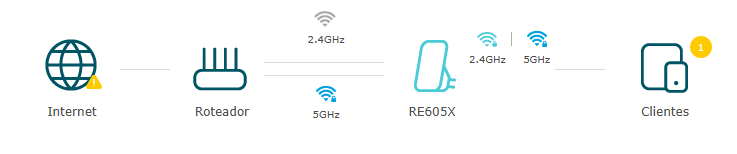
The both repeat and yours client devices don't get access to internet. Today, i try connect the repeat on router via cable to establish a ethernet backhal but not worked. Both router and repeater firmware are up to date:


A thing that i noted that in the repeat not appear the icon EasyMesh on SSIDs of my router:

- Copy Link
- Subscribe
- Bookmark
- Report Inappropriate Content

I have the combination of EX511 and RE305 extender and can't use the EasyMesh even tho both have on the box and settings that they support it!
This is completely stupid!
I've already updated both firmwares, tried using the app and web page, and nothing, the app just says the router does not support onemesh, and the web page says "Not connected to any EasyMesh network"
Trying through the wps method just goes "Failed to configure device"!
- Copy Link
- Report Inappropriate Content
Hi Saishy,
I still have the same problem. The engineer who was supporting me via email stopped responding, and TP-Link Brazil's technical support team stated that I don't need the Mesh solution and won't refund my money. Their actions are simply ridiculous. Below is a summary of their responses:
https://www.reclameaqui.com.br/tp-link-brasil/problemas-com-produtos-tp-link-adaptador-wireless-rede-easy-mesh_xJP5DycYRiND0_IZ/
- Copy Link
- Report Inappropriate Content
The problem continue and i will return the tests with the brazilian support.
- Copy Link
- Report Inappropriate Content
After one year and three mounths ago, i resolve my problem. The resume is:
- The TP-Link Brazil replace my repeater RE605X;
- I have change the channel 5ghz to 36 in router EX511, reset the new RE605X and the backhaul was establish on 5 ghz (I have tested alone, without support of TP-Link).
Other actions that i have execute:
- Guest Network disabled;
- Multi SSID disabled;
Finally, i have peace!
- Copy Link
- Report Inappropriate Content
Information
Helpful: 0
Views: 3939
Replies: 14
Voters 0
No one has voted for it yet.