
MU-MIMO option not show under 5ghz band

This thread has been locked for further replies. You can start a new thread to share your ideas or ask questions.

MU-MIMO option not show under 5ghz band

This thread has been locked for further replies. You can start a new thread to share your ideas or ask questions.

MU-MIMO option not show under 5ghz band
2025-04-26 03:41:19 - last edited 2025-04-26 03:43:57
Model: Archer AX12  
Hardware Version: V1
Firmware Version: 1.1.24 Build 20240823 Rel. 43366(5553)

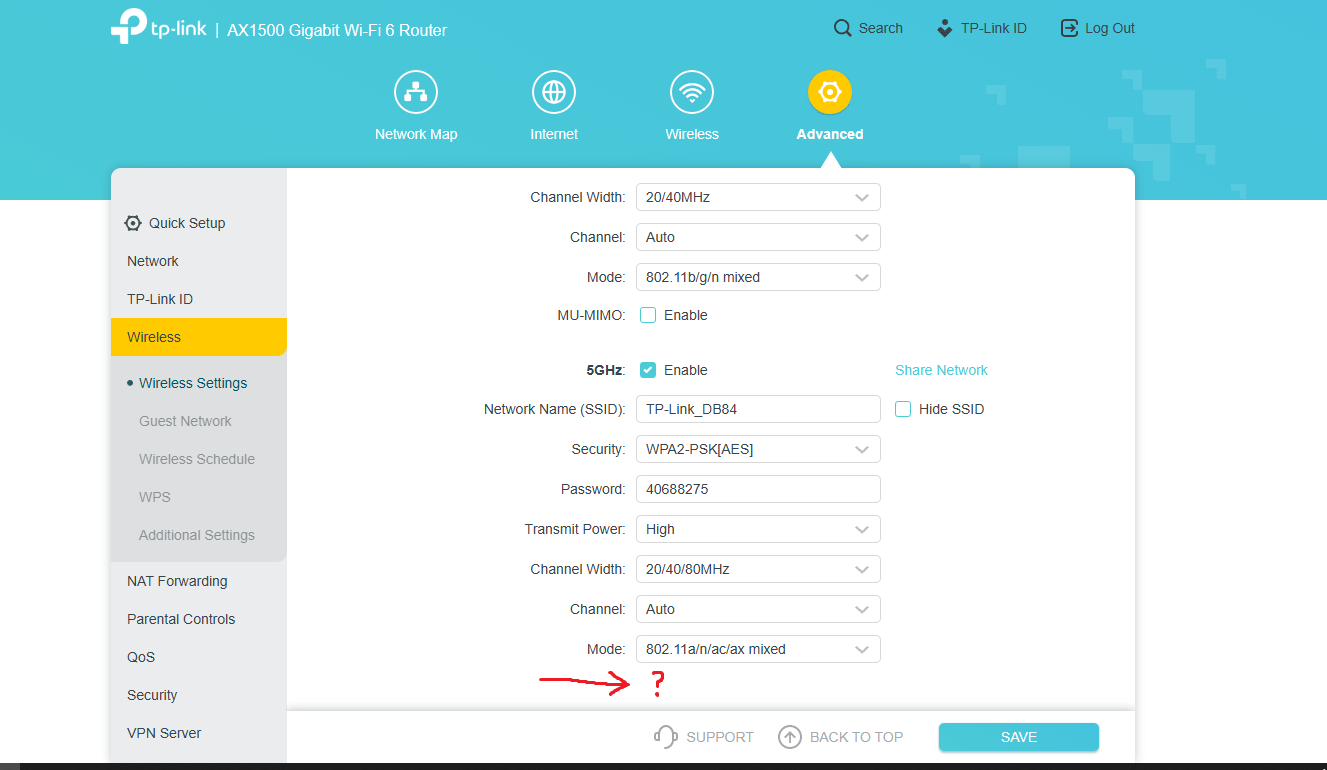
i cant find mu mimo option for 5ghz band after disable smart connect it only show for 2.4ghz band, please help!
 

  0      
  0      
#1
Options
7 Reply
Re:MU-MIMO option not show under 5ghz band
2025-04-27 08:22:33

Hi  @mfatur,

Thank you for reporting your feedback to our community.

Please refresh the web interface for a try. Please try different client to log in the web interface.

May I know, when did the issue occur? 

Nice to Meet You in Our TP-Link Community. Check Out the Latest Posts: △Pre-release Firmware for Archer AX50 Introduces New Parental Control Features and Enhancements △Introducing AI QoS: Elevate Your Gaming Experience on the Archer GE800 Gaming Router △Connect TP-Link Archer BE550 to Germany's DS-Lite (Dual Stack Lite) Internet via WAN △Tether KidShield Test Recruitment - Safeguarding Children's Online Experience If you found the post or response helpful, please click Helpful. If an answer solves your problem, click "Recommended Solution" so that others can benefit from it.
  0  
  0  
#2
Options
Re:MU-MIMO option not show under 5ghz band
2025-04-27 12:45:34 - last edited 2025-04-27 12:52:27

Joseph-TP wrote

Hi  @mfatur,

Thank you for reporting your feedback to our community.

Please refresh the web interface for a try. Please try different client to log in the web interface.

May I know, when did the issue occur? 

the issue happen since the first i buy the router about week ago sir

  0  
  0  
#5
Options
Re:MU-MIMO option not show under 5ghz band
2025-04-29 11:22:55

 Hi@mfatur,

Thanks for your reply.

This is really strange. Do you need this function urgently? If so, I suggest you reset the router and reconfigure it. If the problem persists, I suggest you replace it with a new one from the retailer.

Nice to Meet You in Our TP-Link Community. Check Out the Latest Posts: △Pre-release Firmware for Archer AX50 Introduces New Parental Control Features and Enhancements △Introducing AI QoS: Elevate Your Gaming Experience on the Archer GE800 Gaming Router △Connect TP-Link Archer BE550 to Germany's DS-Lite (Dual Stack Lite) Internet via WAN △Tether KidShield Test Recruitment - Safeguarding Children's Online Experience If you found the post or response helpful, please click Helpful. If an answer solves your problem, click "Recommended Solution" so that others can benefit from it.
  0  
  0  
#6
Options
Re:MU-MIMO option not show under 5ghz band
2025-04-29 11:25:44

  @Joseph-TP yes i check from the official webpage ax12 is support mu mimo but i dont see this option what should i do?

  0  
  0  
#7
Options
Re:MU-MIMO option not show under 5ghz band
2025-05-06 01:55:01

Hi@mfatur,

Sorry for the late reply.

It looks like a display issue, would you mind collecting a backup file for us to analyze?

How to create and restore from a backup file on your TP-Link Router


Please email the file to support.forum@tp-link.com, attaching [Forum ID 812040] and details, and we will have a dedicated person to assist in analysis and follow-up.

Nice to Meet You in Our TP-Link Community. Check Out the Latest Posts: △Pre-release Firmware for Archer AX50 Introduces New Parental Control Features and Enhancements △Introducing AI QoS: Elevate Your Gaming Experience on the Archer GE800 Gaming Router △Connect TP-Link Archer BE550 to Germany's DS-Lite (Dual Stack Lite) Internet via WAN △Tether KidShield Test Recruitment - Safeguarding Children's Online Experience If you found the post or response helpful, please click Helpful. If an answer solves your problem, click "Recommended Solution" so that others can benefit from it.
  0  
  0  
#8
Options
Re:MU-MIMO option not show under 5ghz band
2025-05-06 02:10:44

  @Joseph-TP i just sended the file to support.forum@tp-link.com

  0  
  0  
#9
Options
Re:MU-MIMO option not show under 5ghz band
2025-05-06 02:37:10

Thanks@mfatur,

We will consult engineers for further help and follow up your case via email.

Nice to Meet You in Our TP-Link Community. Check Out the Latest Posts: △Pre-release Firmware for Archer AX50 Introduces New Parental Control Features and Enhancements △Introducing AI QoS: Elevate Your Gaming Experience on the Archer GE800 Gaming Router △Connect TP-Link Archer BE550 to Germany's DS-Lite (Dual Stack Lite) Internet via WAN △Tether KidShield Test Recruitment - Safeguarding Children's Online Experience If you found the post or response helpful, please click Helpful. If an answer solves your problem, click "Recommended Solution" so that others can benefit from it.
  0  
  0  
#10
Options
