
ax23, lag spikes since install
 This thread has been locked for further replies. You can start a new thread to share your ideas or ask questions.
I installed my Archer AX23 today and I keep getting lag spikes when gaming. From steady 20ms I get bumps to 400ping every 1-3 minutes or so.
So far I tried:
- Playing on 2.4ghz and 5ghz, same result
- Using wired connection, works fine
-Changing channels of wireless, even thogh there's no 5ghz networks near me
When using my default ISP modem I don't get these lag spikes. So I am 100% sure that the AX23 is causing this issue. How do I fix this?
- Copy Link
- Subscribe
- Bookmark
- Report Inappropriate Content


Hi@aaphoofd,
Thank you for contacting our community.
For your issue, here are some suggestions:
1) Make sure the Router is properly placed, it should be put in an open area instead of inside a cabinet or shelf.
2) Login to the web management interface of the Router, go to Advanced > Wireless > Wireless Settings, change the wireless channel and channel width:Changing Channel and Channel Width on a TP-Link Router
3) Change the DNS Server of the Router, login to the web management interface of the Router, go to Advanced > Network > Internet > Advanced Settings, change the two DNS Servers into 1.1.1.1 and 8.8.8.8.
4) Go to Advanced > System > Firmware Update to upgrade the firmware of the Router.
- Copy Link
- Report Inappropriate Content

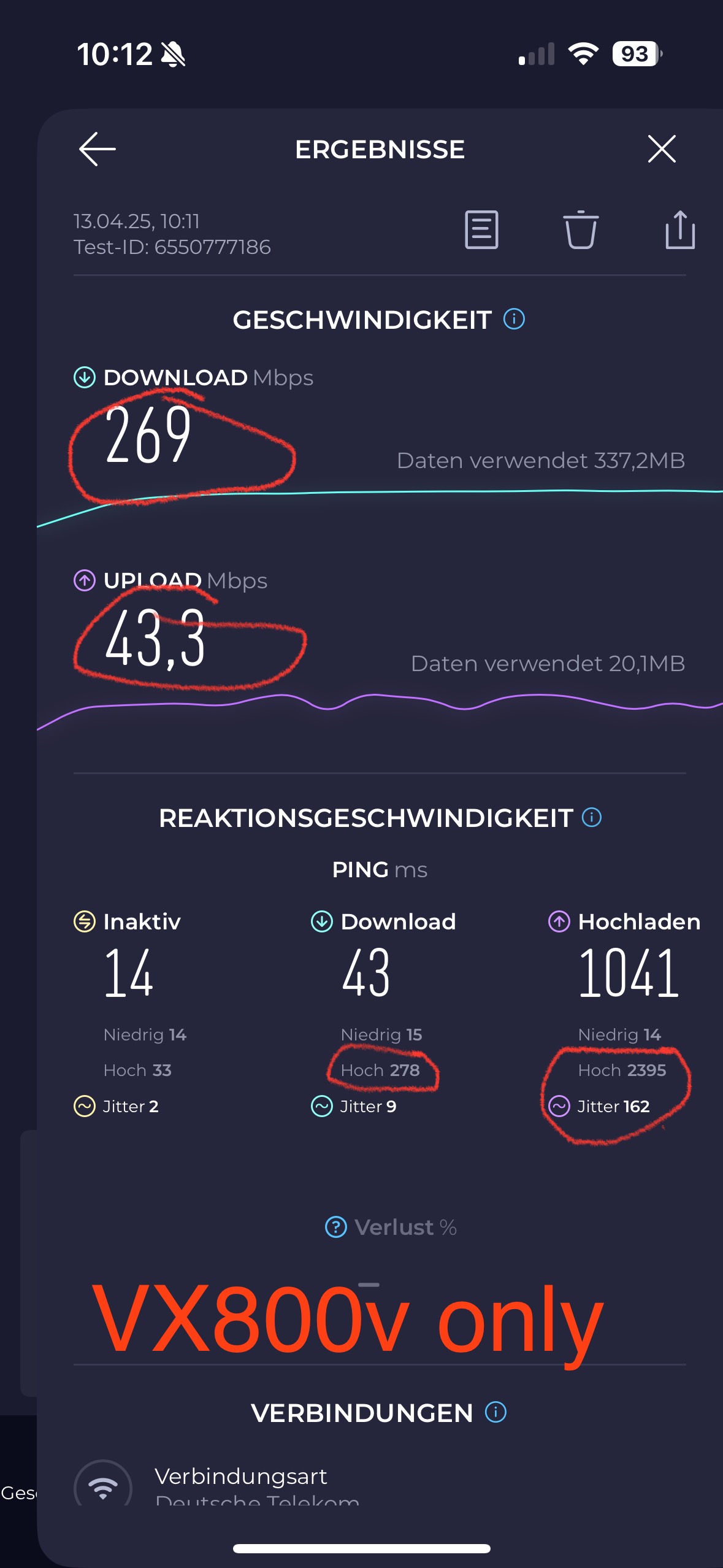
i have an vx800v and i have the same bufferbloat issues.
in online game I'll experience lag spikes to 400ms -800ms . If i use my isp modem (fritzbox) i can use ingress shaping , qos and limit isp speed.
When using my isp modem in front od the router i have zero lag spikes.
i am in contact with the support since two weeks. I simply need options like
QOS limit ,Down and Upload speed.
Limit DSL Sync speed.
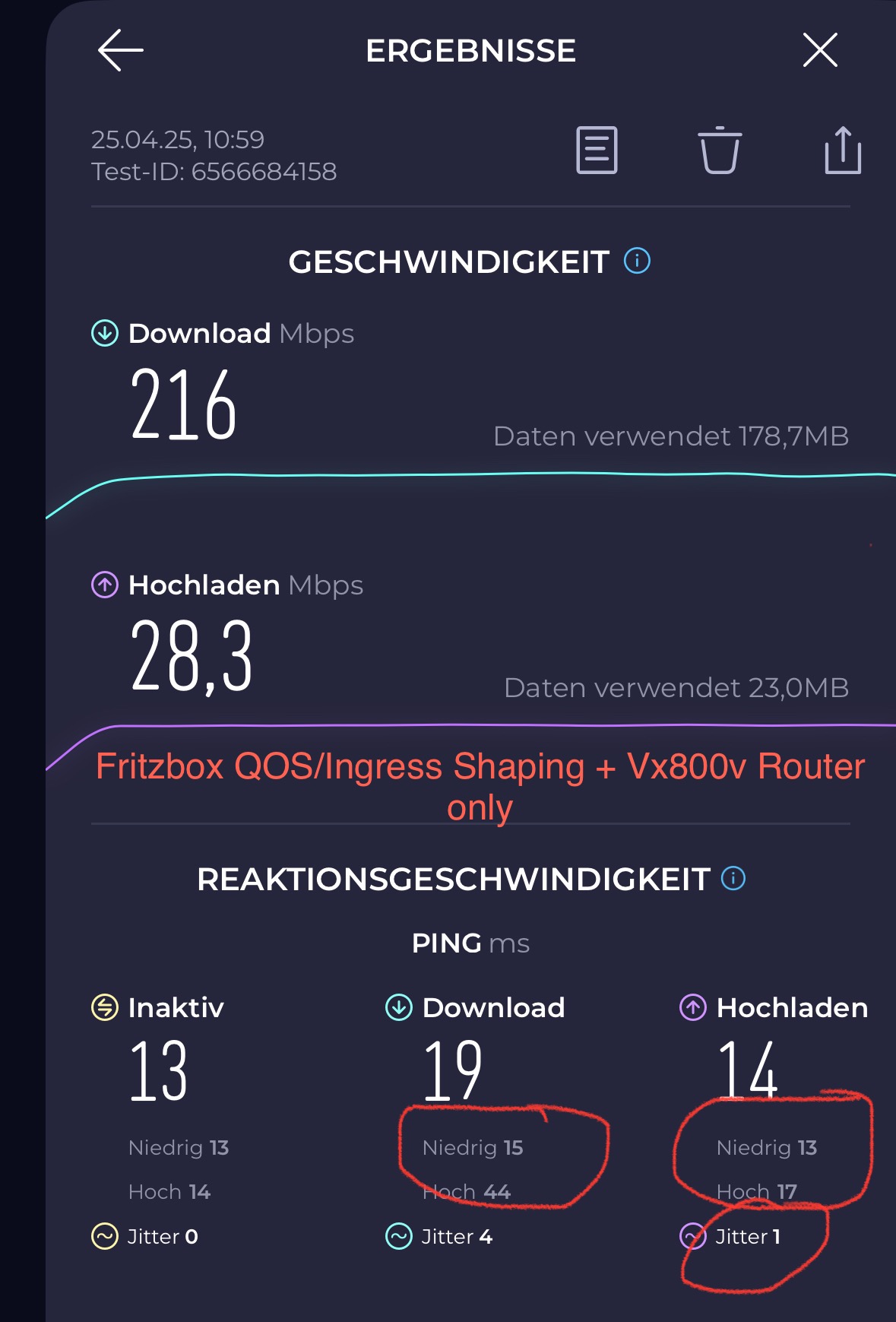
Do a speedtest and look for ping min/max
- Copy Link
- Report Inappropriate Content
Hi@aaphoofd,
Thank you for contacting our community.
For your issue, here are some suggestions:
1) Make sure the Router is properly placed, it should be put in an open area instead of inside a cabinet or shelf.
2) Login to the web management interface of the Router, go to Advanced > Wireless > Wireless Settings, change the wireless channel and channel width:Changing Channel and Channel Width on a TP-Link Router
3) Change the DNS Server of the Router, login to the web management interface of the Router, go to Advanced > Network > Internet > Advanced Settings, change the two DNS Servers into 1.1.1.1 and 8.8.8.8.
4) Go to Advanced > System > Firmware Update to upgrade the firmware of the Router.
- Copy Link
- Report Inappropriate Content
- Copy Link
- Report Inappropriate Content
The TKid is 250444980.
I am a technician myself, there is no troubleshooting needed in terms of wifi issues , its just the modem that needs some options like working qos with down and upload limit and an option to limit/cap the dsl/isp synrate of some sort.
The Problem gets complete eliminated if i put a fritzbox as modem in front and use the vx800v as router only with firtzbox qos and ingress shaping and also limit my VDSL 250 to 233/33 , the bufferbloat test-result will be A+ with maxium 7ms latency.
Thank you anyway :)
- Copy Link
- Report Inappropriate Content
- Copy Link
- Report Inappropriate Content
Hi @SLKingX,
Thank you for your detailed reply.
I found your ticket case on the system, and your case has been escalated to engineer before. It is recommended that you can continue keeping communication with the engineer.
- Copy Link
- Report Inappropriate Content
Information
Helpful: 1
Views: 1564
Replies: 6
Voters 0
No one has voted for it yet.