
Network server not available through wifi mesh
 This thread has been locked for further replies. You can start a new thread to share your ideas or ask questions.
I have recently added 2x X10 hubs to my wifi network and am now not able to access a network server via wifi.
The original setup was a router, with a MacMini plugged directly in.
This was accessible from my MacBook via wifi both on 5Ghz and 2.4Ghz connections.
Since adding the mesh on the 5Ghz network, the MacMini is no longer accessible from the MacBook.
I can still access it via ethernet and the 2.4Ghz connections (essentially bypassing the mesh).
How can I get it to work via the mesh also?
Any help would be much appreciated!
- Copy Link
- Subscribe
- Bookmark
- Report Inappropriate Content

Hi @timothypercival,
Thank you for contacting our community for your issue.
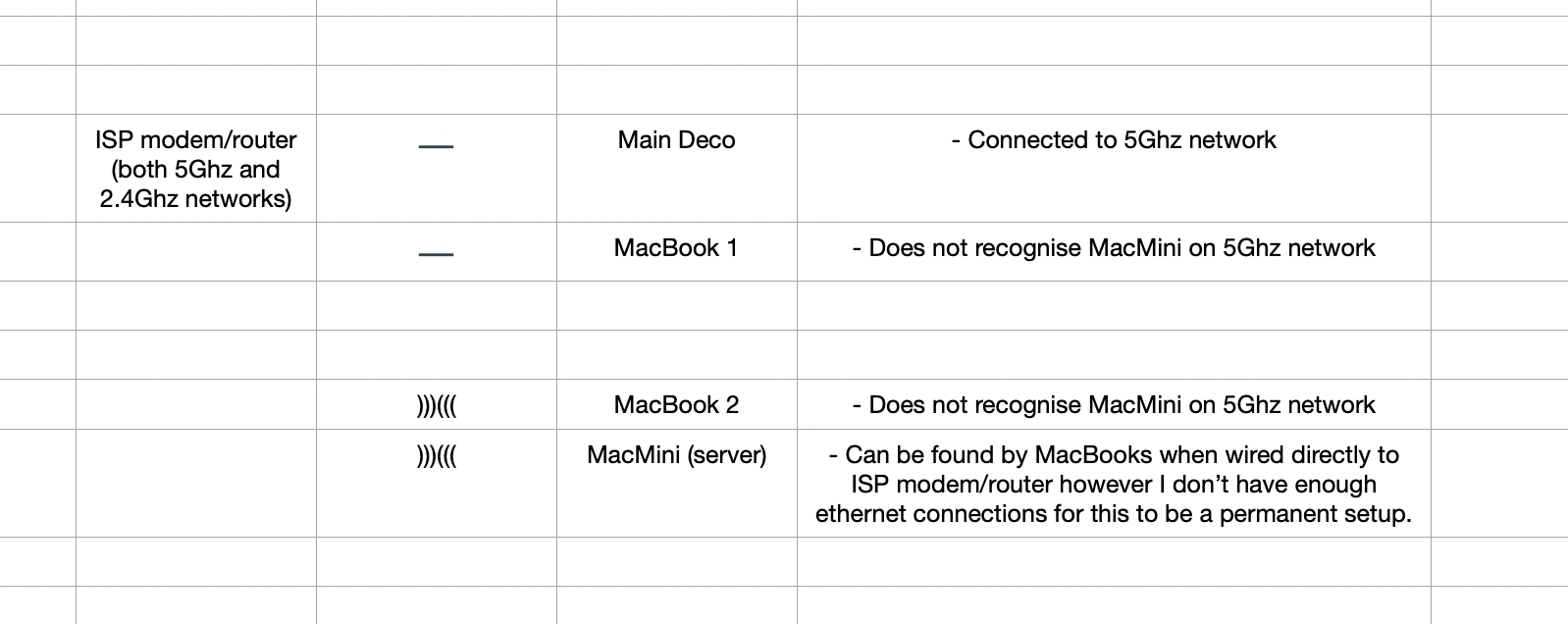
May I know if your network topology diagram is as follows:
ISP modem—router—main deco )))((( client devices
(Note: — stands for wired connection,)))((( stands for wireless connection )
Did you set Deco to wireless router mode? Are the Mac Mini and Macbook connected to the Deco network and the router network respectively?
If this is the case, since Deco is a NAT when used as a router, the devices on the two networks will not be able to access each other.
You should change Deco to Access Point mode: How to set up Deco to work in Access Point mode
- Copy Link
- Report Inappropriate Content
- Copy Link
- Report Inappropriate Content

Thank you for your reply.
From the topology you provided, the two MacBooks and Mac Mini are connected to the Wi-Fi and LAN ports of the ISP router, that is, they should be in the same LAN network and can access each other under normal circumstances.
If only the Mac Mini connection mode is switched to wireless connection and cannot be recognized by the MacBooks, please check the IP of the three Mac devices at this time to confirm whether they are in the same LAN network: How to find IP address on your devices
Please also confirm whether the Wi-Fi connected to the Mac Mini is likely to be deco's 5Ghz? You can check whether there is a Mac Mini device in the client list of the Deco APP, or switch Deco to Access Point mode. How to set up Deco to work in Access Point mode
Best Regards~
- Copy Link
- Report Inappropriate Content
Hi there,
So the MacMini is connected to the router via the 5Ghz wifi connection.
The same one that the Deco is using.
The MacBooks can see the MacMini when on the 2.4Ghz wifi connection, implying that the Deco setup is an issue as opposed to server permissions.
To note...
The original route was setup with 2 wifi networks...
'Flat X' which was the 5Ghz connection.
Flat X - 2.4Ghz' which was the 2.4Ghz connection.
The Deco's network is also called 'Flat X', though believe it might've created both a 5Ghz and 2.4 Ghz network under this name.
- Copy Link
- Report Inappropriate Content
Welcome back~
The Deco can access the internet from a non-Deco device via Ethernet backhaul, but not via wireless backhaul. I am confused about why the Deco can connect to the ISP router via 5GHz.
You mentioned that the ISP router's 5GHz SSID is the same as the Deco's SSID, right?
If Deco is working in wireless router mode, then the Mac mini may be connected to the Deco SSID instead of the ISP router SSID, which will cause the MacBook and Mac mini to work in different subnets.
To confirm this, it would be best for you to change the Deco to Access Point mode, or temporarily change the Deco SSID to something inconsistent. Ensure that the Mac mini and MacBooks are connected to the same subnet.
- Copy Link
- Report Inappropriate Content
- Copy Link
- Report Inappropriate Content
Feel free to update here.
- Copy Link
- Report Inappropriate Content
Information
Helpful: 0
Views: 441
Replies: 7
Voters 0
No one has voted for it yet.