
Desperately frustrating
 This thread has been locked for further replies. You can start a new thread to share your ideas or ask questions.
I bought a t3u plus on Tue, wrote a rave 5 star review on the seller's website and this morning, Wednesday, there was no signal. Re logged in to WiFi,it disappeared. Uninstalled it and tried to reinstall but it was not detected,tried on other laptop,which hadn't any TP Link connections and after running set up got the same cannot detect,make sure name is correct, weirdly as it's the only one,and check it's in the usb port correctly.
- Copy Link
- Subscribe
- Bookmark
- Report Inappropriate Content


Hi @myeebox,
Thank you for contacting our community.
For your issue, please try the following suggestions:
Step 1. Go to Computer Management>Device Manager>Network Adapter.
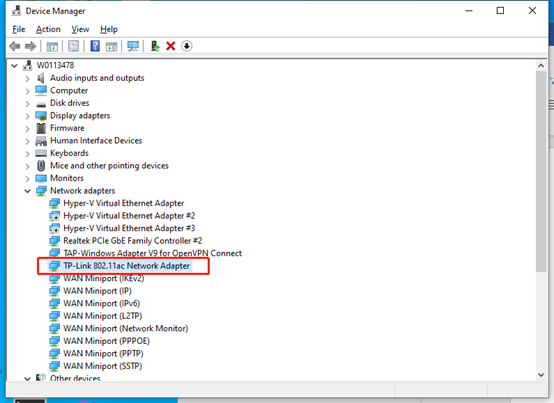
a. If the adapter shows up, install the driver.
b. If the adapter is not there, plug the adapter into another USB port/PCI slot.
Step 2. Install the adapter on another computer to see if it can be detected.
Step 3. Remove the checkbox before "Allow the computer to turn off this device to save power", click OK to return, and then restart the computer after modifying the properties of each USB RootHub. USB devices can resume a stable operation.
Step 4. Right-click on My Computer/Properties/Hardware/Device Manager and double-click on "Universal Serial Bus Controller" to go to several "USB Root Hubs" and double-click on any one to open the Properties dialog and switch to the "Power Management" tab.
If the issue persists, please contact local support for further help.
- Copy Link
- Report Inappropriate Content
Hi @myeebox,
Thank you for contacting our community.
For your issue, please try the following suggestions:
Step 1. Go to Computer Management>Device Manager>Network Adapter.
a. If the adapter shows up, install the driver.
b. If the adapter is not there, plug the adapter into another USB port/PCI slot.
Step 2. Install the adapter on another computer to see if it can be detected.
Step 3. Remove the checkbox before "Allow the computer to turn off this device to save power", click OK to return, and then restart the computer after modifying the properties of each USB RootHub. USB devices can resume a stable operation.
Step 4. Right-click on My Computer/Properties/Hardware/Device Manager and double-click on "Universal Serial Bus Controller" to go to several "USB Root Hubs" and double-click on any one to open the Properties dialog and switch to the "Power Management" tab.
If the issue persists, please contact local support for further help.
- Copy Link
- Report Inappropriate Content
Joseph-TP wrote
Hi @myeebox,
Thank you for contacting our community.
For your issue, please try the following suggestions:
Step 1. Go to Computer Management>Device Manager>Network Adapter.
a. If the adapter shows up, install the driver.
b. If the adapter is not there, plug the adapter into another USB port/PCI slot.
Step 2. Install the adapter on another computer to see if it can be detected.
Step 3. Remove the checkbox before "Allow the computer to turn off this device to save power", click OK to return, and then restart the computer after modifying the properties of each USB RootHub. USB devices can resume a stable operation.
Step 4. Right-click on My Computer/Properties/Hardware/Device Manager and double-click on "Universal Serial Bus Controller" to go to several "USB Root Hubs" and double-click on any one to open the Properties dialog and switch to the "Power Management" tab.
If the issue persists, please contact local support for further help.
@Joseph-TP Hi and thank you Joseph but no. Everything you suggested I'd already tried,except the one about switching off in power management,which previously I had unticked so was surprised to see the box marked.
Having tried to install it on my other laptop and it not being detected was even more frustrating.
So, having just spent 10 mins talking to a very helpful support assistant,who says it's the device and I should get it replaced,I am going to do that. She said it must be a fault in the device.
Today, for 10 min it actually appeared in network adapters and after uninstalling and reinstalling maybe 5 times it never returned. The installer said I had the driver so if I agreed it would be uninstalled so the new one could be. Every time it got stuck on 90%
- Copy Link
- Report Inappropriate Content
Yes, although it is unfortunate, it is likely a hardware problem that causes the adapter not to be detected.
I hope that you can restore the network after replacing the adapter. 
- Copy Link
- Report Inappropriate Content
Information
Helpful: 0
Views: 440
Replies: 3
Voters 0
No one has voted for it yet.